Auto-Cleaning Viruses from Backups with AVG Antivirus
Viruses existed on your computer can migrate to your backups, infecting and destroying data in storagemedia units or even after the restoration. This is the reason to scan any backup dataset for viruses beforesaving a copy, or, perhaps, after restoring it.

How to Automate Virus Control with Handy Backup
Handy Backup can start any antivirus program or a script (batch) in junction with a task executed. To set upthe automated antivirus check, provide the command line string with all the parameters needed to runyour antivirus on a Step 7 of a task wizard.
The Instruction
Virus check is most effective before backup, as it can remove viral infection from originals, not in copies. ForAVG antivirus package, the sequence running the anti-virus check divided into the two parts, one commandstring for each.
- The first string is
cd C:\Program Files (x86)\AVG\[AVG_edition]
where [AVG_edition] is a substitute for a folder name containing your actual AVG software instance, forexample, AVG2015.
- The second string is either
avgscana /SCAN=C:\Users\[username]\Desktop\1 /REPORT=C:\report.txt
or
avgscana /SCAN=C:\Users\[username]\Desktop\1 /REPORT=C:\report.txt
where [username] is your username in Windows. The first string is for scanning a 64-bit edition of Windows,and the second string used if you work under the 32-bit version.
Note: The script also creates a log in a file called C:/report.txt. You can rename this file simply by changing thelast parameter in a last string from C:/report.txt to any other location for a report file.
You can merge two strings provided before (with a second string selected according to your Windowsversion) into a single batch file, then name it somehow like myavgscan.bat, and, finally, provide the nameand the path to myavgscan.bat for Handy Backup.
How to Run the Antivirus Script with Handy Backup Task?
Open Handy Backup, create a new backup task and set all the parameters required until you reach a Step 7.Then mark a checkbox “Run a program before running the task” and insert the name of your batch file(including the full path to it!) into a field below the checkbox.
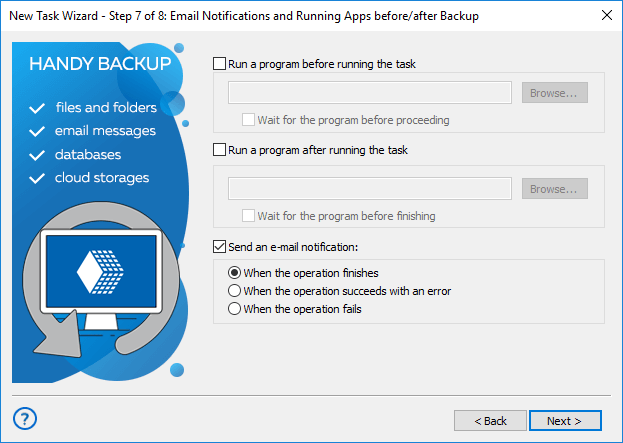
Note: You can select a batch file from your file system by clicking on a “Browse” button and then using thestandard file opening dialog to find and open your script.
Learn more about the Business Backup Software
We Can Help You a Bit More!
If you do not want to write these batch files by yourself, please send us a email at an addresssales@handybackup.net, and we will send you the preset batch file for your antivirus, supported with a briefinstruction how to add it to your task.
Please do not hesitate to write us a letter if you are using another antivirus software instead of AVG. Oursupport team will create a useful script for any antivirus software ever existed under Windows, to help youremove viral threats before saving or after restoring your data with Handy Backup!
 Download for Free
Version 8.5.3 , built on March 5, 2024. 116 MB
30-day full-featured trial period
Download the latest version of Handy Backup!
Download Auto-Cleaning Viruses as PDF
Removing Potential Threats from Backups with Kaspersky Antivirus (PDF)
Removing Possible Viral Threat from Backups with Avira (PDF)