Windows 8 Backup Software
Windows 8 backup enables the creation of a comprehensive image of Windows 8, as well as the 8.1 version. This image is specifically designed for recovery onto another drive or partition, while also retaining duplicates of essential system files.
Handy Backup provides all tools for Windows 8.1 backup in a unified, easy-to-use interface. Try out our free 30-day trial version today!
 Download for Free
Version 8.7.0 , built on May 7, 2026. 152 MB
30-day full-featured trial period
Challenges with Built-in Windows 8 Backup Solutions
High disk space and time requirements. Windows 8 backup typically demands substantial disk space, necessitating a large storage capacity and significant time to complete the backup process. Additionally, if you opt for cloud backup, a fast Internet connection is essential.
As a result, differential backup technologies are gaining increasing relevance for Windows 8 backup. They offer an efficient method to save storage space and reduce backup time, even though this technology is not included in Windows 8 by default.
Specialized software for restoration. Windows 8, like other operating systems, can be backed up seamlessly, including system files, while in operation, utilizing the built-in Windows 8 backup software.
Hence, if you need to restore the system and the operating system isn't functional, you won't be able to execute a recovery program. In such cases, you'll require software capable of booting in recovery mode.
Lack of System Image Recovery. Windows 8 introduces a new backup solution called "File History." However, Windows 8.1 does not support older Windows backup tools.
While Windows 8.1 enables the importation of old backups from Windows 7, it does not support the creation of new backups using the "System Image Recovery" function (recovery from a system image).
Therefore, if you intend to create a system image backup or execute a recovery from a system image with additional features, you will need to rely on a third-party Windows 8 Backup Solution.
Transitioning from Windows 7 to Windows 8
Another compelling reason to back up the operating system and all installed programs is the transition from Windows 7 to Windows 8. During this transition, you may encounter the following challenges:

Your computer may not meet the requirements for Windows 8. While the system requirements for Windows 8 are not significantly higher than those for Windows 7, if your Windows 7 system is operating near its capacity, you may encounter some difficulties.
Your software and hardware may not be compatible with the Windows 8 system. Certain software may experience issues on the new system, even if it still officially supports it.
Windows 8 introduces numerous changes, including modifications to the file structure. Additionally, new drivers are required for hardware compatibility. If your equipment is older, finding suitable drivers may be challenging. Ensure their safety with an efficient Driver Backup Solution.
Opting to upgrade from Windows 7 to version 8 automatically preserves all settings, applications, and data. However, this process may retain obsolete data, consuming valuable disk space alongside other files.

As a result, many individuals opt for a fresh Windows 8 installation. This approach entails creating backups of all crucial data and drivers beforehand, ensuring they're readily available when needed. Considering migrating from Windows 7 to Windows 8? We offer an ideal solution for performing all necessary backups.
Windows 8 Backup Features in Handy Backup
While there are numerous Windows 8 backup programs available, Handy Backup stands out as one of the backup and restore software solutions on Windows 8. What makes it remarkable is that almost every Windows 8 backup feature works flawlessly right from the start, requiring no error correction.

Disk image
Windows 8 disk imaging stands as one of the most preferable and efficient methods of data protection. The software also allows you to perform a "file and folder" backup, assuming that the data is restored through the file system.

Fully automated backup
Utilize a built-in scheduler to configure automatic backup tasks. You can schedule tasks to run at specific times, repeat them at predefined intervals, or even trigger tasks based on system events or run a program as a Windows 8 service!

Flexible Backup Options
You can execute various types of backups (full, incremental, differential, and mixed backups) for Windows 8 backup files. This capability is crucial due to the size of Windows 8 backups. This technology significantly enhances speed also.

Remote backup
The most reliable method to safeguard your data with the best Windows 8 backup solution is by storing the Windows 8 backup on an external drive, FTP, or in a cloud storage service. Handy Backup offers numerous options for remote backup.

Safe and Secure
We offer encryption and password protection, along with a variety of secure storage protocols including SFTP, FTPS, and S3. Additionally, you have the option to run external security software to further enhance data security.

Disaster Recovery
If you're searching for the best Windows 8 backup software, don't focus on backup procedures only; always keep restoration in mind. Handy Backup offers a recovery module that allows you to boot from USB for system restoration goals.
Recommended Solution
Lifetime license

Handy Backup Professional
Opt for the Professional edition for Windows 8 backup and recovery. It offers all functions and plugins tailored for workstation or advanced PC users! Try the free 30-day trial version today!
How to Create a Windows 8 Backup?
To save an entire system image, please create a new backup task using either the simple or advanced task wizard mode. Then, refer to the "Disk Image" or "System Recovery" plugin in the "Disk Clone" group.
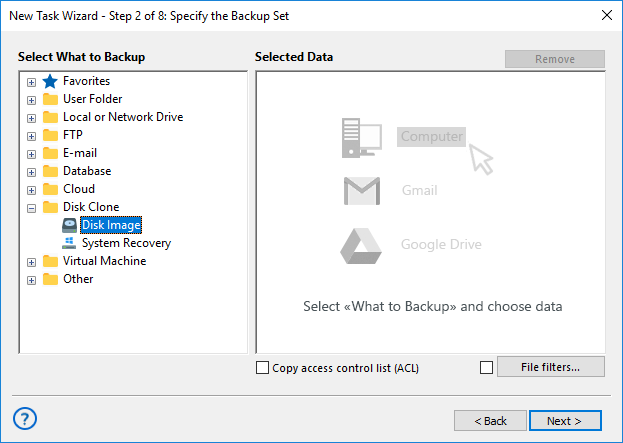
Proceed with creating a task following the instructions outlined in the User Manual.
Note: You can only save a complete Windows 8.1 backup or Windows 8 backup on an entire drive (no partial backups). However, you can save and retain multiple versions, create timestamps, and encrypt image files, among other options.
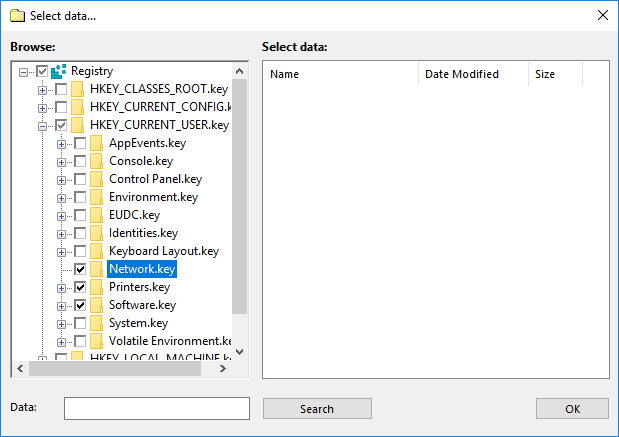
To save specific Windows 8 backup files, libraries, or registry entries, please utilize the appropriate plug-ins in Step 2. The "Registry" plug-in can be found in the "Other" group, while plug-ins for saving files, folders, and user folders are primarily located in the "Local or Network Drive" group.
These plug-ins support incremental, differential, or mixed (cycle) backups seamlessly.
Note: A similar principle applies to creating a Windows 11 full backup.
Review About Windows 8 Solution by Handy Backup
Download for Free
Version 8.7.0 , built on May 7, 2026. 152 MB
30-day full-featured trial period
Download Handy Backup to experience firsthand this simple and efficient Windows 8 backup and restore software!
"With Handy Backup, I easily migrate from Windows 7 to Windows 8.1 with all my data collection including photos and pictures. Now I save a copy of my SSD with Windows 8.1 every month, using Handy Backup Professional, and it is miraculous! At 2016 I was attacked by some ransomware virus and just recovered all my Windows 8 backup files intact, instead of getting troubles!"
J. S. Scott, a commercial photographer, Singapore