How to Take Webmail Backup
Webmail backup is the process of saving and restoring email data directly from web-based email services. Unlike traditional email clients, which store data locally, webmail backup involves accessing and preserving emails, attachments, and metadata from dedicated email servers, typically using the IMAP protocol. This ensures that all your webmail content is accurately preserved and can be restored as needed.
Handy Backup offers a robust webmail backup tool, providing a dedicated plug-in that ensures seamless and efficient data protection. To experience the full range of Handy Backup's webmail backup capabilities, download the latest version for a 30-day free trial.
 Download for Free
Version 8.7.0 , built on May 7, 2026. 152 MB
30-day full-featured trial period

Benefits of Using Handy Backup as a Webmail Backup Tool
Unification
With the Email plug-in and the IMAP protocol, Handy Backup allows you to perform an IMAP mail backup to save data from any server supporting IMAP, including backing up webmail from Outlook, Yahoo! Mail, Gmail, and many others. For enterprise servers, it also supports backing up webmail Exchange using a dedicated plug-in to save business messages.
Scheduling and Automating
Handy Backup's functionality allows you to schedule webmail message backups from minutes to months. You can also link a webmail backup task to specific system events, such as logon/logoff or connecting a USB drive associated with the task. Additionally, you can automate restoration and cloning tasks.

Data Storage Selection
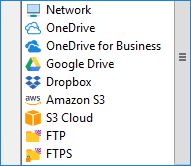
In addition to a local machine, you can save your webmail content to a network drive or folder, a NAS unit, an FTP, SFTP, or FTPS server, an external USB device, or to a cloud service, including OneDrive, Google Drive, Amazon S3, Dropbox, or any WebDAV-enabled cloud.
Additional Features of Handy Backup for Webmail Backup
Beyond the key advantages mentioned earlier, Handy Backup offers several other useful features that make it a powerful and versatile webmail backup software. Here are some of these features:
- Encryption and Compression. Compress your data into a ZIP archive and/or encrypt messages with a 128-bit BlowFish algorithm, ensuring both security and efficiency when transferring data over a network or storing messages in public vaults.
- Various Backup Methods. Choose from full, incremental, differential, or mixed (full/differential) backup methods. Using non-full backup methods can save time and storage space. Additionally, you can save multiple versions of the same backup and create automatic timestamps.
- Control Features. Run your tasks as a Windows service, avoiding interruptions for users working on the machine. Receive detailed reports and email notifications about all jobs.
Recommended Solution
Lifetime license

Handy Backup Standard
Even the most basic Standard Edition includes a plug-in for backup webmail, along with a robust selection of storage options and a comprehensive range of backup features!
How to Backup Webmail Messages with Handy Backup
Here’s a guide on how to backup webmail tasks. This example uses Yahoo Mail as the source, but the process is similar for any other email server. You’ll only need to adjust the server name and potentially a few minor settings. Let’s get started!
- Create a new task in Handy Backup. On Step 1 of the task wizard, select "Backup Task."
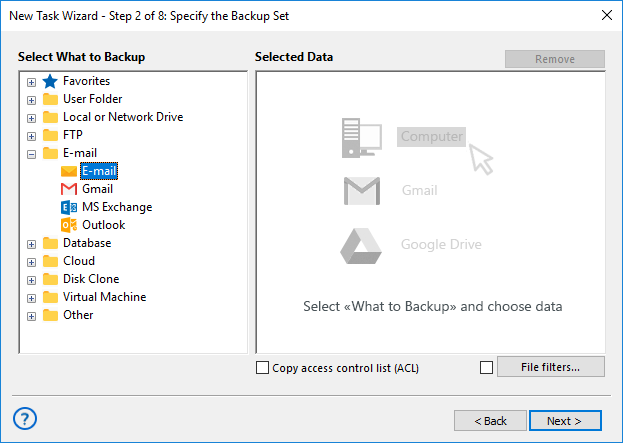
- On Step 2, choose the E-mail plug-in from the Email group on the left.
- Open the connection creation dialog and enter the following information:
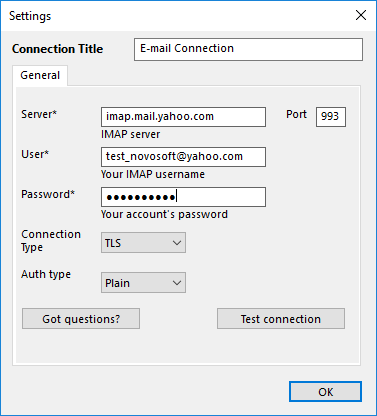
- The configuration name (e.g., Yahoo Mail Backup);
- The IMAP server name and connection port;
- Your username and password for accessing the webmail account.
- Click OK to return to the data selection step. You will then see a list of folders from your email account.
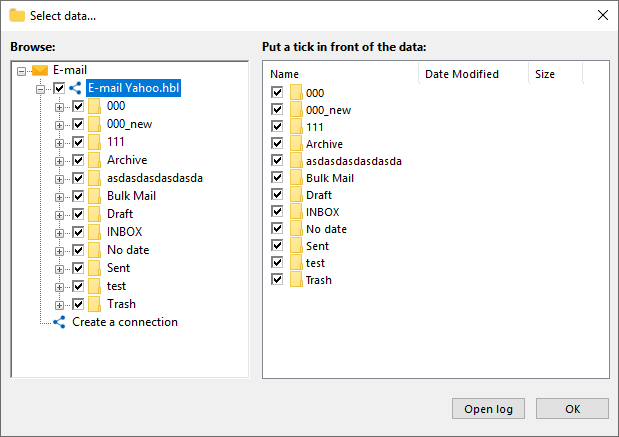
- Select the data you want to back up by checking or unchecking the boxes next to each item.
- Click OK to return to Step 2 and select additional data if needed.
- Continue setting up your backup task as outlined in the User Manual.
Restoring a Webmail Backup
Restoring webmail backup data to either the same or a different server using the IMAP protocol is straightforward. To do this, create a restoration task and select the backup.hbi file from your backup vault on Step 2. This will restore your webmail data to its original state.
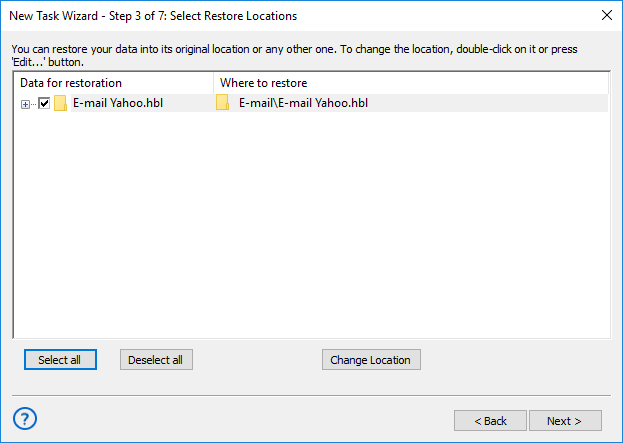
Note: You can change the restore location to clone or replicate your webmail messages effectively!
Using Webmail Backup Messages without Restoring

Handy Backup stores unencrypted messages as EML files. The EML format is a widely supported representation of webmail messages, compatible with most modern local email clients. This allows users to view, modify, or even move EML message files from backups without needing to perform a full restoration!
Video Lesson: Webmail Backup and Recovery
In this video, we will demonstrate just how easy and quick it is to use Handy Backup as webmail backup software. You'll see how to perform Yahoo! Mail backup using webmail and then how to restore all the content to a different email server (in this example, Outlook.com).
Download for Free
Version 8.7.0 , built on May 7, 2026. 152 MB
30-day full-featured trial period
Unlock the full potential of Handy Backup’s webmail backup features. Download the latest version now and try the top webmail backup tool with a 30-day free trial!
Related to Webmail Backup: