Automatic Backup Software for PC
Auto backup software - Handy Backup helps users protect important data automatically by running backup tasks on a predefined schedule, without the need to start each operation manually. Users can configure daily, weekly, monthly, or event-based backups to keep files, folders, databases, and other data safe and ready for recovery.
 Download for Free
Version 8.7.0 , built on May 7, 2026. 152 MB





Auto Backup Software: What Is Considered Automatic?
Automatic backup software is designed to ensure that all important information is copied securely and systematically, minimizing the risks associated with human error, forgetfulness, or inconsistent backup practices. By using such program, users can maintain continuous data security with minimal administrative effort. Key criteria of solution include:

Autostart
Backup tasks are initiated automatically according to a predefined schedule without user action.
No Manual Intervention
Once set up, the backup runs independently, managing all steps such as selecting files, encrypting data, and other.
Regular Backups
The backup follows a consistent schedule (e.g., daily, weekly) to ensure that all new and changed data is securely preserved.
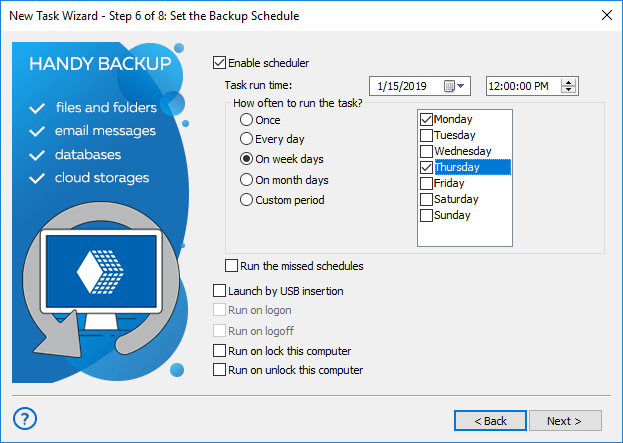
Flexible Backup Scheduling
Handy Backup streamlines the process of setting up automated backups for your data files, folders, databases, hard drives, or even an entire home or business network. Our automatic backup software allows you to choose a backup schedule that perfectly suits your needs, ensuring your data is always protected:
- Everyday backup (daily backup): Schedule backups to run daily, ensuring that your data is backed up every day without fail. This option is ideal for users who need continuous protection and up-to-date backups.
- Backup on week days (weekly backup): Configure backups to run on specific days of the week, such as Monday through Friday. This is perfect for businesses that require regular backups during the workweek while conserving resources on weekends.
- Backup on month days (monthly backup): Set your backups to occur on specific days of the month, like the 1st or 15th. This option is useful for users who need monthly snapshots of their data for reporting or archiving purposes.
- Custom period backup: Customize your backup schedule by choosing specific days, hours, and even minutes. This highly flexible option allows you to tailor the backup process to your exact requirements, whether it's hourly backups for critical data or less frequent backups for less volatile information.
Advantages of Using Automatic Backup

Time-saving: Automatically scheduled backups save you valuable time by eliminating the need for manual backups. This ensures your data is protected continuously without requiring your constant attention. By automating this process, you free up significant amounts of time that can be better spent on critical business activities, increasing overall productivity.

Reliability: Regular automated backups create a reliable backup routine that minimizes the risk of data loss. With consistent backups, you can rest assured that your data is always up to date and safe from unexpected events such as hardware failures, cyberattacks, or accidental deletions.
Convenience: Automatic backups offer unparalleled convenience by removing the need to remember to run backups manually. Once set up, your data protection operates seamlessly in the background. This means you can set it and forget it, knowing that your files are consistently being backed up without any additional input from you.

Compliance: Automating backups helps businesses adhere to regulatory requirements and industry standards for data protection, including mandates outlined in the GDPR and local Data Protection Acts. By consistently backing up data according to compliance guidelines, organizations mitigate risks associated with non-compliance penalties.
Common Use Cases

Backing Up Work Documents
Automatically create secure copies of spreadsheets, reports, and project files to prevent data loss from accidents or hardware failures.

Server and Database Backup
Protect critical business infrastructure by using auto backup software to schedule regular backups of servers, SQL databases, and application data.

Website and Cloud Service Backup
Easily backup website content, CMS databases, and cloud-stored files by setting up routine backups to local drives or external cloud services.

Photo Archive and Personal Data Protection
Preserve family photos, personal videos, and important personal documents by using automatic backup tool to create multiple safe copies.
Auto Backup Software Operations
The purpose of an automatic backup utility is to relieve a user not only from regular selection of backup data, but also from a couple of routine operations such as encrypting, transferring, storing, controlling versions and other backup-related activities.
Just Six Steps for Automated Backup
Creating an auto backup task in simple mode involves six straightforward steps:
- Create a backup task (without selecting an advanced mode option).
- Select data from a backup source.
- Choose storage for a backup copy (e.g. backup to FTP).
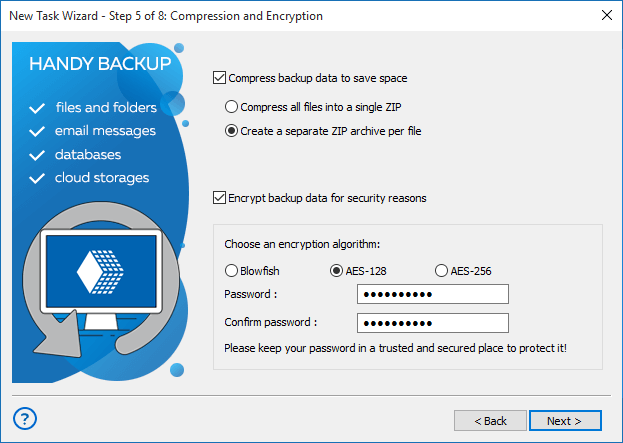
- Encrypt and compress automatic backup content if necessary.
- Schedule your backup task sequence, specifying the repeating period - monthly, weekly, daily backup or custom.
- Provide a name for the task, review task parameters, and complete the Task Wizard.

Recommended Solution
Lifetime license

Handy Backup Standard
Standard Edition offers the optimal, user-friendly solution to automatically back up files, email, and application data on a schedule to local storage or the cloud. If you're looking for reliable backup tool, try it out for 30 days first!
Features for Automatic Backup
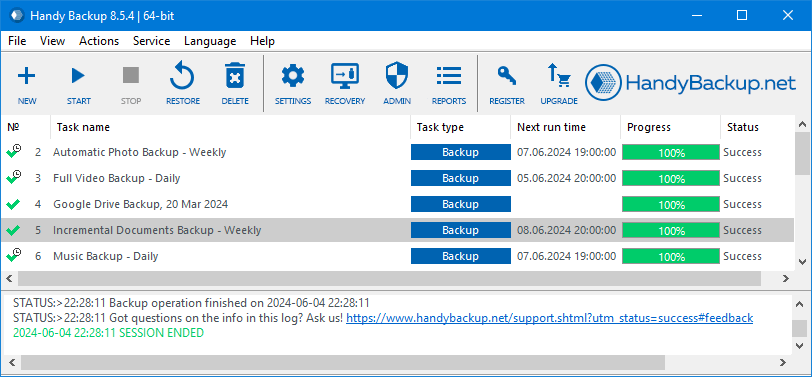
Handy Backup is a comprehensive auto backup software for Windows, supporting both simple and intricate local networks, including Windows 11 backup. It simplifies configuring automated backups for an operating system, hard drive, or entire network.
Using this reliable file backup software, you can protect your data with scheduled backups and strong encryption, ensuring file security and availability.
Handy Backup also includes internal tools such as built-in encryption, an integrated FTP client, a user-friendly interface, and the ability to run programs before or after backups, making it an excellent choice for PC automated backups.
Storage Solutions for Auto Backup Software
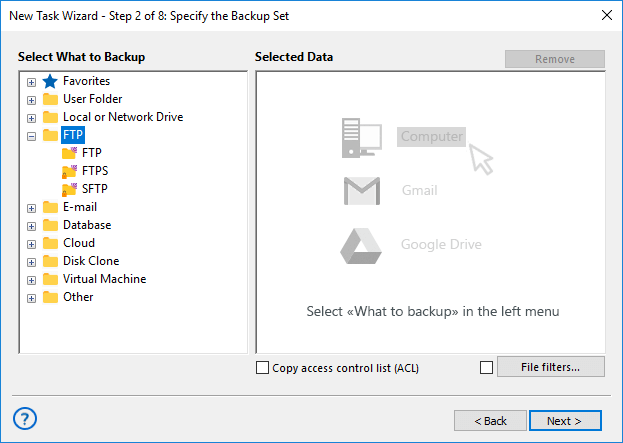
Handy Backup supports a wide range of storage devices, making it an ideal choice for automatic backup software:
- Local drives, external USB disks, and mapped network drives;
- Shared network folders, file servers, and NAS/SAN units;
- FTP, SFTP, and FTPS data servers;
- Commercial and private clouds connected via S3 or WebDAV;
- Popular cloud services such as Google Drive, Dropbox, Amazon S3, OneDrive, and Box.
Comprehensive Features of Handy Backup for Auto Backup Software

Unlimited Backup and Source Items
Enjoy the flexibility of creating an unlimited number of backups, source items, and destination locations, enabling you to perform auto backups of as much data as needed without any restrictions.

File Extension-Based Inclusion and Exclusion Filters
Apply filters based on file extensions to include or exclude specific files from backups, ensuring precise and efficient data protection. Optimize backup processes by targeting essential files and excluding unnecessary ones.

Automatic Shutdown After Backup
Automatically shut down your computer after completing a backup task, conserving energy and ensuring backups are performed even during off-hours without manual intervention.

Support for Virtual Machines and Databases
Get the support for daily backup software, backing up virtual machines and databases to ensure that critical business applications are protected. Need reliable VM backup? Protect your virtual machines easily with our software.

Intuitive Task Wizard and Web Interface
Use the user-friendly task wizard with simple and advanced modes to easily set up complex backups. Also, take advantage of the web interface (Beta) to remotely manage your backup tasks from any device with a browser.

Advanced Backup Options and Notifications
Explore various backup options, including incremental, differential, and mixed backups. Maintain multiple versions of the same dataset and receive email notifications about backup task statuses and activities.

Detailed Logging and Reporting
Access detailed logs of all backup activities, providing complete transparency and allowing users to review and verify each step of the process. This feature is essential for auditing and ensuring compliance with data protection policies.

Lifetime License
Opt for a lifetime license option, ensuring that users have access to the software and all future updates without recurring subscription fees, making it a cost-effective solution for long-term data protection.
Testimonials about Scheduled Backup Software - Handy Backup
Frequently Asked Questions About Daily Backup Software
Which backup solutions offer automated protection for business data?
Automated protection for business data is provided by professional backup solutions that run scheduled backups without manual intervention, ensuring regular copies of critical files, servers, databases, and applications with encryption and reliable recovery options. Handy Backup Small Business delivers this level of automation by allowing companies to centrally manage scheduled backups, secure business data locally or in the cloud, and quickly restore information in case of failures or data loss.
How many backup copies should you keep?
The general rule, often referred to as the 3-2-1 backup strategy, suggests keeping at least three copies of your data: two stored locally but on different devices, and one stored offsite (such as in the cloud). This approach helps ensure data safety against various risks, including hardware failure, cyber threats, and natural disasters. Handy Backup supports creating multiple backup versions and storing data across a variety of destinations, including local drives, network storage, FTP servers, and popular cloud services, making it easy to implement a solid backup plan.
Should you manually verify the success of automatic backup?
Although automatic backup software is built to run reliably without manual intervention, it is still recommended to periodically review logs or status reports to ensure that backups are completed successfully. Failures due to network issues, storage problems, or software errors can happen, and early detection is crucial to avoid data loss. Handy Backup provides detailed logging and optional email notifications, helping users to effortlessly monitor the health and success of their backup tasks without constant manual checks.
Download for Free
Version 8.7.0 , built on May 7, 2026. 152 MB
These capabilities and more make Handy Backup the ultimate windows auto backup software for PC, equipped to safeguard a wide range of data using various plug-ins and features. Give it a try today.
"I have recently changed laptops which involved an upgrade to Windows 10 and was looking for a replacement for some old backup software for which I could no longer get a licence key.
I searched around and tried a few different products but chose Handy Backup for the following reasons: The ability to have a long trial period, nice interface, very easy to use, I have several work bases and have a backup drive at each location and Handy Backup allows me to both auto back up my files and synchronise to a number of portable drives in native file format.
The scheduling - this was a must for me as I want these backups to happen automatically in the background several times per day. I found I could only schedule a backup set once per day but created several copies of the same backup set that initiate at different times of the day.
Overall I’m very happy with my choice of Handy Backup."
Alistair G.R. Poole, NSG GROUP
"I schedule auto backup to OneDrive with Handy Backup instead of a built-in sync tool, as I have many dynamic components on my Wordpress-driven website. It works well, and I always can be sure that my data will be saved to a cloud and recovered when I need"
Justin O’Hare, a still-life photographer