Exchange 2007 Backup Software

Exchange 2007 backup allows saving a copy of Exchange server mailbox database for emergency restoration, cloning, migrating etc. Handy Backup is excellent, automatic backup software for Exchange Server 2007 database, allowing saving and restoring mailbox content with the "MS Exchange" plug-in.
 Download for Free
Version 8.7.0 , built on May 7, 2026. 152 MB
30-day full-featured trial period
Backing up Exchange 2007: Advantages of Handy Backup
Fully Automated Operations
Due to using the MS Exchange plug-in and internal tools such as scheduling tasks, running Exchange Server 2007 backup by a system event and starting/stopping Exchange server 2007 directly from a task if you need for cold backup, Handy Backup allows total automation of Exchange 2007 backup jobs.
Security and Backup Control Options
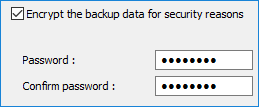
Handy Backup has many control functions as Exchange 2007 backup software, including partial backup (incremental, differential and mixed), internal compression and encryption tools, storing versions with controlled time stamps, running in "silent" mode and reporting its jobs by emails.
Fast Selection of Storage Options
For now, Handy Backup has a constantly expanding list of storage types for Exchange Server 2007 copies, including local and mapped disks, external USB drives, NAS/SAN storages, FTP, SFTP and FTPS servers, clouds such as Amazon S3 Backup, Google Drive, OneDrive/OneDrive for Business, WebDAV clouds etc.
How to Make an Exchange Server 2007 Backup Task with Handy Backup
Use the "MS Exchange" plug-in to backup any edition of MS Exchange, including Exchange Server 2007. To create a new Exchange 2007 backup task, please use the next sequence:
- Open Handy Backup and create a new task by clicking onto the button on the panel.
- On the Step 1, select the backup task and click "Next".
- On the Step 2, expand the "Email" group on the left panel and select MS Exchange plug-in.
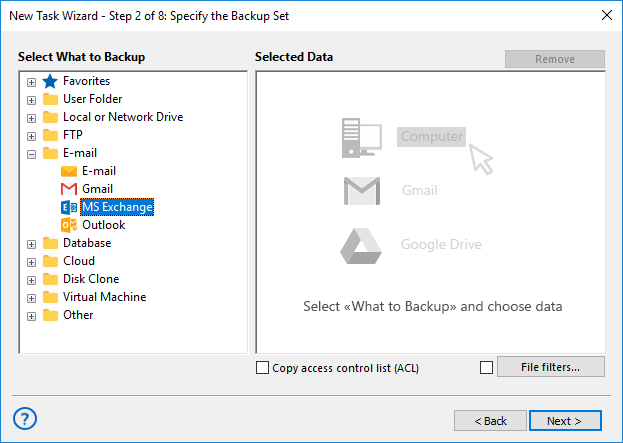
- Click onto the ">>" button, or double-click on the MS Exchange plug-in name.
- You will see the plug-in window. To backup mailbox Exchange 2007, mark this mailbox.
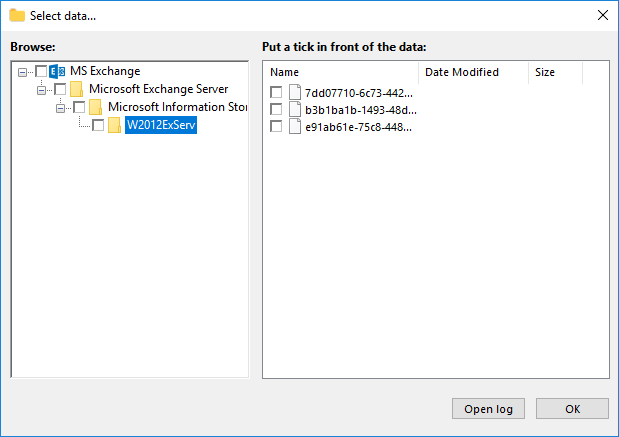
- After you mark all mailboxes or databases to save, click OK and return to the Step 2.
- Continue creating a task as described in the User Manua.
Attention: Note that Exchange Server 2007 saving tasks has no principal differences or restrictions in a task creation process. These are ordinary backup tasks.
Recommended Solution
Lifetime license

Handy Backup Small Business
The ultimate edition for one machine, Small Server solution contains backup software for Exchange 2007 database out of the box.
Restoring from Exchange Server 2007 Backup
You may want to create an auto recovery task when you need to make Exchange 2007 restore mailbox from backup. This is as simple as backup task.
- Create a restoration task as described before.
- On the Step 2, select your backup storage and find a file called backup.hbi with restoring data.
- Select this file and click "Next".
- Continue creating a recovery task as described in the User Manual.
Note: Currently, you cannot restore your Exchange 2007 backup database to another place. Therefore, the simplest way to clone or move your Exchange Server 2007 is to make a drive image for a system disk and then clone this disk to another server.

Do Not Use Hot Image Backup as an Alternative for Exchange 2007 Backup!
You cannot replace a dedicated Exchange base copying with the function of hot backup of an entire server image without stopping the Exchange server. As an Exchange mailing database can change actively when the hot image backup in progress, this technique can cause several errors!
Backup Exchange 2003 Running Under Early Windows Editions
Handy Backup can save a database from any edition of MS Exchange with the same MS Exchange plug-in, including Exchange Server 2003. However, if this software works under such versions of Windows as XP or Windows Server 2003, which are also obsolete, modern versions of Handy Backup cannot support it.
Note: To run Exchange Server 2003 backup from Windows XP or Server 2003, please use Handy Backup 7.7.9 or earlier versions to ensure system compatibility!
Download for Free
Version 8.7.0 , built on May 7, 2026. 152 MB
30-day full-featured trial period
Try Handy Backup as Exchange 2007 backup software by downloading a free 30-day full edition
with all plug-ins and functions readily available!
Read also: