Automatic USB Backup Software
USB backup software - Handy Backup is a reliable tool for protecting your most important PC files. Modern USB flash drives are compact, dependable, and capable of storing up to 1 TB of valuable data, making them a practical archiving solution. To simplify the process, use an automatic USB backup utility like Handy Backup, designed to keep your data safe, portable, and always up to date.
 Download for Free
Version 8.7.0 , built on May 7, 2026. 152 MB




Flexible Two-Way USB Backup
Handy Backup supports two-way backup operations with USB drives, allowing you to both save data to a USB device and back up files from it to other storage locations. This flexible and reliable USB drive backup approach makes it easy to keep your data safe and synchronized across different environments through automated processes.
You can back up the contents of a USB drive to various destinations, including cloud services; local or network folders; FTP or SFTP servers; NAS devices, or even back up a flash drive to another flash drive using Handy Backup. This reliable pendrive backup software makes it simple to duplicate and transfer your portable data across different devices.

Advantages of Handy Backup as a USB Backup Software

Scheduled Automation
Set up USB backup tasks to run automatically at specified times, ensuring your USB data is always up to date without manual effort.

Strong Encryption
Protect your USB backups with industry-standard encryption, keeping your sensitive data safe even if your flash drive is lost or stolen.

Multiple Backup Storages
Save backups not only to an another thumb drive, but also to clouds, FTP servers, local disks, and other storage options for extra reliability.

Email Notifications and Logs
Receive instant email alerts about USB backup status and access detailed logs to monitor each operation step-by-step.

Fast Restore
Restore data backed up on a USB flash drive on any PC without Handy Backup installed using Windows Explorer.

Simple Data Selection
Easily select data for backup automatically using plugins, for example choosing only photos or specific folders like "Documents."

User-Friendly Interface
Enjoy a clean and intuitive interface in both the desktop version and the optional web-based management console.

Lifetime License
Pay once and use forever — Handy Backup offers perpetual licenses with no hidden subscription fees or renewals.
Testimonials About USB Backup Software by Handy Backup

I use backup to USB with Handy Backup software for several years. Its function of auto start the backup procedure saves a lot of time for me, as I always have a guaranteed, fresh copy of my projects and books on my USB pen. I am also very fond with the function of USB data sync, which allows me taking copies of my presentations on an auxiliary storage device!
Judith Williams
Fine Arts School, Lawrence, CA
Start Backup when USB Drive is Inserted
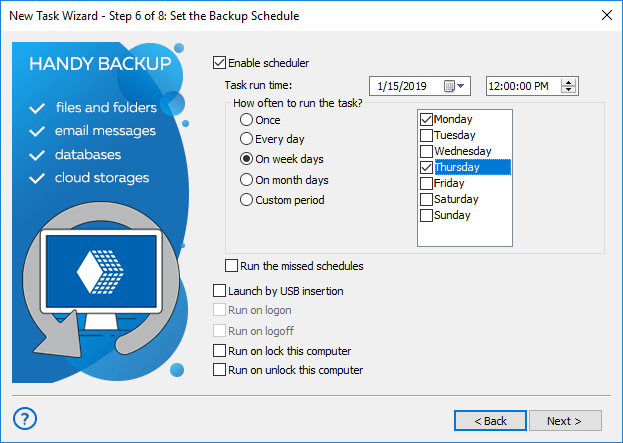
Automatically trigger a backup when an external USB drive is plugged in, ensuring your data is always protected without manual steps. The system detects the connected device and instantly starts the backup process based on your predefined settings. Just check the box in step 6, "Launch on USB insertion."

Recommended Solution
Lifetime license

Handy Backup Standard
Handy Backup Standard provides a reliable and easy-to-use flash drive backup software for backing up your important data directly to a USB drive. This approach keeps your files secure and portable, offering peace of mind with minimal hassle. To create a bootable recovery USB drive, upgrade to Handy Backup Professional.
How to Backup Files on a USB Flash Drive
- Insert a USB drive into any available port on your PC.
- Launch Handy Backup. Click “Create+” or press Ctrl+N to start a new task.
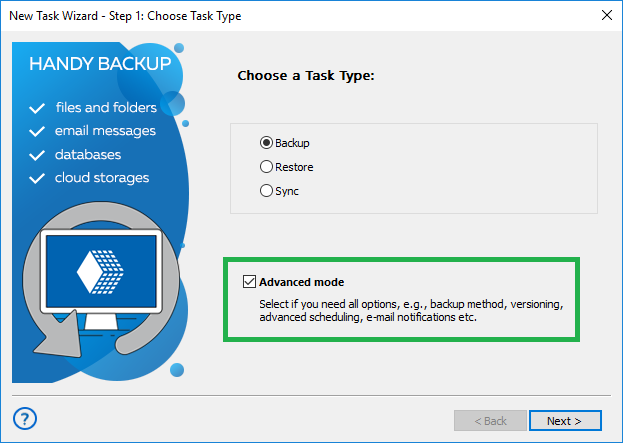
- On Step 1, choose “Backup” as the task type and select the advanced mode.
- Click “Next.” On Step 2, select the files or folders you want to back up. Click “Next” again.
- On Step 3, choose the Computer plug-in as the storage option.
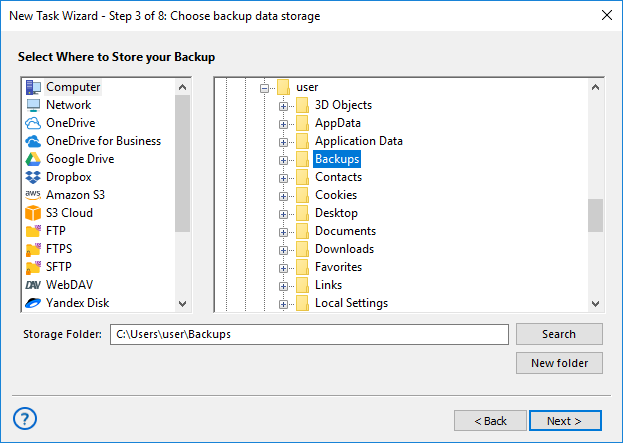
- In the left panel, select your USB device, then choose a folder within it. Click OK.
- If you want to perform a pen drive backup online — for example, to a cloud service like Google Drive — you can select a cloud plug-in instead of the USB device as the destination.
- To run the task automatically when the USB drive is connected, proceed to Step 6 and check the “Launch by USB insertion” option.
- Complete the remaining steps as described in the User Manual to finish creating your task.
How to Back Up a USB Drive to Another Location

To backup USB data, simply select the USB device on Step 2 instead of Step 3, using the “Computer” plug-in from the “Local or Network Drive” group. All other steps remain the same as when backing up data to a USB drive.
Automatic Backup to USB Drive by Plugging in USB Device
You can set up your USB drive backup software task to start every time the particular thumb drive linked to your task will plugged on to your PC. No matter which USB port you use. The program will recognize the device previously assigned to a task.
To protect your data from physical damage or loss, it's best to combine pendrive backup with other storage options, such as cloud services or local drives. Handy Backup makes it easy to automate this process and create a flexible, scheduled backup strategy for maximum data security.
Other Useful Features
Handy Backup goes beyond being just a simple USB backup tool for copying files to flash drives. It offers a wide range of advanced capabilities, including:
HDD Image Backup
Create a complete snapshot of your entire hard drive, including all files and system settings, and securely save it to a USB hard drive using the image backup feature.

E-mail Backup
Safely back up your webmail accounts using the IMAP protocol or save emails from local mail clients, with specialized support for MS Outlook and other popular email applications.
Handy Backup is an ideal flash drive backup software for Windows 11, 10, 8, 7, as well as Windows Server 2025, 2022, and earlier server editions. It’s fast, reliable, and fully automated. Try it now with a 30-day free trial!

Video Tutorial: Using USB Backup Software
In the next video, you'll learn how to create a task for automatic backup to a USB flash drive. We'll show you how to set up an automated pen drive backup using Handy Backup as your pendrive backup software, compress your data into a single ZIP file to save space, add time stamps for easy sorting, and configure the task to run automatically when the USB drive is inserted.
Download for Free
Version 8.7.0 , built on May 7, 2026. 152 MB
Download the 30-day free trial of our powerful USB backup tool and experience how easy it is to protect your portable data. No subscription, no limitations — just full-featured data security from day one.
Frequently Asked Questions About USB Stick Backup Software
Can I automatically trigger Handy Backup when an external USB drive is plugged in?
Yes, you can automatically start backup job when an external USB or Flash drive is plugged in. To do this, create a backup task and go to the scheduling options. Choose the event-based launch method and enable the option “Launch on USB insertion” (usually available in step 6 of the task settings). After that, the program will detect when the external USB drive is plugged in and automatically start the USB backup according to your configuration.
How to backup your computer to a thumb drive?
To back up your entire computer to a flash drive, you need software capable of handling large volumes of data and offering simple navigation through your file system. This process may include copying documents, system folders, or even creating a full disk image. Handy Backup makes this easy. It lets you select any files or folders on your computer and perform a backup to an external hard drive, including USB thumb drives, all in just a few simple steps.
How to backup a flash drive to another flash drive?
To back up one flash drive to another, you need to connect both devices to your computer and use backup software that allows selecting one USB drive as the source and the other as the destination. This is useful for creating portable duplicates or transferring data between removable devices without storing it on the main system. With Handy Backup you can select the first USB drive as the source and the second one as the destination within the same task, even scheduling it for regular use.