Data Backup Solutions to Computer or Online Storages

Data backup is the mainstay of daily data protection for any level, from a standard home PC or desktop to a most advanced server network. To make computer data backup less annoying and as more automated as possible, Handy Backup brings a lot of features to back up your data smoothly and quickly.
 Download for Free
Version 8.7.0 , built on May 7, 2026. 152 MB
30-day full-featured trial period
Why Use Handy Backup for Data Backup?

Handy Backup provides a complete set of featured software for data backup. It can process not only files and folders but also databases, virtual machines, FTP and cloud content (including websites), disk images, and special data such as the registry. Its main feature is automatic data backup online and offline. Learn more about how to make a computer backup effortlessly.
Utilizing Data Backup Solutions in Different Tasks
With Handy Backup, you can create any types of automatic data backup tasks, including saving files, folders, Windows libraries and registry, FTP content, shared network resources, disk images, databases, virtual machines and cloud services such as Amazon S3, Google Drive, Dropbox, and OneDrive.
Storage for Saving Data Backup

Data Backup to Local Storage Units
If you need, backup your data to and from many local storage devices, including computer hard disks, external USB drives such as HDD, SSD and memory cards (with a possibility to trigger a task when you plug a task-related device to a PC slot) etc.

Online Backup Data
For saving your data backup, you can also utilize such online (offsite) storage as FTP, SFTP, FTPS servers, remote drives, NAS units, S3-driven clouds such as Amazon S3, commercial cloud services (Google Drive, OneDrive, Dropbox etc.), WebDAV clouds and other.

Synchronization between Files and Folders
Handy Backup can synchronize data between two folders, either on local or online storage, with a forced "master-to-slave" or mirror synchronization type. It also has a method for mirroring complex information such as databases through data backup and restore to another place.

Restoring Computer Data Backup to Bare Metal
Handy Backup allows making complete data backup by saving a whole image of a drive or a partition, and then restoring it to another drive (including a scratch disk). To do it, Handy Backup delivers the dedicated Disaster Recovery planning software, which is free for versions with disk image plug-ins.
Review About Data Backup Solution by Handy Backup
Recommended Solution
Lifetime license

Handy Backup Professional
For simple and reliable data backup to NAS, FTP, SFTP, FTPS devices, cloud storages, please use the Professional version or higher. Free full version for 30 days!
Other Advantages of Computer Data Backup Software
Task Scheduling
You can make data backup and recovery automatically at an exactly defined time and with an exact interval from minutes to months, as well as triggering a data backup task by some system event such as user logon/logoff. You can also automatically re-run missed tasks.

Silent Data Backup
Handy Backup can make no distractions during backup your data if you run it as Windows service. In this mode, the program does not show an interface window and executes pre-defined tasks by schedule. You can also set up an email notification to be sure about task activities.
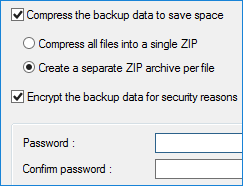
Data Encryption and Compression
Handy Backup provides internal tools for compressing all data backup content into a single or separate ZIP files, and a modified BlowFish encryption option. In addition, it supports different methods of traffic encryption such as SSL/TLS for backup data offsite (e.g. email backup).
Running Other Software Before and After a Task
Finally, you can run a batch file or some external utility either before or after a task, or before and after it. This option is very useful for making a data chain workflow, for stopping some data process to take cold backup (by default, handy Backup almost always makes hot data backup), and so on.
Sample Data Backup Methods: Saving Your Data to Local Drive
In this example, we will use the "Computer" plug-in for utilizing Handy Backup as data backup software. It can store any data to a local drive or to an external USB disk. Here we will show a simplest data backup and recovery method, utilizing a local drive C: as storage. Please follow the instruction:
- Open any file manager and create a new "Backups" folder on drive C.
- Open Handy Backup and create a new task by clicking the "Create" button.
- Select a data backup task on Step 1 (use advanced mode in this example if you want to do it).
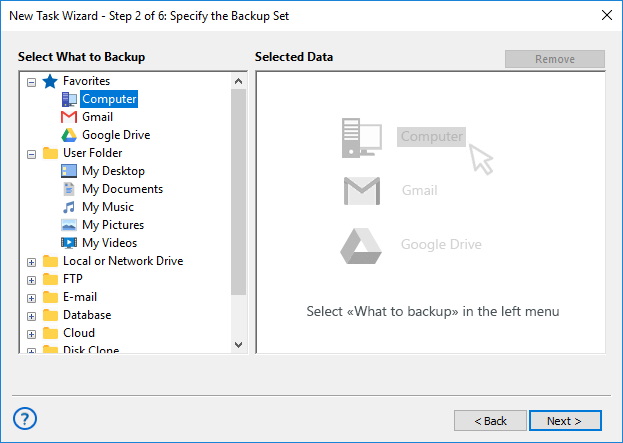
- On Step 2, select any data that you want to backup, according to the User Manual.
- Go to Step 3. Here, select "Computer " as backup destination.
- Select the "Backups" folder created before on the disk "C:". Click "Next".
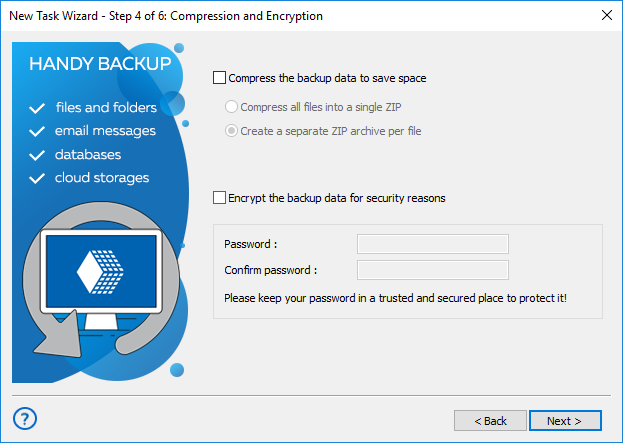
- Continue creating a backup task as described in the User Manual.
Learn more about our local backup software that provides seamless and reliable data protection for both home and business environments.
Native Storage Format of Data Backup

Handy Backup always tries to preserve the original data format when it stores data copies. Therefore, you can use most data backup files directly from a copy, for browsing, moving, viewing, deleting the files, or even for restoring a file manually without a full auto recovery task.
For some complex data, such as disk images or SQL databases, there are no native formats available. Instead, Handy Backup implements other comprehensible formats, e.g., VHD files for drive images, SQL command sequences (dump files) for MySQL and so on.
Download for Free
Version 8.7.0 , built on May 7, 2026. 152 MB
30-day full-featured trial period
Among all data backup solutions, Handy Backup provides a lot of comfort and preserves uniformity of all procedures for any data type. Try its power by downloading a last version with all functions and plug-ins for a 30-day free trial period!
"This is almost perfect data backup software, especially in latest version 8! I can back up my user folders and libraries on-the-fly, in hot mode, without stopping any process related to backup data. In addition, this program works very fast and is almost completely undemanding to system resources!"
Janette Oneagle, a print designer