Running Data Backup as Windows Service
Backup data in a Windows service mode with Handy Backup, to get no additional distractions from a program interface! This feature allows users to schedule backup tasks only once, and always have them started in time even without logon.
 Download for Free
Version 8.7.0 , built on May 7, 2026. 152 MB
30-day full-featured trial period

How It Works
When you switch Handy Backup into service mode, its icon disappears from system tray, without removing a respective process from Windows Task Manager. Starting an OS also launches this process and makes Handy Backup operation invisible and independent of users.
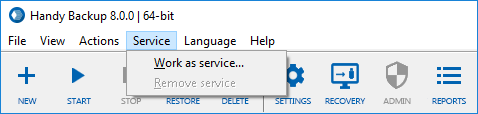
The ability to launch Handy Backup as service is especially useful for a network-oriented edition, Handy Backup Server Network.
With it, a central computer (which is used to manage all tasks) has a server application installed, and networked computers have client applications which run as Windows service and grant the server access to their data. As a result, data from workstations is backed up invisibly, and people who work on them may never know about it.
Utilizing Backup as Windows Service for Centralized Network Backup
During network backup, a central management computer has a server application installed, and networked computers have client applications, which run as Windows service and grant the server access to their data.

As a result, the central panel gathering data from workstations invisibly, and people that work on them may never bother about data backup and about any actions related to it.
Advantages of Running Backups in a Windows Service Mode

Simultaneous Backup for Many Users
With a service approach to backup, it is possible to run backups of two and more users at the same time, without interfering any daily job for these users.

Reducing a System Load
Running backup tasks as service with low priority allows reducing any interferences with other programs and applications running at the same time on the same system.

Informing Users about Backup Results
Ensuring efficient backup reporting through a smart email notification system and tray icon signals, users and system administrators stay informed about backup progress without the necessity of running a GUI to control all tasks.
Recommended Solution
Lifetime license
Handy Backup Server Network
Performs backup as Windows Service. The solution is Windows 10,8,7, Vista and 2019,2016,2012, 2008 Server compatible. Network Agents for Windows and Linux OS are available. Free 30-days trial version!
Remote Backup Service
Remote servers provide the most reliable and secure storage for data protection. They deliver even higher level of automation. When you back up data online, you do not need to worry about changing media, create proper conditions for tapes, etc.
All you need to do is order storage from a hosting provider and configure backup plan and then you may forget about backups for months.
Download for Free
Version 8.7.0 , built on May 7, 2026. 152 MB
30-day full-featured trial period