How to Do a Complete Backup of Computer Data
Entire computer backup means creating a complete copy of your full computer data, either by backing up files or by creating a disk image at the logical level. File backup saves specific files and folders, while an image backup creates an exact replica of your entire disk or partition, including the OS, applications, and settings, allowing for full system restoration.

Complete Computer Backup Options

File Backup:
Backing up all the files stored on your computer is known as file backup. This method allows you to select specific files and folders, making it ideal for users who want to protect personal data like documents, images, and videos.

Image Backup:
Computer backup software enables you to create disk-level copies of all the data on your computer, also known as image backup. This method is ideal for users who need to restore their computer to its exact previous state, ensuring no data is lost.
How to Make a Computer Backup: Image-Based Approach
Please note that the Image-based Backup plugin can create both a complete drive image and a partition image. To use it effectively, follow these instructions:
- Begin by downloading the Handy Backup application. It’s quick and easy to get started!
 Download for Free
Version 8.7.0 , built on May 7, 2026. 152 MB
30-day full-featured trial period
- Launch Handy Backup and create a new computer backup task in Step 1. No need to worry about choosing between simple or advanced modes just yet — simply click "Next" to continue.
- In Step 2, select the Disk Image plugin from the Disk Clone group to ensure a comprehensive backup of your system’s disk.
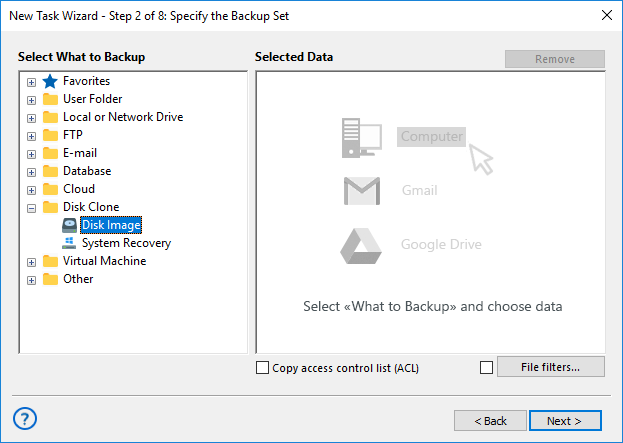
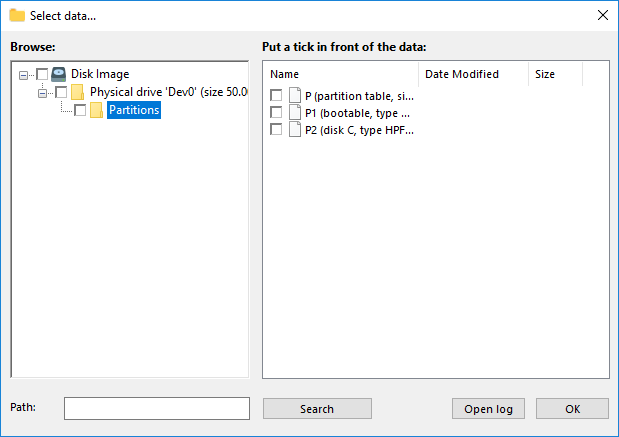
- Tick the box next to the disk or partition you wish to back up for a seamless entire computer backup process.
- After selecting your desired data, click "OK". The selected drives and partitions will then appear in the Backup Set pane of the New Task Wizard, giving you a clear overview of your backup configuration.
- Continue setting up your backup task as detailed in the User Manual. Customize your complete computer backup by enabling versioning, scheduling, and data encryption, or even configure external applications to run before or after the backup to streamline your workflow.

Note! The full drive image file (located in the Physical Drive folder) contains all the data from your hard drive, including everything in the Partitions folder. To ensure an entire computer backup — the answer to how to do a backup of my computer — avoid selecting individual partitions. Also, make sure to run Handy Backup as an administrator to guarantee that all data from your computer drive is properly copied.
Customers about Handy Backup

"Windows teach how to backup computer to OneDrive or to a local disk, but how about other computer backup storage? I seek for an answer, and I got it! Handy Backup, this computer backup system provides me all that I need for making regular and complete snapshots of my machine. It is truly wonderful, due to its outstanding flexibility and classical, intuitive GUI!"
David M. Newmann, Handy Backup user
Recommended Solution
Lifetime license

Handy Backup Professional
The Professional edition lets you back up your entire computer using advanced disk image technology and supports a wide range of storage options right out of the box. Download your free 30-day backup software trial today and explore powerful features for comprehensive PC protection!
Advantages of Handy Backup as Computer Backup Software

Automation
Automate every step of your computer backup process with Handy Backup. Set custom backup schedules, and let the software take care of creating disk copies, while ensuring your data is always safely stored and easily recoverable.

Encryption
Encrypt your sensitive data with Handy Backup's built-in AES-256, AES-128, and Blowfish encryption methods. Secure your files and make sure they are protected from unauthorized access, whether stored locally or in the cloud.

Disk Image Backup
Create exact disk-level physical backup of your entire computer with Handy Backup's Disk Image plugin. This solution ensures you can restore your system to its exact previous state with all settings and data intact.

System Recovery
Perform seamless system recovery with Handy Backup’s System Recovery plugin. Recover your entire system or specific files with ease from a bootable USB drive or any backup source.

Flexible Storage Options
Choose from various storage options for your backups, including cloud services, FTP servers, external drives, or local backups. Handy Backup offers the flexibility to store your data wherever it suits your needs best.

Cloud Backup
Back up your data to popular cloud services such as Google Drive, OneDrive, Dropbox, Amazon S3, Box, and many others. Handy Backup integrates with both commercial and private clouds that support S3 or WebDAV protocols.

Windows Compatibility
Perform total computer backup with full compatibility for Windows 11, 10, 7 and older versions, as well as Windows Server 2025, ensuring seamless operation across various systems.

Lifetime License
Get a one-time purchase for all your computer backup needs with the Handy Backup Lifetime License. Enjoy permanent access to all the essential backup features without worrying about recurring subscription fees.

Ensure your computer backup is completed without interruption by using an uninterruptible power supply (UPS). This backup power source guarantees that the backup process will finish even in case of power failure, keeping your data safe and sound.
Download for Free
Version 8.7.0 , built on May 7, 2026. 152 MB
30-day full-featured trial period
Handy Backup enables you to backup computer online, to a local disk, or to any external storage. It’s quick, easy, and secure — try it now as your computer backup software by downloading a 30-day free trial!