Email Recovery Software and Mail Data Cloning
Email recovery software allows restoring emails after backup, as well as data cloning to another mail service.
Handy Backup provides unified plug-ins for email data recovery either in local clients or onto Web-based mail services, allowing using it for cloning mails or just as deleted email recovery software.
 Download for Free
Version 8.7.0 , built on May 7, 2026. 152 MB
30-day full-featured trial period

Email Data Recovery: Basic Principles and Terms
Before using some mail recovery software, you must have an email backup. It is also true for cloning emails. With a backup at hand, you can use Handy Backup either for deleted email recovery or as email cloning software, even for migrating to completely another mail service.
Advantages of Email Data Recovery with Handy Backup

Unified Native Format for Messages
Most local clients and the E-Mail plug-in for Handy Backup save email messages as separate files in readable, unified EML format. Therefore, to clone data or to restore a message, you can use these EML files freely, up to making email data recovery for just one message from all dataset.
Automation for All E-mail Recovery Software Functions
Besides automated connection and data transferring operations provided by Handy Backup, you can use other automation tools, including scheduling email cloning tasks to appropriate time and repeating periods, searching message files by masks of name, informing users by e-mail about completing tasks etc.

Recommended Solution
Lifetime license

Handy Backup Standard
The home-oriented Standard edition, as well as all higher editions, provides an effective mail recovery software solution for the needs of all users! Free 30-days trial version!
Utilizing Mail Recovery Software: Use Cases
Before using Handy Backup as email recovery software, you could have made some email backup. For preparing to recover emails, please use the common steps described here.
- Open Handy Backup and create a new restoration task on the Step 1. Click “Next”.
- On the Step 2, select your email backup storage and find a file backup.hbi inside it.
- Click “Next” to continue; then use one of next cases on the Step 3.
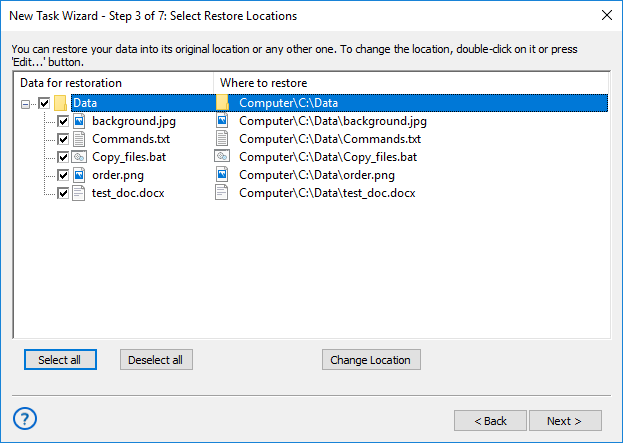
For Local Clients
Use the Computer plug-in on the Step 3 of creating a new recovery task to utilize Handy Backup as deleted email recovery software or to clone mail message data to another place.
For Network-based E-mail Services
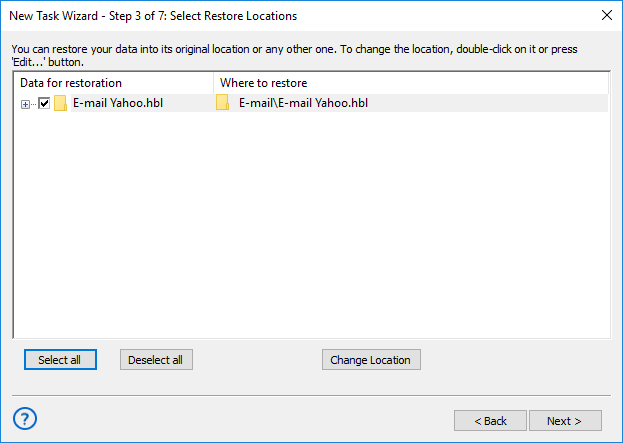
Utilize the generic E-Mail plug-in on the Step 3 to restore data via the IMAP protocol onto some network email server. You must have (or create) a connection to this server before recovering.
For Dedicated Email Services
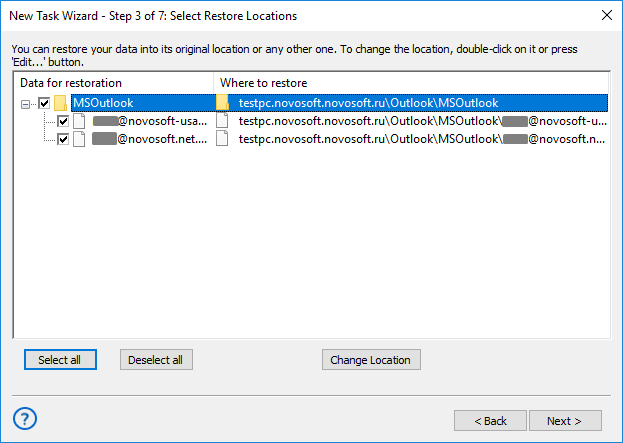
Use either the Outlook plug-in to recover emails for Microsoft Outlook client (do not mix it with the Outlook.com email service!), or the MS Exchange plug-in to restore Exchange server data.
Note: After choosing a particular email recovery software solution, you can continue creating a new restoration task freely, as described in the User Manual.
Video Instruction: Email Recovery after Backup from Another Service
In this video example, we will use Handy Backup as email recovery software just after backing up some content from Yahoo!Mail. You will see how to recover a copy of your “Inbox” folder to Outlook.com service by using a convenient and comprehensible Task Wizard for creating an email recovery task!
Download for Free
Version 8.7.0 , built on May 7, 2026. 152 MB
30-day full-featured trial period
Handy Backup can serve as perfect email recovery software for any types of message clients and servers! Try it with a free 30-day trial version – download just now!