Folder Backup Software for Windows - Handy Backup
Folder backup software - Handy Backup will help you to secure windows folder content automatically. With the convenient and reliable backup solution, you can protect your crucial information when making automatic folder backup to any place, regardless of an exact folder location and its content type!
 Download for Free
Version 8.7.0 , built on May 7, 2026. 152 MB
30-day full-featured trial period

Auto Backup Folder with Handy Backup: Typical Tasks

Backup Windows Libraries and User Folders
For these folders, typically containing up to 90% of principal content for Windows backup folder operations, Handy Backup provides dedicated plug-ins, definitely named “User Folders” and “Windows Libraries”, allowing quick access and fast backup or recovery for these folders or separate files inside.

Backup Folders by Name
As a folder backup tool, Handy Backup contains not only the "Computer" plug-in that allows making auto backup folder data but also a searching tool called "File filters…" on Step 2 of a new task wizard. Using file filters, you can include or exclude data in your backup folder list by a mask of name.

Auto Backup Folder to USB Drive
Some folders are big and containing constantly changing data; therefore, an external disk is a perfect place to save this content. You can perform folder backup to USB flash drive automatically by triggering a backup task to run every time when you will insert a task-related USB device to some USB slot in a PC.
Customers About Folder Backup by Handy Backup
Recommended Solution
Lifetime license

Home Office Backup Solution
The Standard edition for home users is a full-scale folder backup software solution, allowing saving folder copies locally, by network or to any popular cloud.
How to Make Automatic Folder Backup?
In this short instruction, we will show how to create a task to backup folder from any place by using the "Computer" plug-in. Please open your Handy Backup and follow the next instruction:
- Open Handy Backup. Create a new task by the button on the main panel, through a menu or by pressing Ctrl+N keys
- Select a backup task type on Step 1. Use either simple or advanced mode. Click “Next” to proceed.
- On the Step 2, open Local of Network Drive group and select the Computer plug-in.
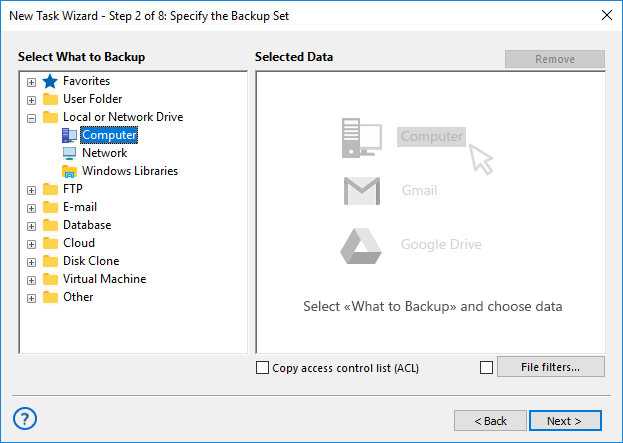
- In the new data selection dialog, find a folder that you want to back up.
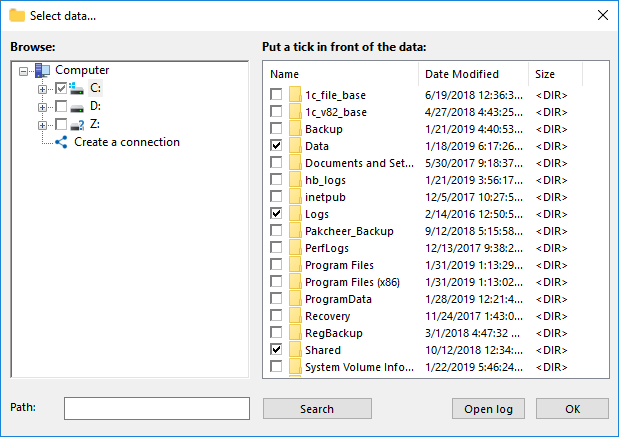
- Mark a checkbox against the folder name. To back up another folder, mark it, too.
- Click OK and return to the Step 2 window.
- Continue creating a task (see the User Manual for details). That is all!
Folder Backup Software Advantages
Partial Backup for Reducing Work Time and Storage Space Requirements
In advanced task wizard mode, Handy Backup allows partial backup, including incremental, differential and mixed full/incremental or full/differential data copying/ With partial backup, you can greatly reduce task running time and save much space on storage, due to copying only renewed data, not all dataset.

Automatic Folder Backup Operations
Schedule your tasks to run at an exact time and with a precisely defined interval of repeat, from minutes to months, or start to backup folder content by a system event. Additionally, you can run other software before or after executing an auto backup folder task.
Security and Convenience Tools
The last but not least is a set of options for making file folder backup safer and less consuming. These options include making many versions of a single folder copy, built-in encryption and compression, utilizing protected storage protocols (SFTP, FTPS, S3) and other functions of folder backup software.
Many Storage Types
With Handy Backup, you can create tasks of auto backup folder to many different places, including such modern storage media types as:
- Other local folders on hard drives, SSD or external USB disks,
- NAS and shared network folders, mapped network drives,
- FTP servers, as well as SFTP and FTPS,
- Cloud storage services accessible with S3 or WebDAV,
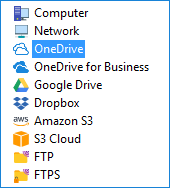
- Popular cloud servers, such as OneDrive, Dropbox, Google Drive backup or Amazon S3.
Automatic Folder Backup to USB: Video
Please see the next instructional video that describes an entire process of auto backup folder content to some USB drive. You will learn how to create a folder backup task, how to optimize storage space by packing backups in a single ZIP file, to choose and mark time-stamped versions, and other useful things.
The Cross-Platform Solution for Backup Folder of Windows 11,10, 8, Windows Server and Linux
Handy Backup can backup folders in Windows 11, Windows 10 or any other modern version of Windows, including server editions. It also supports Linux in native mode, allowing to backup folder content under Ubuntu 16.04, 14.04 or compatible distributives.


 Download for Free
Version 8.7.0 , built on May 7, 2026. 152 MB
30-day full-featured trial period
Try Handy Backup as your standard software to backup folders automatically.
Download a fresh version with all plug-ins now for a free 30-day trial!
"I backup folder with my digital paintings to Dropbox every day. Handy Backup allows me doing it automatically, worrying no about such things as regular backup or data consistency. It is especially wonderful that I can open my folder backup copy just from Dropbox to show, browse or modify my pictures. In my opinion, Handy Backup is an excellent folder backup software solution!"
Abby Murkey, digital artist (an individual software user)