Grandfather Father Son Backup Strategy
Grandfather-father-son backup is the one of most popular backup schemes, allowing saving data into the two different places with three repeating frequencies. Handy Backup provides tools for GFS backup by using the mixed full/differential backup as “father and son”, and another “grandfather” full backup.
 Download for Free
Version 8.5.3 , built on March 5, 2024. 116 MB
30-day full-featured trial period

What Is Grandfather-Father-Son Backup?

The GFS backup rotation technique is a popular method of data backup, allowing combining full and partial copying to different media for both reducing backup time and enhancing storage security. You can find many articles about what is grandfather-father-son backup strategy means.
The Principle of GFS Backup Rotation
In the grandfather father son backup technique, the three scheduled steps make backups:
- The "grandfather" – full backup to some place, perhaps very offsite;
- The "father" – another full backup, more regular, to a faster storage;
- The "son" – incremental backup (or differential backup) to the same storage as "father".
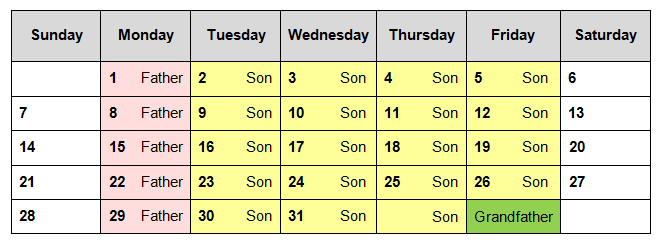
An example of grandfather-father-son backup schedule
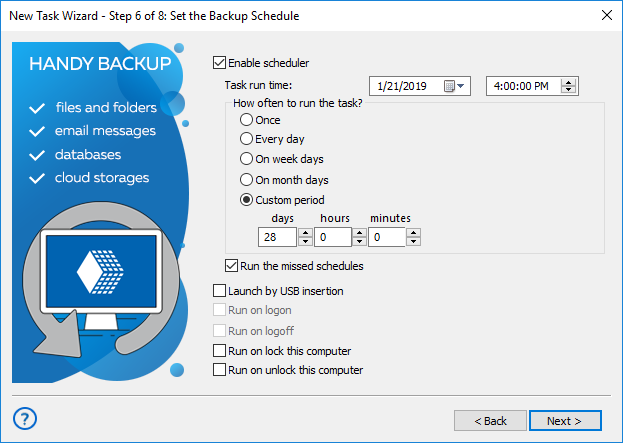
To apply this backup scheme, Handy Backup uses the two separate tasks: one to perform a scheduled mixed backup (i.e. a cycle of full backup followed by some preset quantity of differential backups, repeating at a cycle) as both "father" and "son", and another full backup task as "grandfather".

Grandfather-Father-Son Backup Advantages/Disadvantages
Basic advantages and disadvantages of grandfather-father-son backup are obvious. Compared to simple backup, the GFS backup strategy takes much time and some planning job for preparation. It also uses at least two storage types for same data. The result, however, is a regular, reliable and consistent backup!
Features and Options of GFS Backup Scheme in Handy Backup

Big Choice of Storage Types
You can save both your “elder” and “lesser” backups to many storage types, including physically or digitally secured data vaults: local drives, external USB disks, NAS, data servers, FTP, SFTP and FTPS storage or clouds like S3-driven, Google Drive, Dropbox, OneDrive (for Business, too) etc.

Flexible Scheduling on Each Step
You can make the grandfather father son backup with uneven or non-standard intervals, like making different backup stages repeating in minutes, in weekdays or in months. Handy Backup allows very flexible scheduling for each task, allowing integrating your GFS backup into more complex strategies.

Complex Logics for Complex Data
With Handy Backup, you can divide your complex datasets into different types to apply grandfather father son backup scheme to all these data or only to some components of an information array. Divide and merge, mirror and clone, do different tasks on different network servers – all in one solution!
Professional Software for Backup to Clouds & Other Storages


+ External and Local HDD, WebDAV, USB, Network
How to Set Up Grandfather Father Son Scheme in Handy Backup?
To operate in a GFS backup scheme with Handy Backup, you can use the sequence of actions provided by the next instruction. In this example, we are assuming that you will apply a GFS backup scheme to “My Documents”, with FTP storage for “father” and “son”, and OneDrive account as “grandfather”.
Part One: Tuning up Father and Son Backup
Firstly, open Handy Backup. Call a new task wizard by clicking the “Create” button on the main panel, or by calling for a main or context menu. (Alternatively, you can just press Ctrl+N.) Select the backup task type on Step 1, and mark the “Advanced mode” option to access to all the functions of a new task!
- On Step 2, select the "My Documents" plug-in as backup data source in the "User Folders" group on the left pane. Click on the plug-in name to add it to backup list.
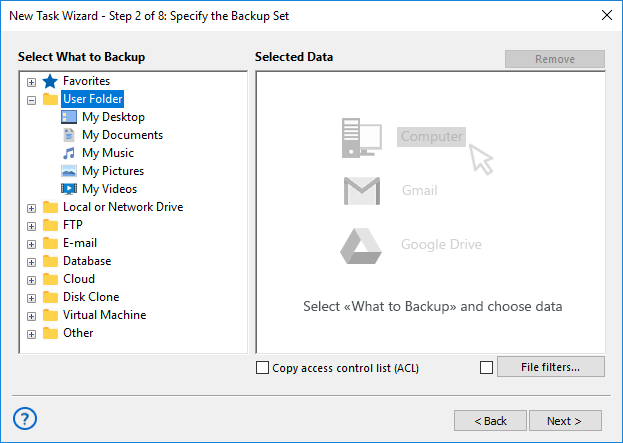
- Mark checkboxes against data that you plan to back up (or just mark an entire folder).
- Click OK and then click the "Next" button to go to Step 3.
- On the Step 3 window, click on the "FTP" on the left pane, and then click on the "Create a connection…" string on the right pane, to make an access to your FTP storage.
- In the connection dialog window, set up all connection parameters to your FTP server.
- Click OK. Now click on the FTP connection name that you just created on the right pane.
- Select a particular storage (folder) on an FTP server to place your backup. Click OK.
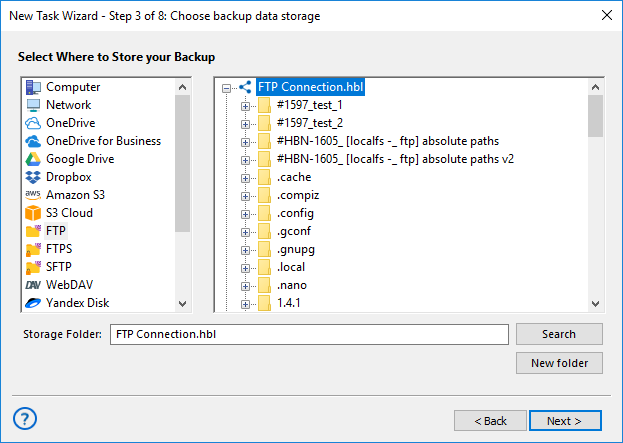
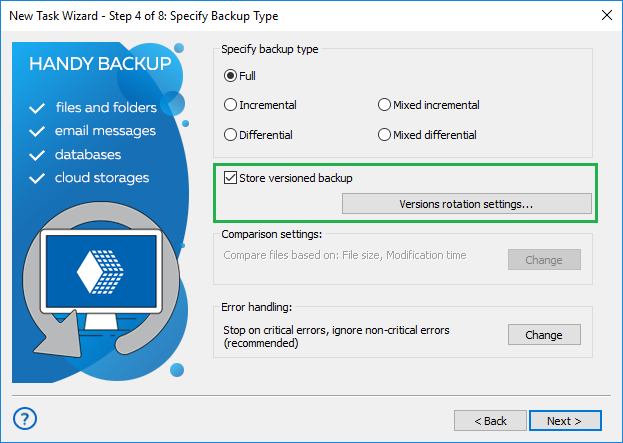
- Now click "Next" and go to Step 4. Here, select the "Mixed differential" backup option.
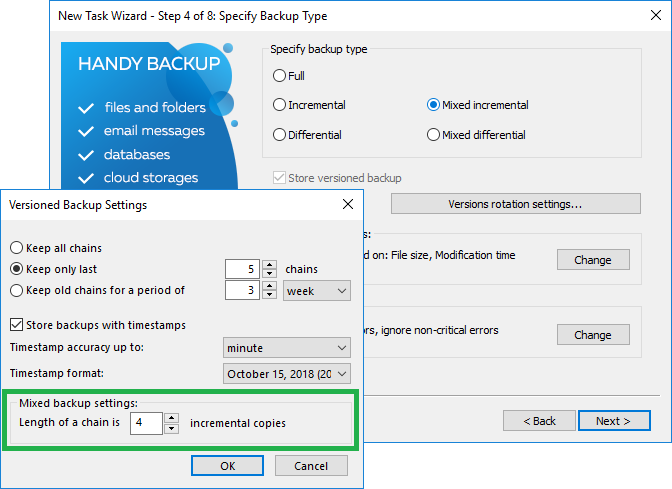
- Click on the "Versions rotation settings". You will see the new dialog window.
- In this dialog, select "Keep only last" and mark 5 copies next to this option. Click OK.
- Click "Next" and go to Step 5. You may choose data encryption and compression on this step. Regardless of these options, click "Next".
- Now you are on Step 6, and here you will schedule your task.
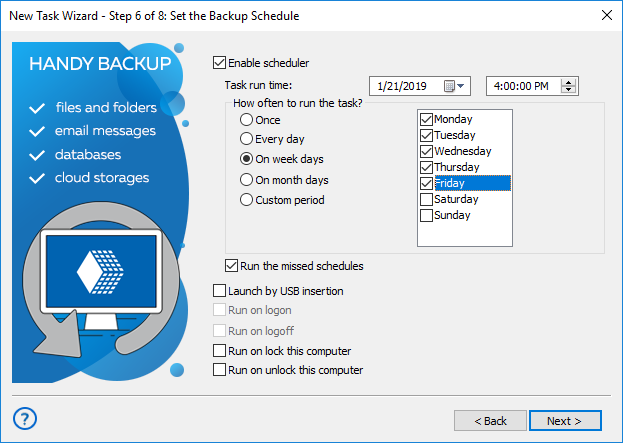
- On the "Start" date field, select the next Monday to run this task at first as "father" backup.
- Select the "On week day" option, and mark the workdays of the week to make "son" backups.
- We are also recommending marking the "Run the missed schedules" options for this case. It will guarantee the backup consistency.
- After finishing scheduling, click "Next" to continue. Step 7 is for making external software calls; if you do not need it, go to final Step 8.
- On the final step, uncheck (!) the option of immediate start to a task, and give your task a name (as an example, "FatherSonOne"). You will complete the task creation!
Customers About Grandfather-Father-Son Backup by Handy Backup
Recommended Solution
$249 per license
Handy Backup Small Business
The Small Business edition can organize analogs of grandfather father son rotation schemes for any types of data and storages – just out of the box!
"For me, Handy Backup is a sort of magic. I can implement any scheme of backup that I need, including 3-2-1 and Grandfather-Father-Son backup rotation, with just a few clicks of a mouse. I use the Server Network edition to govern backups on our entire local network, and with the GFS backup task preset, I have absolutely no problem to configure and take any data image that I need!"
George Simmer, a system administrator of Tesco West Coast group