Backup and Restore Software: Types of Data Recovery
Backup and restore are the two actions that literally can save a day for any IT-based action. Handy Backup is the universal Windows backup and recovery software designed to keep and restore data in all types of IT systems, from a single home PC to the complex business network.
 Download for Free
Version 8.7.0 , built on May 7, 2026. 152 MB
30-day full-featured trial period
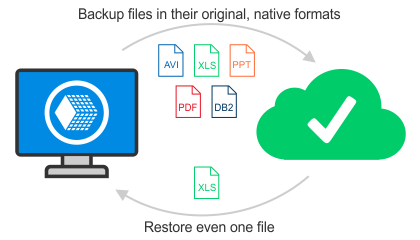
Most Important Features of Handy Backup and Restore Software
Advanced Data Restoration Options

Restore data using the automated restoration procedure, or select backup data stored in their native format (see below) to use it by the place or to copy manually wherever you need. You may always control the content of your restored files.
Automated Database Backup and Restore

You can just select the database type (or backup website content, or other business-oriented data type) as the backup or restoration source to automate backing up or restoring of it. Hot backup will be implemented if the data type allows it.
Universal Interface for Restoration Actions

Use the same interface and same principles to restore data as to back up. No extra effort is needed to organize the restoration of data backed up previously. Handy Backup will automate as much operation as possible in every single backup and restore case.
Restoration Using Timestamp

Data may be backed up using time stamps, descriptors containing the exact date and time of creating the particular copy. Timestamp data are directly displayed in the backup folder name, allowing restoring data quickly sorted by the time of backing up.
Organizing Everything You May Want to Organize

Handy Backup is equipped with well-developed auxiliary functions including E-mail notification of user, running backup as service even with no user logged in, and automated execution of some software before or after backup and restore tasks.
Advantages of Backing up in Native Format
As described before, data are stored in the native format. This approach brings a lot of advantages for data resoration process.

No restoration required to use backup files
With the Handy Backup and restore software you can open any single file in the backup directory and work with it. Get direct access to your backup files!
Searching and restoring information manually
User can find any file in a backup set by the typical file criteria (name etc.) and move it to the right place by any file manager.
Viewing backup content
When opening the backup directory, a user can directly see what it contains and plan what to do with these data.
Using backups for cloning or mirroring data
As data are stored in the original form, the backup directory can be just renamed or moved entirely to clone its data.
Recommended Solution
Lifetime license

Home Backup Software
Discover the power of Handy Backup using Standard edition for easy backup and restoration of your valuable data! Free 30-days trial version!
How to Restore from Backup Automatically?
User can restore backup data just as quick as creating the backup set. Create a new restoration task and select the backup data you wish to restore; software will do all other job for you.
- Alternatively, you may select data manually to restore from backup by moving the needed files and folders to right new (or old) places. As mentioned above, keeping data in the native format may greatly simplify the selection and checking of necessary data to restore from backup.
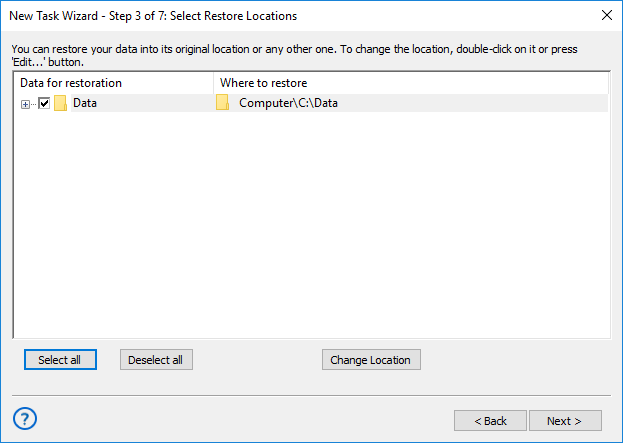
Note: You can "backup" or "restore" data just to clone or synchronize the information.
Backup and Restore of Windows 11, 10, 8, Server Editions
Handy Backup simplifies Windows restore and system data backup for various editions, including complete disk image backups. This process is as automated as other features, only requiring a selection from available data types. It's compatible with Windows 11, 10, 8 and Windows Server for seamless data structure restoration.
Backup and recovery software is vital for data security and business continuity. Handy Backup offers advanced features, like incremental backups and flexible scheduling, adapting to your needs. With a user-friendly interface, it's your reliable data protection partner, guarding against failures, malware, and data loss.
Download for Free
Version 8.7.0 , built on May 7, 2026. 152 MB
30-day full-featured trial period
Ready to experience our backup and restore software? Download a 30-day backup software trial and see the difference for yourself.