Desktop Backup Software for Windows Computer
Desktop backup software allows either creating a copy of "My Desktop" Windows folder, which contains all objects shown on your desktop (main screen), or saving desktop PC data and operating system (say, backup desktop Windows 11 or Windows 10). Handy Backup performs these tasks easily and efficiently!
 Download for Free
Version 8.7.0 , built on May 7, 2026. 152 MB
30-day full-featured trial period
Best Desktop Backup Features of Handy Backup

Easy to Use
Handy Backup copies all desktop data through the "My Desktop" plug-in in the "User Folders" group. Just click onto the "My Desktop" on the left panel, and the program will automatically select all objects for Windows desktop backup. All you need after it is to select a proper storage for your desktop backup!

"Desktop Backup Software" in Both Cases
Handy Backup can serve for "desktop backup" either in a typical way (i.e., by copying the "My Desktop" folder) or by creating an image of an entire desktop unit (i.e., a computer hard drive) with full computer backup. Both actions are equally easy and reliable to perform!

Advanced Desktop Backup Options
You can use other backup options, including making incremental or differential backup, keeping different backup versions on the same storage, and scheduling your task by an exact time and repeating interval. In addition, you can use an advanced task wizard with much more backup options!
Desktop Backup Storage Solutions
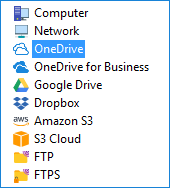
You can select a desktop backup drive, either local or external, or even a shared network resource (e.g., a NAS disk or a remote shared folder) for backing up desktop content. With Handy Backup, you can utilize such storage solutions as:
- Local and external USB disks, flash pen drives and memory cards;
- Shared and mapped network resources;
- FTP, SFTP and FTPS servers, NAS units (e.g. QNAP desktop backup);
- Desktop backup cloud solutions via WebDAV or S3 interface;
- Commercial cloud services like Dropbox, Google Drive, and OneDrive offering seamless cloud-based backup solutions.
Note: For the Server Network edition, this is also an option of using local and external drives connected to remote machines for desktop online backup.
Windows Desktop Backup
If your Desktop is used for easy access and management of computer programs and documents, and you want to backup data intended for regular use, then Handy Backup is the right solution for you. Handy Backup solves the question of protecting its data from accident deletion or loss through an integrated preset called Desktop Backup.

Users About Desktop Backup Solution by Handy Backup
Why Should I Choose Handy Backup?

Simplicity
Handy Backup is intuitive backup software friendly to people with different level of experience with computer technologies. Simple, fast and easy to use!

Security
With Handy Backup the simple way to save files is the secure way. Encrypting the backup data allows you to secure chosen files, regardless of type and size.

Compression
You can compress the backup files if you wish to save space. Files will be saved in Zip format, the most popular compression format among Windows users.

Scheduler
You can choose day and even certain time when you want Handy Backup to start backing up desktop and how often to repeat. Automate your backups!
Recommended Solution
Lifetime license

Home Backup Software
Give your desktop a reason to be eternally thankful to you, as it thrives through a data misfortune after a timely backup. Download and rejoice now! Free 30-days trial version!
How to Backup Desktop in Windows with Handy Backup?
Sure, it is easy! Just follow the instruction provided here.
- Open Handy Backup. Create a new task with a "New" button. Select a backup task.
- On Step 2, click onto the "My Desktop" on the left panel.
Attention: Do not select the "Use advanced mode" option unless you have a plan to utilize all extra steps and features of Handy Backup as desktop backup software. In typical cases, simplicity is advantage!
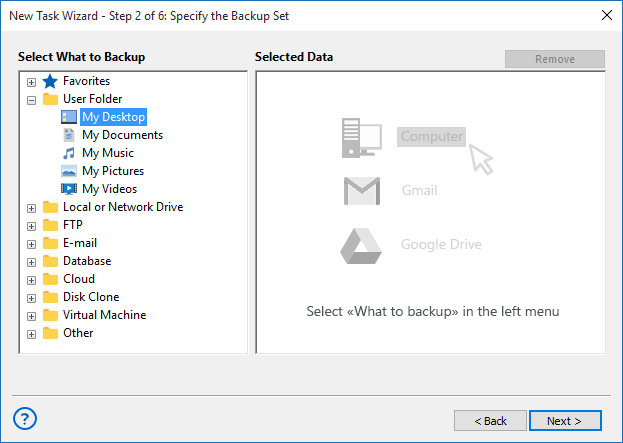
- In a new window, mark the checkboxes against data that you plan to back up.
- When finishing, click OK. Click "Next" to proceed.
- On Step 3, select your desktop backup drive or other storage. Click "Next" again.
- On all other steps, select task parameters that you need, or just click "Next" to proceed.
- On the final step, give your task a name. Click "Finish". That is all!
Making a Desktop Backup Drive
If you want to make a desktop backup as a whole drive image, follow the instruction above with next changes for action sequence:
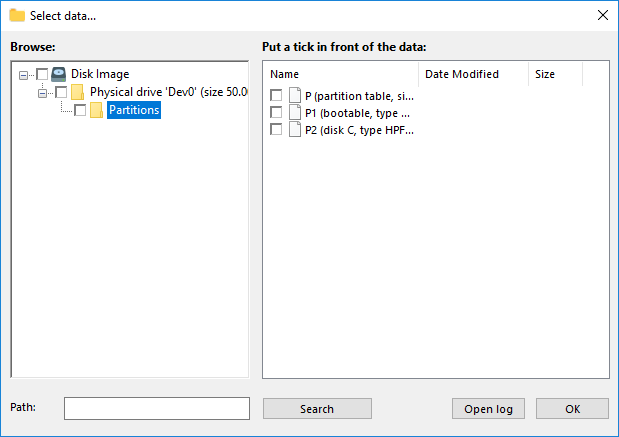
- On Step 2, select "Disk Image" from the "Disk Clone" group on the left panel.
- Then choose a system drive from a list, and mark it with a checkbox.
Note: You can easily restore this desktop backup image by using the Disaster Recovery utility. You have no need to copy an image to a USB drive where you have this utility (but you can do it, sure). Instead, you can restore a Windows desktop backup image from any drive connected to your PC!
Video Lesson: Desktop Backup to USB Storage
In the next video you can see how to use the desktop backup solution Handy Backup for backing up Windows desktop. You will see how to backup desktop content and how to recover it.
Download for Free
Version 8.7.0 , built on May 7, 2026. 152 MB
30-day full-featured trial period
Looking for Windows 11 file backup solution? Handy Backup has you covered! Download our 30-day free trial version and see for yourself how easy and efficient it is!
"I wonder how easy and efficient is to back up my desktop content with this software! My screen is a settling place for too much files and folders, including ultra-important data, and without Handy Backup, I can suffer definitely! Good tool for us the common users!"
Sarah Reachy, a customer