Automatic Website Backup Software
Website backup tool - Handy Backup is designed to automatically create and store copies of your website data, including files, databases, and configurations. The software provides a simple and reliable way to back up your entire website, from static pages via FTP, SFTP, or FTPS to dynamic content stored in SQL databases, with the option to securely store backups locally or in popular cloud storage services such as Amazon S3 and other compatible cloud platforms.
 Download for Free
Version 8.7.0 , built on May 7, 2026. 152 MB
30-day full-featured trial period





How Often Should I Backup My Website?
Automatic website backup is one of the most important steps you can take to protect your online presence. But how often should backups be created? The ideal frequency depends largely on the nature of your site and how often its content or functionality changes. Let’s take a closer look at different types of websites and the backup strategies that best suit them.

Static Websites
For websites that rarely change—such as personal portfolios, company landing pages, or simple informational sites — backups can be performed less frequently. In most cases, a full backup once a month is enough. However, even static websites may be vulnerable to server failures or malware, so it's still important to maintain at least one recent backup.
Highly Active Websites
Websites with frequently updated content — like blogs or forums — require more regular backups. New articles, user comments, or media uploads may be added daily, so a daily backup schedule is recommended. Incremental website backup can also be useful, saving only the changes since the last backup to save time and storage space.
E-commerce Websites
For online stores, frequent backups are essential. Transactions, product updates, customer data, and inventory records change constantly, and losing even a few hours of data can result in lost revenue and frustrated customers. Ideally, e-commerce sites should be backed up multiple times per day using reliable site backup software.
Back Up Your CMS to Any Storage
Handy Backup makes it easy to back up content from any CMS or blog platform, including, for instance, WordPress auto backup, without the need for manual scripts or complicated dashboard tools like cPanel incremental backup. Simply connect to your CMS host (for example, GoDaddy) and effortlessly back up all static content via FTP/SFTP/FTPS, while also securing dynamic data through your DBMS.
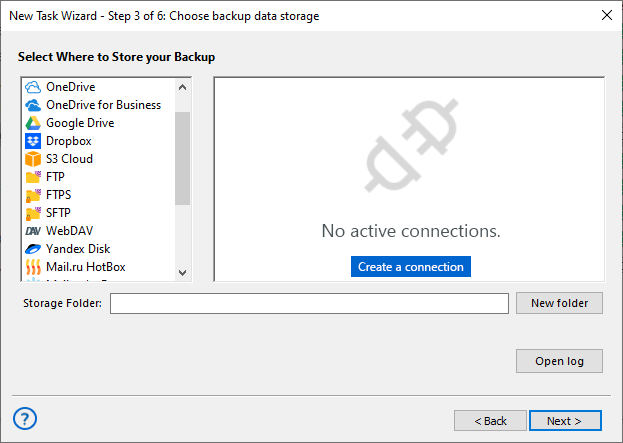
Our website backup software automates cloud backup to Amazon S3, as well as to Dropbox, OneDrive, and other storages. Enjoy flexible options, including local drives, external devices, network drives, NAS, and more.
List of Supported Clouds


Advantages of Handy Backup as Website Backup Tool

Automatic Website Backup
Automate full website backups, including HTML, scripts, media files, and databases like MySQL or PostgreSQL. Use cron-style scheduling to run backups daily, weekly, or on custom events without manual actions.

Encryption and Archiving
Enable strong encryption for your website backup online files using AES-256, AES-128, or Blowfish algorithms. You can also archive your backup to efficiently store and manage your website data while ensuring its security.

Schedule Backup Sequences
Create flexible backup schedules using time-based or event-driven triggers. Run auto website backups at specific intervals to keep your data protected without manual effort.

Partial Backup
Save storage space by running differential or incremental backups of selected website components. Back up only changed files regardless of your CMS or hosting setup.

Backup History
Maintain a detailed history of your backups with clear timestamps. Use these records to restore data from any previous backup version when needed, track backup frequency, and verify backup consistency over time.

Web Server Backup
Protect your complete web environment, including static files, scripts, and databases like MySQL or MS SQL. Minimize downtime by quickly restoring both site content and server configurations.

FTP/SFTP Access
Access files on FTP, SFTP, or FTPS servers to backup website content or store backups remotely. Use secure connections for reliable data transfer in both directions.

Database Backup
Perform dynamic website backup of content stored in MySQL, MS SQL, or other databases without interrupting operations. Ensure compatibility with most major database engines used in modern websites.

Wondering how to copy an entire website? Unlike other website backup solutions, Handy Backup directly accesses your web server files, ensuring a complete website backup online without relying on browsing or partial content. This allows you to restore your entire site efficiently in case of a disaster.
List of Supported Databases

Database backup plugins: MySQL, MariaDB, MS SQL, Oracle, PostgreSQL, and any ODBC-compatible DBMS.
Client Reviews

"I am a computer support business and will be using the licences on 3 different sites for backup purposes. As well as file backups I will be doing disk images both of which I will FTP to a NAS or offsite server. I am largely doing this because of ransomware viruses which have hit several of our clients. I have been using Handy Backup for over 10 years but not the professional version until now. I will also be purchasing the server version for some of our clients."
Michael Jarvis, Logic Link
Recommended Solution
Lifetime license

Handy Backup for Small Business
To use Handy Backup as your website backup tool for protecting both site files and databases, you’ll need the Small Business edition or higher. Start your free 30-day trial today and discover how easy and reliable professional website protection can be!
How to Backup a Website with Handy Backup
Here's how to easily back up a typical website with Handy Backup. In this example, we'll back up a website using the SFTP protocol for static content and a MySQL database for dynamic data.
- Start by creating a new task. Click on the main panel, select "New Task..." or simply press Ctrl+N.
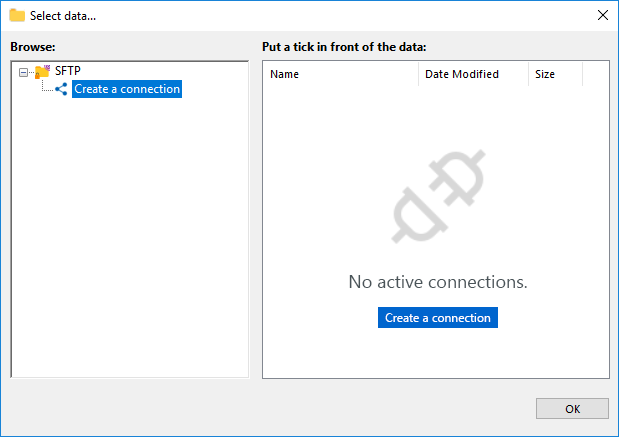
- Select the SFTP backup task in Step 2 to open the SFTP dialog window.
- Double-click the "Create a connection" button to open a new settings dialog.
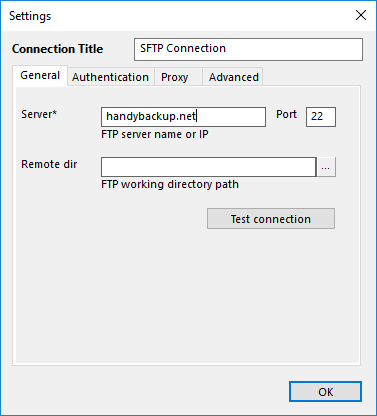
- Enter the parameters to access the website via SFTP.
- General: Enter server IP, port, and remote directory path.
- Authentication: Provide username/password or use key pair.
- Proxy: Enter proxy details (address, type, credentials).
- Advanced: Enable UTF-8, use absolute paths, and configure transfer resume.
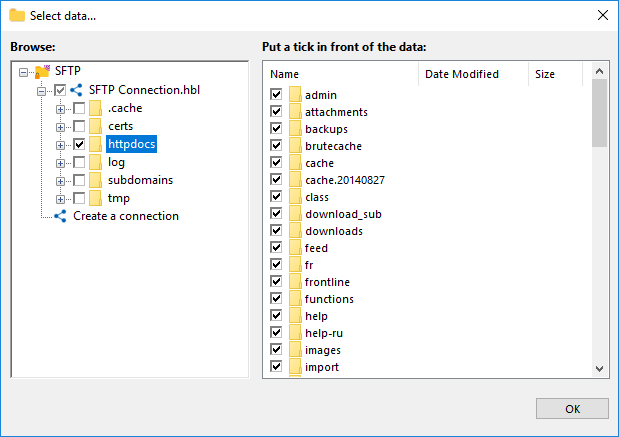
- Select the website data you want to back up and click OK.
Note: Handy Backup supports other FTP backup options with dedicated "FTP" and "FTPS" plugins. These work similarly to the "SFTP" feature.
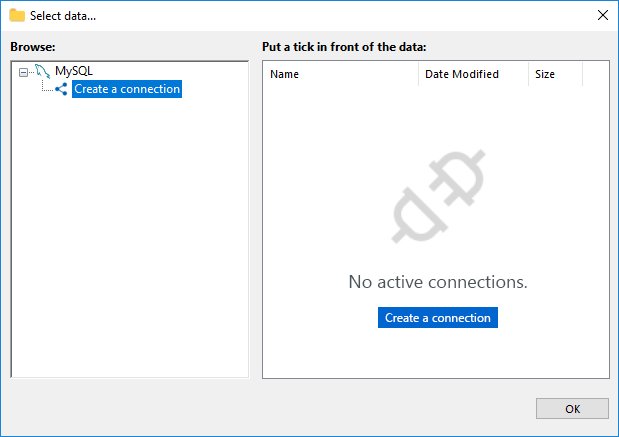
- Next, let's focus on the dynamic content. Go back to the main Step 2 window and select "MySQL" from the "Databases" plugin group, just like you did with the SFTP selection earlier.
- Double-click the "Create connection" option to open the MySQL configuration dialog.
- Enter the connection details to access your website content via MySQL for seamless backup integration using SQL Server backup software.
- General: Enter the MySQL server host (IP or hostname), port number, DB username, and password.
- SSL: Configure SSL settings for a secure TCP/IP connection (enable/disable). Provide paths to the root certificate, client certificate, and client certificate key.
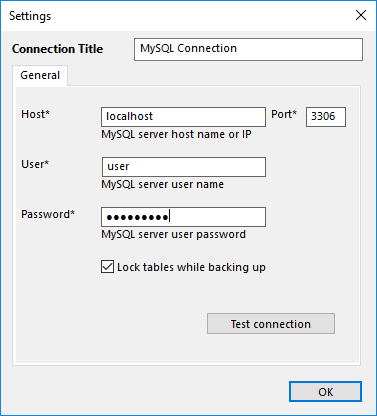
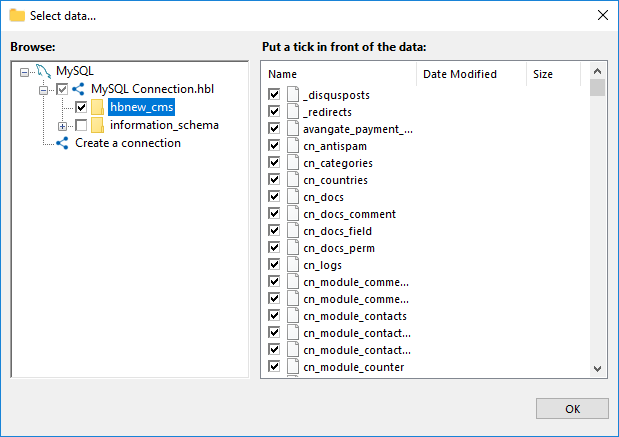
- Click OK to return to the MySQL data dialog. From here, select the database you wish to back up.
- Click OK to proceed. Once you're back in Step 2, move on to the next step.
- Now you can configure other task settings, such as choosing a storage location for your backups, enabling compression and encryption, setting up task schedules, and even archive your backups to efficiently manage the data stored. These actions are not specific to website backups. For detailed instructions on these steps, please refer to the User Manual.
Cloning Website Servers
Backing up your website helps minimize the risk of data loss in the event of a disaster and reduces server downtime to a minimum. Time is money – the less time your site is down, the lower the costs associated with it.
Reliable Backup and Recovery Plan
For critical projects, it’s essential to not only have a backup and recovery plan but also a comprehensive Windows Server backup solution. With Handy Backup, you can easily sync multiple files and databases, ensuring that you have an alternative server ready in case the original one fails.
Seamless Server Cloning
Handy Backup enables server cloning by restoring website backups to a different machine. To ensure a successful restoration, the destination server must have a similar environment, including compatible web server software (e.g., Apache, Nginx), operating system, and necessary configurations.
Handy Backup's Additional Advantages

Email Notifications: Stay informed of backup task statuses with customizable email alerts. Receive notifications for successful backups, errors, or any interruptions, ensuring you are always updated on the health of your backup system.
Detailed Logs: Maintain detailed logs of all backup processes, including errors, completion times, and file paths. These logs can be saved to shared folders, NAS/SAN devices, or file servers for easy access and centralized management.
21 Languages Supported: Handy Backup supports 21 different languages, making it easier for users from different regions to set up and manage backups in their preferred language, ensuring accessibility for a global audience.
Web Application: Access your backup tasks and data remotely with the Handy Backup web application, providing a convenient and secure web-based solution for managing backups without the need for installed software.
Versioning: Keep multiple versions of your files to safeguard against accidental modifications or deletions. Handy Backup allows you to restore any previous version with ease, ensuring that critical data is always recoverable.
Hot Backups: Perform backups of files, databases, or entire systems while they are in use without disrupting operations. Handy Backup supports "hot" backups, ensuring that your data is protected in real-time with minimal impact on performance.
Windows Compatibility: Handy Backup is fully compatible with Windows 11, previous Windows editions, and Windows Server versions up to 2025, ensuring that all your backup tasks can be efficiently managed across a range of Windows environments.
Lifetime License: Enjoy the benefits of a lifetime license, with no ongoing subscription fees. This allows you to use the software indefinitely, ensuring long-term protection without additional costs for future updates and upgrades.
HAVE QUESTIONS? CONTACT US
Frequently Asked Questions About Website Backup Tools
- Why is it important to back up a website?
A website can be vulnerable to data loss due to hacking, server crashes, software errors, or accidental deletion. Without a backup, restoring your site could be difficult, time-consuming, or even impossible. Regular backups ensure you can quickly recover from any disruption and minimize downtime. Handy Backup makes this process simple by offering automated scheduling, database backup, and secure storage options.
- How often should I back up a static website?
For static websites, which don't undergo frequent changes, a backup schedule of once a week or once a month is usually sufficient. However, if you're adding new content occasionally or making minor updates, consider scheduling backups on a monthly basis. Handy Backup allows you to set up customizable backup intervals, so you can easily automate your backup process according to your specific needs, ensuring your website is always protected.
- How often should I back up a dynamic website?
Dynamic websites, such as e-commerce stores or blogs, frequently change due to user interactions and content updates. Therefore, daily backups are recommended to ensure all new content, including product listings, blog posts, and customer data, is securely backed up. With Handy Backup automatic backup software, you can set up automatic website backup on a daily basis or customize the frequency to match your site's activity level, ensuring that your valuable data is always protected.
- What is a recommended website backup schedule?
A good website backup schedule typically includes daily incremental backups combined with weekly full backups. This approach minimizes storage usage while maintaining recovery points. It’s also helpful to store copies both locally and in the cloud. With Handy Backup, you can easily configure a layered backup strategy using incremental, differential, or full backups, and store your data across multiple destinations including FTP, SFTP, NAS, cloud services, or external drives.
Video Instruction: Website Backup Software
In the next video, you'll learn how to backup a website with ease using Handy Backup. We’ll guide you through the entire process, including how to backup and restore both static and dynamic content.
Download for Free
Version 8.7.0 , built on May 7, 2026. 152 MB
30-day full-featured trial period
Our website backup tool offers a comprehensive solution for safeguarding your online data — including secure storage and protection against data loss or cyberattacks. Download the 30-day trial to explore its full potential and keep your website safe and resilient.