Tower of Hanoi Schedule: the Strategy of Data Backup Rotation
Tower of Hanoi backup strategy, named after the classical Tower of Hanoi puzzle (which consists from moving eight disks between the three spines, with no larger disk put over a smaller in a single spine), is a method originally used for backup tape rotation, but now it is a much more common backup method.
 Download for Free
Version 8.7.0 , built on May 7, 2026. 152 MB
30-day full-featured trial period

Tower of Hanoi Schedule: The Basic Principle of Backup System
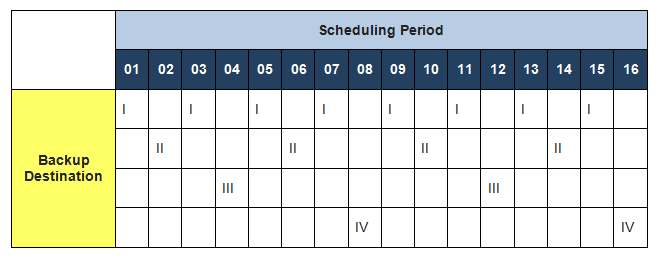
In the Tower of Hanoi backup retention scheme, the first media set is used every second day, the second media set is used when the first set is not used and is used every fourth day, the third media set is used when neither of the previous sets are used and every eighth day and so on.
Any equal quantum of time can serve as a base instead of a “day”, e.g., a minute, a 10-minute interval, a Sunday or a three-month period. Here, the term “day” is only for illustrating the basic principle.
Note: As compared to Grandfather-father-son rotation schedule, this one can employ more backup media sets and save a deeper backup history. This backup rotation schedule requires only five backup media sets to perform daily backups during a month, for instance.
Recommended Solution
Lifetime license

SoHo Backup Software
The simplest Standard edition for home users fully supports all components needed for the Tower of Hanoi backup strategy, allowing saving data to three or more storage sites.
Implementing the Tower of Hanoi Backup Method in Handy Backup
To create an automatic implementation for the Tower of Hanoi backup strategy, you must make some backup tasks in a New Task Wizard, with each of these tasks copying the same dataset. Here we are providing an instruction for the “four-tower” set. Please follow the next necessary operations:
- Create a new Handy Backup task for the “first tower” backup.
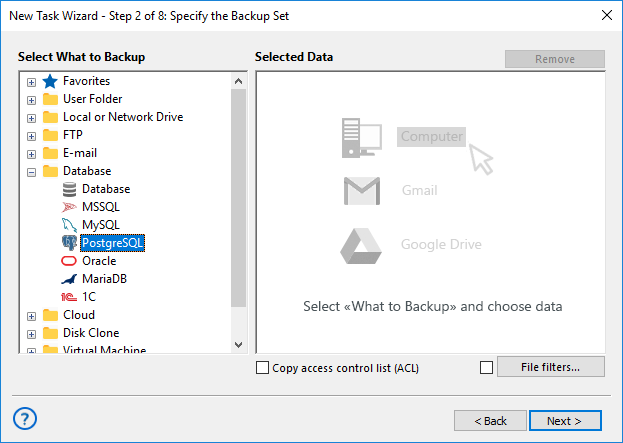
- On Step 2, select the dataset to save in a Tower of Hanoi backup.
Note: For all tasks of the Tower of Hanoi backup rotation scheme, always mark the “Use advanced mode” option on Step 1. Without this option, you cannot get access to some principal features!
- On Step 3, select a data destination that will serve as the “first tower”.
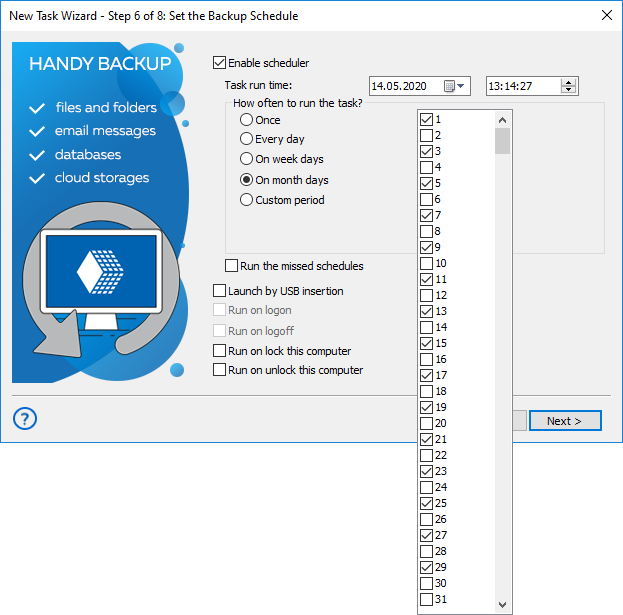
- On Step 6, schedule this task to execute at each other day.
- Set the name of this task as the First Tower Backup.
- Create a new backup task and select the same dataset on Step 2.
- On Step 3, select the “second tower” backup storage.
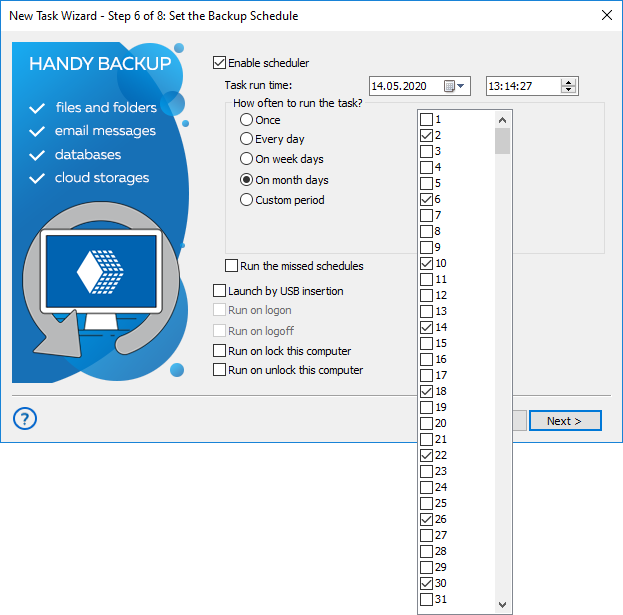
- On Step 6, set up the backup for the second day and a repeating period of four days.
- Name this task as the Second Tower Backup. Again, create a new backup task.
- Select the “third tower” vault, and on Step 6, set up a fourth day as the starting day.
- Also, make a repeating period of eight days for this task. Name it the Third Tower Backup.
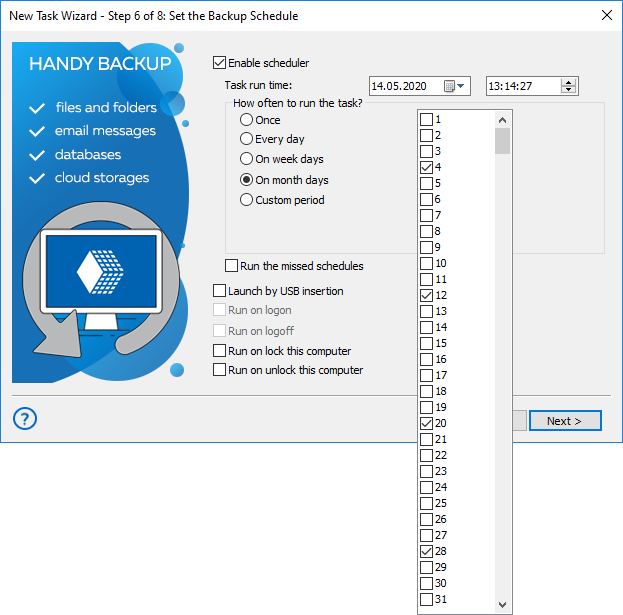
- On the last step, create another task with the same dataset and the “fourth tower” vault.
- Schedule it to start on the 8th day and a 16-day repeating period. Of course, this task will have a name like Fourth Tower Backup.
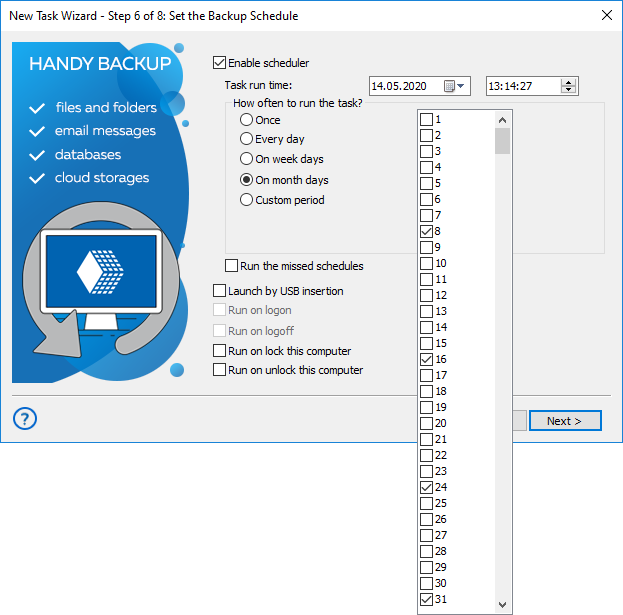
These are all the operations to set up a Tower of Hanoi backup system in Handy Backup! You can select any preferred scheduling period instead of days, and you can add any depth to this algorithm by using powers of two for an initial interval between tasks and the doubles for this interval for repeat.
How the Tower of Hanoi Backup Strategy Works
Each additional backup media set added to the rotation doubles the deepness of backup history. The program uses it only when the previous sets are not in use. Thus, the later a backup media set is added to the history, the older files it stores and the less time a program will use it.
Caveat! The Tower of Hanoi backup schedule enables one to have a deep backup history, but does not allow storing many recent backup copies, as a daily backup is erased in two days, for example.
Download for Free
Version 8.7.0 , built on May 7, 2026. 152 MB
30-day full-featured trial period
Get Handy Backup for easy implementation of Tower of Hanoi backup method!
Download a newest version for a free 30-day trial!
Related to Tower of Hanoi Backup:
Learn more:
- Lost USB Flash
"I misplaced my USB drive and I’m trying to figure out where I might have left it. Is there any way to check when and where it was last connected to a computer?…" - Round Robin Scheduling Algorithm
"Round robin scheduling is an algorithm that engages all objects (e.g. data) in some cycle of processing. When completing operations over the last object…" - Effective Backup Scheduling Strategies in 2024
"Backup scheduling is one of the most valuable features of data backup software. The best backup schedule practices eliminate the need for manual backups,…"