Linux WebDAV Client | Windows WebDAV Client
WebDAV Client is a software tool for transferring data via the WebDAV protocol. It is commonly used for WebDAV backups, syncing local folders with cloud storage, and secure remote file management. Modern clients offer advanced features such as encryption, access control, and automated synchronization for improved data security.
Download Handy Backup for a 30-days trial and experience a secure and efficient backup solution. Use it as a WebDAV Linux client to protect your data with seamless cloud storage integration.
 Download for Free
Version 8.7.0 , built on May 7, 2026. 152 MB
30-day full-featured trial period

Types of WebDAV Clients Explained

Native (Built-in)
WebDAV clients for Windows and Linux, such as those provided by operating systems like Ubuntu and Windows 11.
Third-party
WebDAV client for Linux, Windows, and other platforms, offering more advanced features and better performance.
When choosing a WebDAV client, key factors include data transfer speed, security features like encryption, and file-locking options. While native clients may have slower transfer speeds, third-party solutions like Handy Backup provide advanced features, such as secure backup, automated synchronization, and high-speed data transfer for both Linux and Windows users.
Exploring WebDAV Client Solutions
WebDAV client software enables seamless file access and management across different platforms, such as Windows and Linux. These clients allow users to connect to servers, facilitating secure and efficient file synchronization, remote storage access, and collaboration. Below, you'll find a list of commonly used WebDAV client for Windows and Linux environments alike, offering various options for different user needs.
| Windows WebDAV Client Software: | Ubuntu WebDAV Client Solutions: |
|---|---|
| Windows Explorer BitKinex NetDrive WebDrive |
Dolphin Nautilus Firefox |
Cross-Platform WebDAV Backup Solution for Windows and Linux: Handy Backup Server Network
For a step-by-step guide on installing and configuring network agents for Linux, check out our User Manual. This comprehensive resource covers the latest compatible distributions and provides clear, easy-to-follow instructions to ensure seamless integration and efficient backup management. Get started today and streamline your Linux backup process!

Key Advantages of Handy Backup Server Network for Linux WebDAV Backup

Encryption
Protect your backups with strong encryption algorithms like AES-256, AES-128, and Blowfish. Keep your sensitive data secure from unauthorized access, ensuring maximum protection for your files.

Scheduled Backup
Automate your backup tasks with flexible scheduling options. Set up daily, weekly, or custom schedules to ensure your data is always backed up on time without manual intervention.

Partial Backup
With Handy Backup as your Windows WebDAV client, you can efficiently manage data transfers using differential and incremental backup modes for optimal protection.

Archiving
Compress your backups to save disk space while preserving all essential files with full integrity. Store archived backups efficiently, reduce storage costs, and retrieve them quickly whenever needed.

Before-After Tasks
Automate your workflow by executing scripts or applications before and after each backup task. Enhance efficiency, streamline operations, and optimize your backup process with customizable pre- and post-backup actions.

Versioning
Keep multiple versions of your backups to restore data from any point in time. Easily revert to previous versions in case of accidental changes, corruption, or data loss.

Timestamps
Track and manage your backups with accurate timestamps. Know exactly when each backup was created, making it easier to restore specific versions when needed.

Native Format
Store your backups in their original format, ensuring easy access and restoration without additional software. Recover your data seamlessly and without compatibility issues whenever needed.
Recommended Solution
Lifetime license

Handy Backup Standard
Handy Backup Server Network is a powerful cross-platform solution for seamless WebDAV backup on Linux, managed effortlessly through a Windows control panel. With a host of advanced features and an intuitive interface, it’s designed to make data protection simple and efficient. Download the free trial today and experience the convenience for yourself!
Using Handy Backup for WebDAV Backup on Linux
Handy Backup is a WebDAV backup client that enables secure two-way WebDAV backups (from or to cloud storage). While Handy Backup supports WebDAV backup on Linux systems, the process is facilitated through Windows-based Network agents (workstations), which are centrally managed via a control panel on Windows OS. This approach ensures smooth integration for Linux distributions, including Ubuntu, without the need for native Linux WebDAV clients, allowing efficient backup management across platforms.
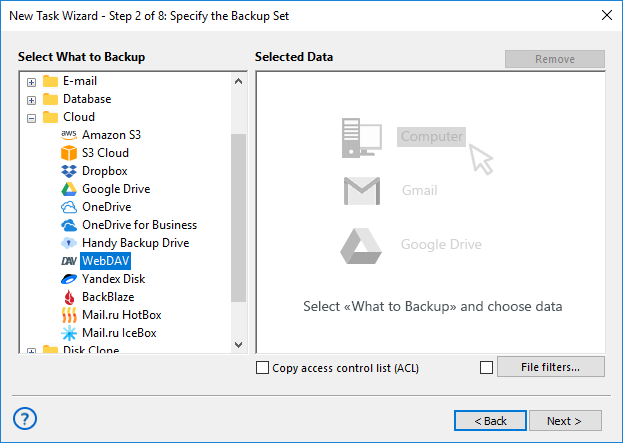
- Open the Windows Control Panel where you manage all backup tasks. Select the Create Backup task type and click Next.
- If you need advanced features, such as selecting the backup type, configuring pre/post-task execution, and more, check the Advanced Mode option.
- In step 2, choose the connection to your Linux network agent (workstation).
- Select the files for backup through a plugin compatible with your Linux distribution.
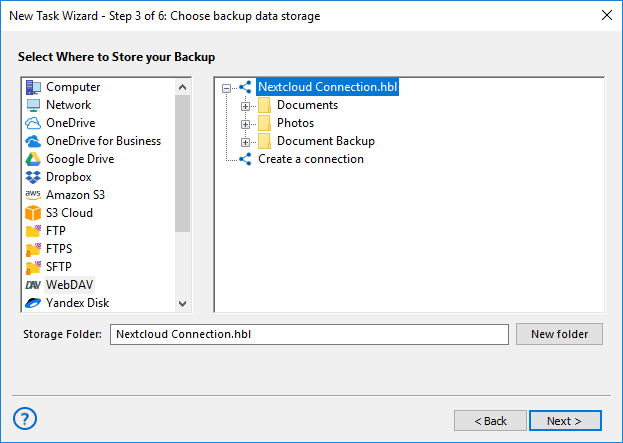
- In step 3, choose the WebDAV plugin where the backups will be stored.
- Set up the WebDAV backup task settings, including encryption for security, automation for scheduled backups, and other preference
- Click Finish, and the backup task will be created.
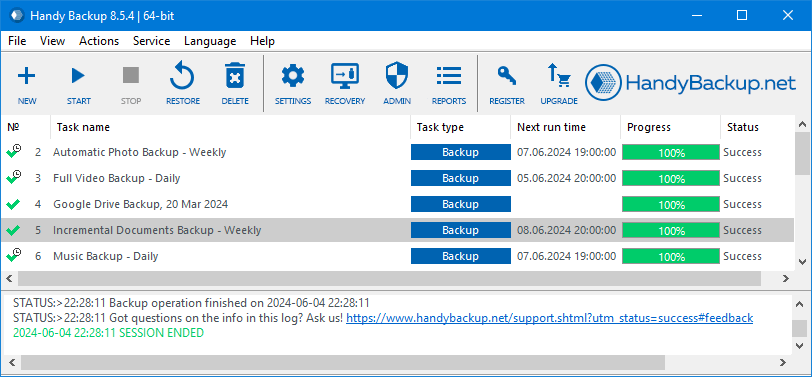
Note: Handy Backup also provides a Web Interface (Beta), enabling remote backup management via any browser. Compatible with all OS, it allows you to control Windows-based backups, even from Linux, offering flexibility and convenience.

Growing Support for Linux: Tell Us What You Need
We are constantly working to improve our products, expanding Linux backup compatibility with new distributions and plugin support. If you have specific requests for a particular distribution or plugin, feel free to contact us at [email protected].
Extra Benefits

Handy Backup supports 21 languages, making it easy for multinational teams to use. This feature enhances communication and simplifies data protection tasks across diverse teams, ensuring smooth collaboration in different regions.
The 30-day trial allows you to explore all features of Handy Backup risk-free. It’s the perfect way to evaluate its functionality and performance before committing to a purchase, ensuring it meets your backup requirements.
Handy Backup is fully compatible with all modern Windows versions, providing seamless Windows 11 backup along with support for earlier versions, catering to both personal and enterprise needs.
Handy Backup also supports several Linux distributions, providing flexibility for Linux administrators. Continuous updates ensure compatibility with a range of systems and plugins, adapting to evolving infrastructure needs.
Handy Backup offers professional customer support, providing expert assistance with setup, troubleshooting, and optimization. The team is always ready to ensure a smooth experience for you with quick, knowledgeable responses.
The web application allows you to manage your backups remotely, providing flexibility and control from anywhere. You can monitor, schedule, and restore backups without being tied to your local device, ensuring peace of mind.
Handy Backup’s intuitive interface is designed for ease of use. With simple menus and backup configuration, both beginners and experts can quickly set up, monitor, and manage their data protection without hassle.
Handy Backup’s lifetime license provides ongoing access to all features and updates, eliminating renewal fees. This cost-effective model guarantees long-term data protection with no hidden costs, ensuring continued use without interruptions.
How to Use a Linux WebDAV Client for Mounting
Setting up a WebDAV connection on Linux can be challenging, as the protocol may not be immediately intuitive. Below, we provide step-by-step instructions on how to manually configure a Linux WebDAV client and a server.
Note: The following steps apply to the standard Linux WebDAV console client and not to Handy Backup or any third-party software solutions.
First, you'll need to install the davfs2 package. Please note that commands prefixed with "#" are root commands, while those prefixed with "$" are for the current user (where [username] represents the user’s name, without square brackets).
Next, execute the following command to load the necessary module:
# modprobe coda
Test Root Mounting
- # mkdir /mnt/DAV
- # mount.davfs2 https://dav.test.com/share/ /mnt/DAV
- # umount /mnt/DAV
Allow Users to Mount the Repository
- Add [username] to the users group, and re-log in as [username] if necessary.
- $ mkdir ~/.davfs2/ ~/mnt/DAV/
- # cp /etc/davfs2/secrets ~[username]/.davfs2/
- # chown username: ~[username]/.davfs2/secrets
- Add the credentials to ~[username]/.davfs2/secrets, following the instructions inside: https://dav.test.com/share username SeCret
- As root, add the following line to /etc/fstab:
https://dav.test.com/share /home/[username]/mnt/DAV/ davfs2 user,noauto 0 0
After completing these steps, [username] will be able to mount the repository using: # mount /home/[username]/mnt/DAV/
Thus, Handy Backup can serve as a WebDAV sync client on Linux, offering much more than just backup functionality. In addition to securing your data, it allows seamless integration with your preferred cloud service as a WebDAV Linux client. While Handy Backup supports WebDAV backup on Linux systems, the process is handled through Windows-based Network agents, which act as intermediaries for transferring data from Linux machines to various cloud services.
Download for Free
Version 8.7.0 , built on May 7, 2026. 152 MB
30-day full-featured trial period
Experience Handy Backup as your reliable Windows and Linux WebDAV client for a seamless backup and restore process!
Download the full version now and enjoy a risk-free 30-day trial—no credit card required! Start protecting your data today!
See also: