Automatic Files & Folder Sync Software for Windows
Synchronizing files and folder can solve many tasks, from keeping files in actual state simultaneously on several computers to make subscription updates to "fast backup" in some situations. Use the might of Handy Backup for automatic Windows folder sync with other folders, local, remote or cloud-based!
 Download for Free
Version 8.7.0 , built on May 7, 2026. 152 MB
30-day full-featured trial period
Typical Cases Where It Is Reasonable to Synchronize Folders
For user convenience, three types of synchronization that Handy Backup provides as a folder sync tool are used to sort these cases by methods of implementation, used for several typical IT duties. For each type of task synchronizing folders, we briefly describe a typical use case really existed.
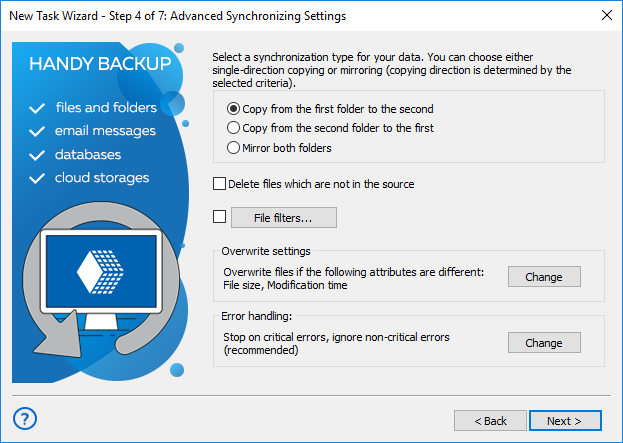
Synchronizing Upon a First Folder
Automatic folder sync software chooses the first selected folder as "master" and the second folder as "slave". In result, the content of the second folder renews by a program accordingly to a content of the first folder.
- Distributing files by subscription. Let us have a "master" computer where some new information stored, and a "client" computer requiring all changes and updates in this information. Sync the folders upon a first folder, to take automatic subscription updates.
Synchronizing Upon a Second Folder
A reverse of the pervious method, the second folder chosen becomes a "master", reconfiguring and renewing the information in the "first" folder according to its own data state.
- Quick restoration. Using this technique to synchronize some folder with a remote folder or device containing some backup information, you can quicken the process of restoration. It can be very useful to quickly restore some documents or other relatively small files.
Note: Not only restoring but also backing up many small files can be faster and more efficient than more traditional backup approach in some cases (e.g. for emergency backup of a folder containing user documents). Along with compressing to one file, this technique is one of ways for optimizing backup!
Mirroring Both Folders
The most obvious technique renews data in either folder chosen for synchronization. Typically, this approach used mainly to synchronize folders via network, or to keep in actual state some data placed simultaneously in a desktop and a laptop.
- Working together for some project. A common way to share workflow is to select a remote folder on some network, FTP or cloud account (see the next chapter) for keeping the project-related information, and use the best folder sync software you can afford to keep syncing.
What I Can to Synchronize as Folders?
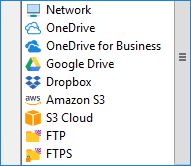
As folder synchronization software, Handy Backup allows you working with many different data sources, viewed as folders or folder-containing devices. A list of these devices and storage places includes such things as:
- Local drives. These drives can be PC disk(s) or external USB drives
- Remote drives. Network-shared PC drives, external devices or NAS units.
- FTP/SFTP/FTPS. Handy Backup allows file synchronization for any FTP server.
- Cloud-to-cloud sync. You can even use cloud accounts as both first and second folders.
- Storage clouds. Sync it via local folder (Google Drive) or dedicated option (Amazon S3).
However, it is important to remember that synchronization is not the same as backup, especially in cloud environments like OneDrive. More details can be found in Onedrive sync vs backup.
Recommended Solution
Lifetime license

Handy Backup Standard
To synchronize folders in Windows 11/10/8/7 or Server 2022/2019/2016/2012/2008, you need Standard edition. Try free for 30 days!
Other Folder Synchronization Options
As perfect Windows folder synchronization software, Handy Backup allows some other options to synchronize folders and files locally or via network in a most effective way. Let us speak about these options and features.

Flexible Folder Synchronization Setup
Handy Backup allows users to set up and tune almost every aspect of syncing ever existed. You can choose what to do with files (replace for some selected rule, or keep both copies), which files must be synchronized (by using filename masks), tune the behavior according to file attributes and so on.

Scheduling and Triggering Synchronization
You can schedule Windows file syncing according to your needs, triggering a task by a specified time or a period, by logging onto the system or by placing a task-related removable unit into the USB slot on your PC. This flexible triggering allows you automating your file synchronization even more.

Control Options
You can turn Handy Backup to run as Windows service, automatically running all your synchronization tasks and giving you no unwanted messages during the process. In other hand, you can set up user notification functions, to be informed via email about each completed syncing.
How to Sync Folders in Windows Using Handy Backup?
The process of creating a file synchronization task is quite simple. Open Handy Backup, create a new task and select a synchronization task type. Then choose first and second folders for syncing, select other options according to a guide provided here, schedule or trigger the task and save it. That is all!
Note: If you plan to sync folders over network, please provide a stable and reliable network connection for any time then your task will be performed. If the connection will not function properly, the task can fail (and be repeated when the connection will be re-established, if you enable this option).
Further Experience: Try Handy Backup as Your Folder Sync Tool!
If you want to learn more about how to synchronize folders using Handy Backup, please read the User Manual and related sources in this site explaining different aspects of sync technology.
And to get some immediate personal experience with Handy Backup in a role of folder sync software, please download Handy Backup and try it freely for 30 days with a full set of functions.
 Download for Free
Version 8.7.0 , built on May 7, 2026. 152 MB
30-day full-featured trial period
Related to File and Folder Sync: