Automatic ZIP Backup Software
Zip backup is a method of reducing storage size used for data copies. To optimize backup storage, it is wise to compress some backups to ZIP files and reduce the space that you use for something other data you may need. Handy Backup has all instruments to backup data with ZIP compression, encryption and other features.
 Download for Free
Version 8.7.0 , built on May 7, 2026. 152 MB
30-day full-featured trial period

ZIP Backup Software

Creating a Single Archive or Compressing Separate Files
Handy Backup features the integrated ZIP backup compression algorithm. Any data that you back up with Handy Backup can be automatically compressed in a single ZIP backup file, or in multiple ZIP files for each file or folder backed up.

Convenient Setup for ZIP Compression Backup
Handy Backup is an example of backup software with ZIP compression, with a convenient interface and all backup-related options defined through tasks. Each task carries its individual settings (backup ZIP compression, encryption, scheduling, and other) and may include any amount of data.
What to Backup to ZIP
Here is a brief list of what can be backed up with ZIP compression in Handy Backup:
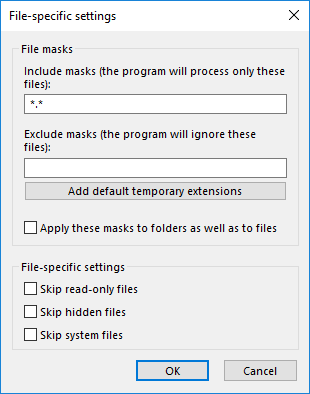
- Files Backup. A backup task may include any amount of files and folders, which can be selected individually, or through predefined presets: My Documents backup, Desktop backup, Outlook backup and other. For any task you may enable a flexible filtering system which lets you back up files that you need only (backup videos, backup pictures only, etc.)
- Disk Image Backup. In terms of saving storage space during disk imaging, the best effect will be achieved not through ZIP backup compression, but through skipping sectors that are not occupied by any files. And as regards, particularly, ZIP compression of a hard disk drive backup, the compression ratio is practically unpredictable.
- Database Backup. Handy Backup features rich set of functions related to backing up databases of different types. Most data imported from DBMS can be compressed quite well, producing files smaller by up to 50%. Learn more about database backup.
Recommended Solution
Lifetime license

Home Office Backup Solution
The Standard edition has all instruments to backup data with ZIP compression, encryption and other features without any efforts or extra costs! Free 30-days trial version!
How to Make ZIP Backup
It is simple but somehow depends on the task wizard mode selected on Step 1. In the Simple Mode, you can set up your ZIP compression on the Step 4 of 6. Just check the "Compress the backup data to save space" option and select a type of packing (separate files or unified archive) that you need. On the Advanced Mode, this option will be Step 5 of 8 but in all other aspects it has no differences with a simple-mode action.
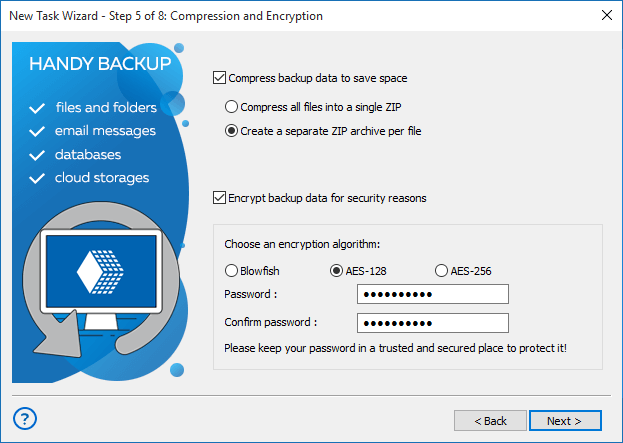
Attention: Because the system not compute increments for ZIP-packed files, you cannot use the Incremental Backup or Mixed Incremental option (on Step 4 of the Advanced Mode wizard) if you plan to pack backups into ZIP archives. (Still, you can use full or differential backup instead.)
Using External ZIP Compression Utilities
With Handy Backup, user can select an external compressing software execution before or after the backup task. This action is realized through the pre- and post-action engine built in Handy Backup.
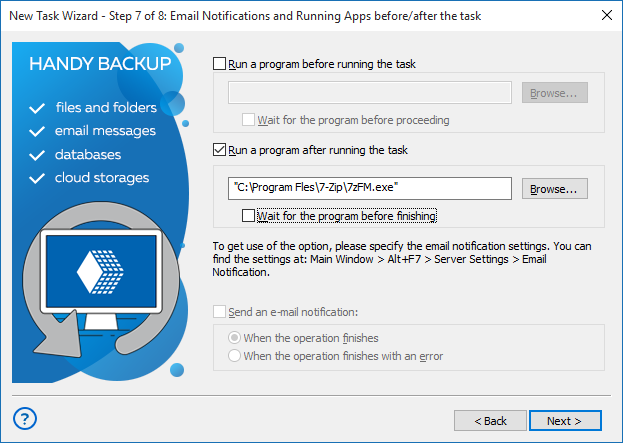
To run an external compression program, enter the command line describing this task on Step 7 of the task creation wizard. Just check an appropriate box and enter the command line. This is the sort of a "preliminary" or "aftermath" backup, compared to "on-the-fly" backup with a built-in tool.
Download for Free
Version 8.7.0 , built on May 7, 2026. 152 MB
30-day full-featured trial period
Handy Backup - reliable ZIP backup software for your PC!
Zip compression by Handy Backup allows for seamless data archiving, making it an essential tool for businesses looking to enhance their operational efficiencies. The software’s intuitive interface enables easy navigation and operation, allowing you to compress large files quickly without sacrificing data integrity. This is particularly beneficial for organizations handling large volumes of data daily, as it significantly reduces the time and resources required for data management.