Small Business Backup Software - Handy Backup
Small Business Backup Solution by Handy Backup - your all-in-one, user-friendly data backup utility for Windows OS. Effortlessly safeguards files, databases, and critical business data to the cloud or any local storage, including NAS, external drives, or on-premises servers. We understand the resource constraints that small and medium-sized businesses often encounter, so we've crafted a cost-effective backup solution for smb.






Why You Need the Best Small Business Backup Solution from Handy Backup?

The answer is simple: it protects. Small business backup software not only secures your data against hardware malfunctions, virus attacks, ransomware, and occasional losses but also assists in copying, cloning, mirroring, and transmitting your data to other users and locations, ensuring synchronization, and more.
Utilizing Handy Backup, you can protect your valuable time, energy, and finances from issues like critical data loss, disruptions stemming from data crashes, ransomware and cyberattacks, or the necessity for frequent manual copying of diverse files and folders to other locations.

Backup of All Popular Databases
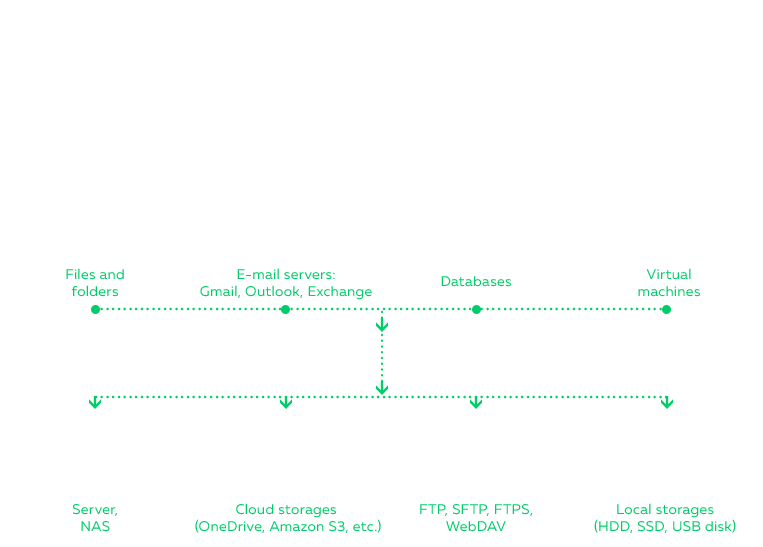
The software can automatically back up data from MS SQL, MySQL, PostgreSQL, Oracle, and other databases. It also supports backing up the message base of MS Exchange and personal emails from IMAP servers.

"Hot" Backup to Speed up Jobs
As required for data backup solution for small business, program copy any type of data without stopping other processes using these data, saving both the time and efforts from unnecessary pauses.

Web Applications and Website Backup
You can back up your website and its content effortlessly with Handy Backup. Create full copies or mirrors of your company site using FTP, SFTP, or FTPS protocols, or store website data locally for added security.

Full Automation
Backup and restore all type of user and server data directly “out of the box, without a need for any further upgrades!Handy Backup software for Small Business contains all available plug-ins, features and options.

Backup of Critical Data
You may automate saving copies of any of your mission critical business apps data, including files and folders selected by name and/or extension masks.

Full Control over Backup Tasks
To provide full control over actions, all the program activity is logged. This is also the possibility to notify users about any performed action via E-mail.

Running as Windows Service
Handy Backup can be started as Windows service, doing the scheduled job automatically, producing up to no distraction by users operating with the same machine.

Backing up Entire Servers
Handy Backup has tools to save a perfect image of any server, physical or virtual. It supports any type of virtual server engine, including Hyper-V, VirtualBox and VMware. It allows “hot” server snapshots.
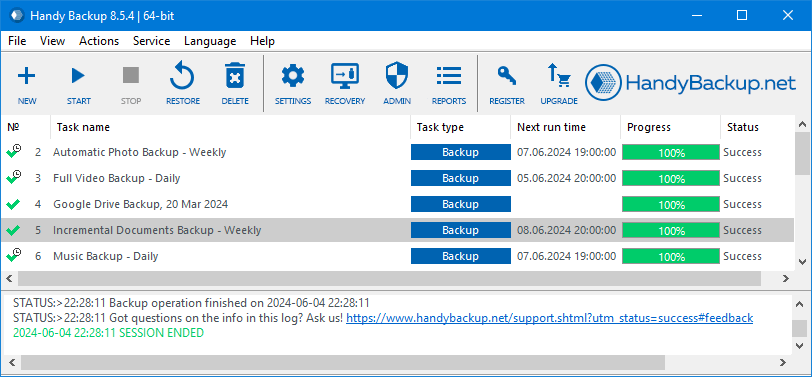
Setting up your business data backup tasks is quite simple. Please see the User Manual to learn how to create your first backup task in a simple wizard mode. An advanced mode contains a few more steps and a lot of additional useful options for planning your active backup for business purposes.
Easy-to-use Inteface for Business Data Backup
Supporting Cloud Backup for Small Business Data
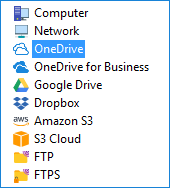
Our backup software seamlessly integrates with a variety of leading cloud services, including Amazon S3, WebDAV-driven clouds, Google Drive, OwnCloud, Dropbox, OneDrive/OneDrive for Business, and Box. These integrations ensure robust and efficient cloud backup solutions for businesses, meeting your data security needs.

Fine-Tuning for Your Backups
You can setup backup tasks flexibly by scheduling, make full, incremental and differential backup, rotating backup versions and utilize many other options for efficient small business data backup.
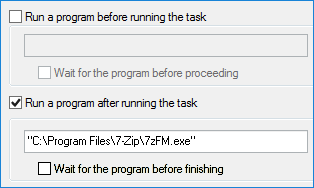
Starting Pre- and Post-Actions
This solution also can execute other programs, such as compression utilities or antiviruses, before or after any task, to control other aspects of security, data transfer, integrity etc.
Utilizing External and Online Storage
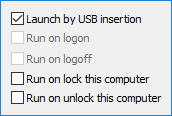
Any modern external storage, whether it's HDD, SSD or NAS, is fully compatible with Handy Backup. You can even start a task automatically when you are plugging a USB unit related to a task into your machine!
 Download for Free
Version 8.7.0 , built on May 7, 2026. 152 MB
30-day full-featured trial period

LifeTime License, Free Tech Support
License for the major version of Handy Backup is last for the product lifetime, as well as all minor upgrades and free tech support for customers; we will answer quickly to your requests and needs!

All in One, Cost-Effective Solution
You can perform small business data backup for files, folders, databases and disk images backup using a single program for all of it. During the 30-day free trial period, you have access to all the plugins for testing at no cost!

Easy to Use
Automated features for all data types include popular databases are greatly reduce the time for setting your backups, as well as the classical, self-explaining interface.

Native Backup Format for Unencrypted Data
The program preserves native format of any data during backup (unless compression or encryption specified by a user). This allows using these data directly with related tools, such as Windows Explorer.

Auto Restore To or From another Place
You can restore data automatically by creating a recovery task, including restoring backups manually moved to other place, speed up restoration, versioned backup and an option for restoring to another place add greatly to comfortable restore.

Ready-to-Use Cases and Best Practices
The official product website and social network groups regularly publish and discuss different backup strategies, use cases and best practices allowing utilizing Handy Backup by most efficient ways.

Innovative Software Design
Algorithms used by Handy Backup are always being the top of the SMB backup solutions on the IT market, providing the utmost speed, comfort and reliability available for a day.

On-Premises Backup and Cloud Backup for Small Business
Handy Backup offers small businesses a versatile solution with on-premises backup and cloud backup options, ensuring data protection and flexibility. Seamlessly combine both strategies to safeguard your critical data.

Web-Based Backup Management
Handy Backup allows you to manage and monitor your backup tasks remotely through a web interface, providing full control over your backups from any device, anywhere. No need for physical access to the computer; stay connected at all times.
Handy Backup Small Business works with MS Windows 11, 10, 8, 7 or Windows Server 2025, 2022, 2019, 2016, 2012(R2), 2008(R2), as best small business backup solution. No special hardware requirements!


Answers and Questions about Small Business Backup Software
- Why backup is important for business?
Backup allows saving copies of your crucial business data intact from both perils and inconveniences, from ransomware attacks to security leaks, from sudden authority inspections to hardware upgrades. In addition, you can use business backup software to copy or move data automatically to another place.
- What a backup system for small business must do?
Best backup for small business must be simple and as automated as possible, because small enterprises can have limits of dedicated UT employees for controlling backup. For example, Handy Backup contains an easy graphical interface, a two-mode task wizard and a big collection of backup advices and manuals.
- What is the best backup strategy for small business?
From all existing strategies, from a simplest 3-2-1 backup strategy (3 backup method) to such advanced techniques as Hanoi Tower, the classic and most efficient approach is the Grandfather-Father-Son, or GFS, business backup strategy. Whether you need an on-prem backup solution or prefer cloud-based backup, Handy Backup offers flexibility to meet your needs.
- How regular must be a business backup plan?
It depends completely on a frequency of business data backup changes. For those data changing automatically, such as website forum content or a database of goods, repeat a backup task in hours or minutes. For projects, reports, results and so, you can make backups once or twice per day, etc.
- How to backup company data securely?
Use secured storage and protocols, such as S3 business cloud backup storage services, SFTP servers in a local network, or physically secured USB drives. In addition, you can use the built-in Handy Backup encryption feature for small business backup, or even call to external encryption software in advanced mode!
G2 Review: Powerful Backup + Restore App for Desktop, Servers
"One of my favorite features is huge array of upgrade options between versions, especially the fact that you have the option of buying select features of the small server version at a lower price instead of the entire small server version that is lots more expensive. Allows file and folder level backups to multiple formats and locations, as well as mirror image based backups to the same.
The expanded backup options in the server version allow you to backup nearly any format or system natively, to anywhere you want. Specifically for me I love that Handy Backup lets me have a program installed on my desktop that reaches out to my different websites to backup, version, and download MySQL databases without having to pay for an expensive online service, and I control how many versions I want to keep."
Scott F. Read the full review
"I use Handy Backup for all of my businesses and personally. It is the best and only software I use for backups. Thank you for a great product."
Leigh Follestad, Shaw Company
"Have been running Handy Backup on two servers, using two packages for MS SQL and SFTP backup. A third sever has now been added and I finally bought Small Business edition for all of them. Given the ease of use of the Handy Backup to date I look forward to the all round, unified, in-one-package, solution I’ve just bought into."
Chas, Handy Backup User
More testimonials
Marked as Best Small Business App by PCMag
Handy Backup™ Small Business was awarded as "Best Small Business App" by PCMag in its small business backup software review.