Data Duplication Software for Windows

Data duplication makes an exact copy of some dataset for purposes of reliability and, sometimes, speeding up an access to these data. Using backup and restore operations, Handy Backup can serve as efficient data duplication software for any existing type of information.
 Download for Free
Version 8.5.3 , built on March 5, 2024. 116 MB
30-day full-featured trial period
Duplication Software Trivia
Duplication software solutions create an exact copy of data in some other place than an original set. For Handy Backup, this operation consists generally from a backup part (making a copy), and, possible, a restoration part (transferring a copy of this copy to another place, such as to different SQL server).
Advantages of Using Handy Backup as Data Duplication Software
Easy to Use, Quick to Perform
Handy Backup allows data duplication for files and folders (and, thus, for any data represented as files and folders) by direct synchronization between folders, or more complex duplication software solutions like copying a database and cloning it to as many sites as needed – all in automated mode!
Scheduling the Jobs, Controlling the Results
You can schedule your data duplication task to an exact time and exact repeating period (from a minute to several months), or even to a crucial system event like user logon/logoff. You can also receive notifications and reports about data duplication tasks by an email, or control these tasks manually.
Securing Data, Shielding Traffic
Handy Backup uses some algorithms for traffic encryption, including utilizing dedicated API for several clouds (Amazon S3, Dropbox, Google Drive and OneDrive, for example), as well as accessing secured FTP storages (SFTP/FTPS). In addition, it allows internal data encryption via the modified BlowFish method.
Using Handy Backup as Simple Data Duplication Software
Here we will show how to make data duplication via synchronizing. To create an automatic data duplication task, please follow the instruction below.
- Open handy Backup and create a new task via the menu, by a button or by Ctrl+N keys.
- On the Step 1, select a synchronization task, and proceed to the Step 2 by clicking "Next".
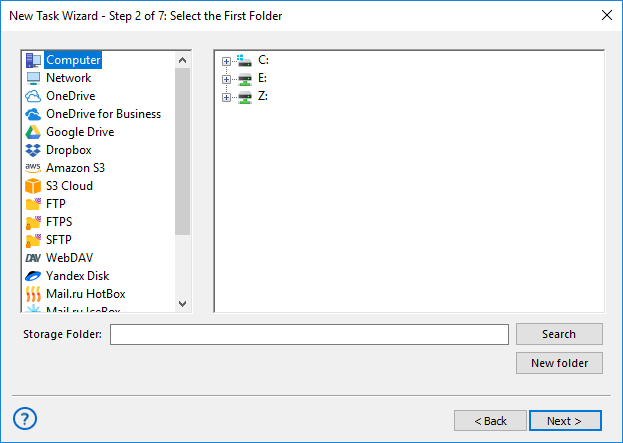
- On the Step 2, select a first folder on some storage as a source for data duplication.
- On the next Step 3, select a second storage folder – a receiver for your data copy.
Caveat! For many storage types (FTP, clouds) you must create a connection to that storage before making synchronization. To do it, double-click on the "Create a connection…" string in the configuration list, and then provide the necessary information for connecting with an account on this storage.
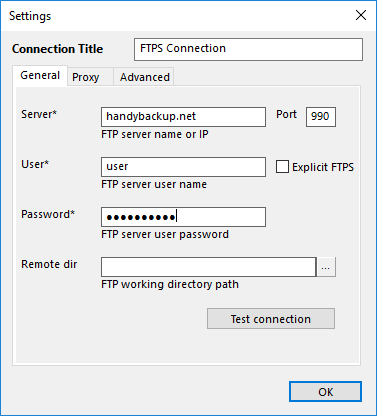
- Select synchronization settings on the Step 4.
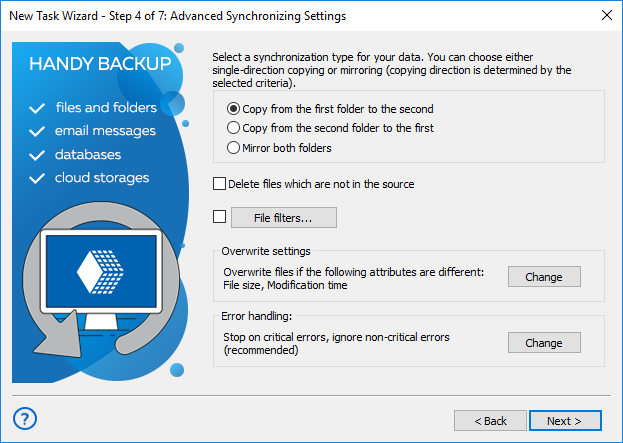
Note: For data duplication, you must copy data from the first folder to second as a rule. Mirroring data is a somewhat another task than duplication, although you can do it exactly by this way, only selecting the "Mirror both folder" option as synchronization type.
- The next step allows you to schedule the synchronization task by time or to an event.
- You may also run external software (e.g. garbage cleaners) before or after a task on the Step 6.
- On the final step, give a name for your task and run it immediately if you need it.
That is all! Your data duplication task now will work automatically, according to its pre-defined settings and schedule plans.
Recommended Solution
$249 per license
Handy Backup Small Business
The Small Server solution is a perfect data duplication tool for business, organization and even for personal needs, allowing duplicating any data types from any storage automatically.
Data Duplication between Complex Data Sources
For duplicating the information between non-storage data sources such as databases and virtual machines, Handy Backup uses a different strategy than the direct synchronization.
- Firstly, you can create a backup from this source into some secured storage.
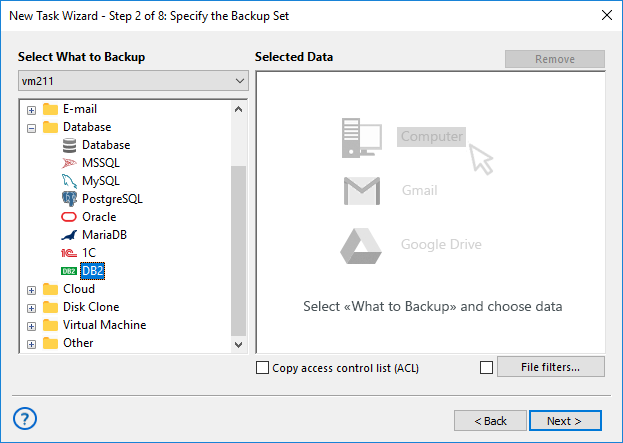
- The next action is to restore your backup into a completely different place for data duplication.
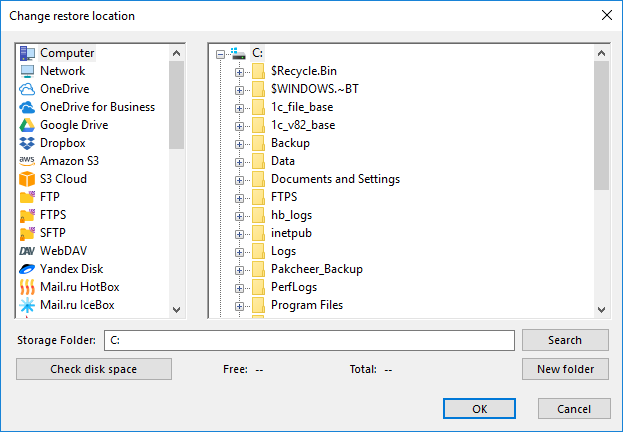
For detailed instructions, you can refer to the User Manual, where you will find a description for all the steps of creating backup and recovery tasks.
Download for Free
Version 8.5.3 , built on March 5, 2024. 116 MB
30-day full-featured trial period
Handy Backup can serve as automated, efficient and easy to use data duplication software. Experience its might by downloading a 30-day free trial edition with all functions and plug-ins!
Related to Data Duplication: