Email Backup Services: Mail.com, ProtonMail, GMX
Email backup services are in high demand for webmail platforms that were once popular but are now in decline, as well as for newer, less well-known services (such as regional email providers). Some users are looking to migrate to different platforms, while others simply want to secure their emails.
Download our free 30-day trial to explore Handy Backup's versatile email backup service. Safeguard your data and easily migrate emails from a wide range of webmail platforms with our intuitive and automated solution.
 Download for Free
Version 8.7.0 , built on May 7, 2026. 152 MB
30-day full-featured trial period
Backup Email Services with Handy Backup: Advantages

Partial Backup
Perform partial backups (incremental, differential, or mixed) to maximize efficiency, saving both time and storage space while maintaining comprehensive data protection.

Universal Approach
Use our E-Mail plug-in to save messages in the standardized EML format and access any webmail server via IMAP. Seamlessly migrate between services or perform automated backups with ease.

Version Backup and Timestamps
Utilize version backup to keep track of multiple email versions and apply timestamps to backup folders for easy retrieval of specific data copies whenever needed.

Scheduled Jobs
Set and schedule your email backups to run at specific times or repeat at intervals ranging from one minute to several months, ensuring your data is always protected.

Full Automation and Encryption
Utilize built-in algorithms to compress or encrypt your email backups. Enhance security by applying external tools (such as grabbers and encryption managers) before or after the backup process.

Email Notifications and Logs
Receive timely notifications and detailed reports sent directly to your email, keeping you informed about current tasks and backup statuses, so you never miss a beat.
Other Features for Efficient Mail Server Backup
Comprehensive backup features ensure data protection and ease of use, making it a reliable solution for various needs, including backup email services.
With versatile backup options, users can safeguard everything from individual files to entire systems. The intuitive interface simplifies setup and management, providing peace of mind with minimal effort.

Volume Shadow Copy allows the creation of consistent and reliable backups even when files are actively in use or locked by the system.
Custom Plugins provide flexibility by allowing the creation of plugins for specific tasks or unique environments, ensuring integration with other services.
Email Migration ensures smooth migration of email data between platforms, making it easy to switch between email services without losing access to important emails.
Windows Compatibility guarantees full support for all modern versions of Windows, ensuring seamless and stable integration for your backup tasks.
30-Day Free Trial provides access to all features for a full 30 days, allowing users to explore and test the software's capabilities without commitment.
User-Friendly Interface offers a clean and organized design, making it easy to manage and monitor backup tasks efficiently from one central dashboard.
Dedicated Customer Support ensures access to reliable support for troubleshooting, technical guidance, and assistance with any issues, available at all times.
Easy to Learn design makes it simple for users of all skill levels to quickly understand and effectively use the backup software for regular and advanced tasks.
Cost-Effective Editions offer a variety of pricing options, allowing users to choose the edition that fits their budget and specific backup needs.
Lifetime License is available, offering a one-time purchase for long-term use, eliminating recurring fees and ensuring lasting value.
Recommended Solution
Lifetime license

Home Office Backup Solution
Unlock the power of email protection with our Email Backup Plugin for IMAP, included even in Handy Backup Standard. Download our 30-day free trial today and discover how our email backup service can effortlessly safeguard your valuable email data with seamless protection!
Configuring the E-Mail Plug-in for Different Backup Services
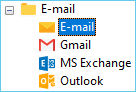
This plug-in is included in all editions of Handy Backup and can be found in the E-Mail data source group on Step 2 of the backup task wizard. For more information on how to use this plug-in, please refer to our email backup guide. To access any email backup service, it must first be properly configured.
Mail.com Backup
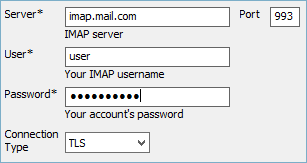
To establish a connection with the Mail.com service, use the following settings:
- Server: imap.mail.com
- Port: 993 (secure) or 143 (non-secure)
- Connection type: TLS (for port 993)
GMX Backup
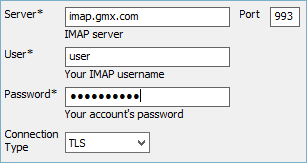
To connect to your GMX account with our backup tool, use the following settings:
- Server: imap.gmx.com
- Port: 993
- Connection type: SSL
Excite.com Backup and Migration
Excite.com is largely inactive today, so you may prefer to migrate from Excite.com rather than simply relying on its email backup services. Additionally, IMAP connections are not supported. Instead, you can use a local email client, such as Thunderbird, to download your Excite.com content via POP3 and then utilize it.
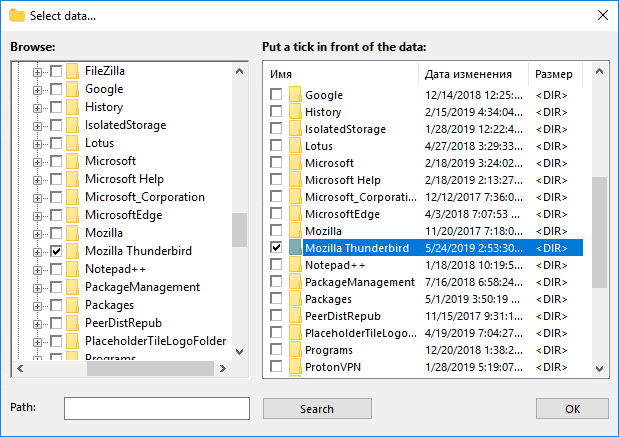
Note: To work with Excite backup content effectively, your chosen local client must support the EML message format. This will enable you to transfer your Excite emails to another mail server by sending the folders containing EML messages to a different account using the IMAP protocol!
ProtonMail Backup

This scenario poses unique challenges due to ProtonMail's end-to-end encryption, which safeguards emails even while stored on ProtonMail servers. Consequently, the only way to perform efficient Proton Mail backup data is by using ProtonMail Bridge, which enables connections to local email clients such as Thunderbird and Outlook via IMAP and SMTP. This allows you to download your emails into a local client and subsequently perform your backup from there.
Similarly, if you're exploring alternatives like Zoho Mail Backup, it’s crucial to understand how it integrates with your email clients and backup processes to ensure seamless data protection.
Backup Email Services: Video
This video tutorial demonstrates a 'generic' approach to backing up email services using Handy Backup's email backup service. It showcases the convenience and ease of this software solution, illustrating how to back up popular email services like Yahoo! Mail and Outlook.com.
Download for Free
Version 8.7.0 , built on May 7, 2026. 152 MB
30-day full-featured trial period
Here’s the revised text with the request integrated: Handy Backup exemplifies an effective and modern backup mail service compatible with any existing mail server. Experience it for yourself with a free 30-day trial—download the latest version, complete with all available plug-ins!