Automatic Data and Hard Disk Image Backup

English

English

  • French
  • Russian
  • Spanish
  • German
  • Japanese
  • Italian
HomeContact UsPartnersOnline Backup
CloseRegister

Login

Password

  • Backup Software
  • Download
  • Order
  • Support
  • About
  • Backup Software for Home
  • Handy Backup Home Standard
  • Handy Backup Home Professional
  •  
  • Backup Software for Business
  • Handy Backup Small Server
  • Handy Backup Network Server
  •  
  • Handy Backup for Android
  • Online Backup Service
  •  
  • Compare Versions
  • Screenshots
Backup Software
  • Handy Backup
  • Handy Backup Server
  •  
  • Handy Backup Plug-ins
  • Language Packs
  •  
  • Sources for Partners and Press
Download
  • Purchase Handy Backup
  • Upgrade Handy Backup
  • Help Me Choose Edition
  •  
  • Volume Order Pricing
  • Special Offers
  •  
  • Information for Resellers
  •  
  • Contact Sales
Order
  • Contact Support
  • FAQ
  • Handy Backup User Manual
  • How to Register
  •  
  • How to Back up
  • Backup Terms Glossary
  •  
  • Feedback Form
Support

Handy Backup / Features / Handy Backup Home Professional - Computer Backup and Drive Imaging Software for Windows

Handy Backup Home Professional - Computer Backup and Drive Imaging Software for Windows

Handy Backup Home Professional an ideal solution for advanced users and office users. It gives the following advantages:

  • Secure backup to remote servers via SFTP
  • Running Handy Backup in Windows service mode allows executing a task exactly at the specified time even if the user is not logged in at the moment
  • Image backup of entire hard drive including the operating system, applications, and configurations for fast restoration of the system in case of a failure.

Features of Handy Backup Home Professional:

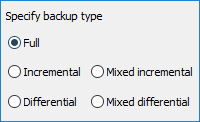
1. Full, Incremental, & Mirror Backups - Handy Backup supports three different types of backup: full backup, incremental backup and mirror backup. You can choose any of the three types depending on your needs. With full backup all files of the selected backup set are copied upon each backup session; with incremental backup only new and last modified files are backed up. Mirror backup is used to keep contents of two folders identical.

2. Flexible and powerful backup scheduler allows scheduling backup tasks for automatic execution on a regular basis. You can back up every day or on particular days of the month, week, or a custom period. It is also possible to prompt Handy Backup to run the missed schedules.

3. Backup with ZIP compression allows users to compress the data before backup and save storage space. All in all there are 9 levels of compression.

4. Backup of Files, Folders, Emails, Settings, Programs, & Program Settings, Website

  • Backup files, folders and FTP locations
  • Backup of The Bat!, MS Outlook and Outlook Express, Mozilla Thunderbird data, including messages, news and address book
  • Email Backup via POP3 allows doing the backup of email messages directly from the mail server (Yahoo Email, Adelphia Email, etc.) without downloading messages to your computer
  • Backup of My Documents, Favorites and Desktop folders. With just one mouse click these data will be added to your backup set
  • Windows Registry Backup You can back up the entire Registry files or select system keys or user keys and so on
  • ICQ, Yahoo, AOL Instant Messengers Backup Handy Backup will automatically find data from these applications and add them to the backup set, including received and shared files, profiles, skins and settings
  • Browser Firefox backup of your entire browsers data including settings, bookmarks, links etc
  • ACDSee, Adobe Photoshop CS2 backup of data from most popular graphics editors
  • Media players Winamp, Windows Media Player automatic backup of settings, visualizations, skins and playlists
  • Utilities (Total Commander, WinRAR, WinZip) backup of different utilities settings
  • Backup website Back up your website for storage, convenience and security

5. File Selection Criteria for Media, Photos, Pictures
Handy Backup allows you to apply different masks to the backup data: office documents (.doc, .xls, .ppt, .pdf, ), media files (.avi, .mpeg,), pictures and photos (.jpg, .giff, .psd, ) etc.

6. You can exclude temporal, system and other types of files. Some system files and folders are not permitted to be moved or copied, and are accessed only by Windows. You can prompt Handy Backup to exclude such files from the backup set. Open files can be excluded as well.

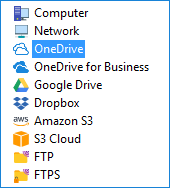
7. You can save your data to various storage devices:

  • backup to HDD allows backing up data to a local hard drive
  • backup to CD allows backing up data to multiple disks
  • backup to DVD allows backing up data to most popular storage media such as DVDR/DVDRW
  • backup to HD DVD and backup to Blu-Ray allows backing up data to the new generation storage media with the storage capacity up to 100 GB
  • backup to LAN allows backing up data anywhere on the network
  • backup to FTP servers you can back up to remote FTP server and work with your files anywhere you go. There is MD4/MD5 password support for FTP backups. Besides, there is an option to create new folders at a remote FTP server
  • backup to USB you can back up your data to a USB connected device such as a flash card or external hard drive
  • backup to ZIP, JAZ, MO, floppy disks

8. Enhanced DVD/Blu-Ray/HD DVD Engine
Recording data to most suitable storage media including DVD/Blu-Ray/HD DVD no third party software is required to record backup data to disks. Users can select speed of recording for DVD/CD/Blu-Ray/HD DVD. As for CD-RW/DVD devices, an automatic media rotation is provided, which prompts the user when a disc is full and needs to be replaced.

9. Remote Backup Service allows you to back up your most critical data to our online server and access them via any web browser at any time from any location.

10. Self-Restorable Backup Sets
You can perform automatic restore of backup data on a flexible schedule. Besides, you can restore backup data to any machine regardless of whether Handy Backup is installed on it or not.

11. Selective Restoration of Data
You can perform a selective restore of the backup data. This is much quicker and you dont have to restore the entire backup set.

12. One-way or two-way synchronization of Files and Folders between servers, desktops, notebooks, LANs, ZIP disks, secondary hard disks, etc.

13. Managing open files allows skipping files which are open at the moment of backup to avoid loss of file integrity.

14. E-mail notifications about operation results are sent to you regularly providing you with the up-to-date information about execution of the tasks and errors.


15. Backup with timestamps allows creating multiple versions of backup files and store them together with dates of creation. So you can purge old backups and restore files to the state they were at a particular point in time.

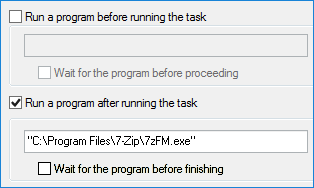
16. Option to set some other program to run before/after running your tasks you can schedule your task to run before or after a selected program.

17. Option to run backup on log on/log off allows users to launch backup, synchronization and restore tasks after they log on or off so tasks can be executed without users supervision.

18. Comprehensive step-by-step Wizard takes you through all steps of backup, restore and synchronization tasks creation giving you useful tips upon each aspect of backup, restore and synchronization.

19. Tray agent displays the status of current operation, and allows running your tasks through the right-click.

20. Drag & drop interface for quicker operation through the program interface and in the Windows environment allows you to easily manage data and tasks.

21. Command line interface for professional users allows performing most important actions such as execute task, stop task etc without opening the application.

22. 128-bit Encryption can be applied to all of your backup data to protect them from possible risks during the transfer and storage. The encrypted data can not be intercepted during the transfer and can not be deciphered even by the most notorious hackers.

23. Multi-threaded transfer engine c executes backups in the background with minimum system resource consumption. Thus Handy Backup runs invisibly in the background not disturbing the performance of other programs.

24. Support Auto updates the program regularly checks for updates and notifies you if there are any updates available.

25. All backup activities are recorded in log file - by viewing the log file, your stay informed about all executed tasks and task statuses, as well as errors. In fact, all Handy Backup proceedings are recorded in the log so you always know what caused a particular problem

26. Image Backup allows backing up the entire hard drive of a given computer, including the operating system, and restoring the computer to a working state after hard drive crashes or system failures.

27. Hard Disk Cloning restoring hard drive image backup to location different than the original is an effective way to clone hard drive or partition.

28. Run backup as Windows Service - allows users to set up backup schedule and options once and have backup processes always started in time even if no user logged in.

This feature is available in Handy Backup Home Professional:

$99 per license

Buy Now

Price: $99 (1 license)

Volume discount: $0

Total: $99

Upgrade to 7.0

Volume Discounts
1 license$99 per unit
2-9 licenses$71 per unit
10-49 licenses$66 per unit

See all volume order prices

See all Order options.

What to Back Up

My Documents backup - one click backup of the My documents folder including pics, videos, music, text files

Website backup - most reliable solution to protect your business web representation

Disk Image Backup - back up your hard drive by creating a hard drive image and saving it to the storage medium

MySQL backup - simple, comprehensive backup of the MySQL database tables

ODBC Database Backup - back up any ODBC compatible databases including MySQL, Oracle, FoxPro, Interbase, MSSQL, DB2, MS Access, Postgre SQL etc.

Where to Back Up

Backup to DVD-R - record your backups to DVD-R with our in-built DVD burning tool

Backup to CD-R - record your backups to CD-R using data encryption and compression with one click

Backup USB - back up your data to any USB connected device such as USB flash key

Backup to FTP - transfer your backups to remote FTP server for more data security

Backup from FTP - back up data stored on a remote FTP server to your local computer or any removable storage medium

How to Back Up

Backup with ZIP compression - backup with 10 levels of Zip compression saves storage space

DVD backup verification - makes sure your data are restorable from DVD copy you made

Synchronizing files and folders - one click synchronization of files and folders across multiple locations including remote FTP servers

Who uses Handy Backup?

Loading client logos...

Copyright © 2004-2012 Novosoft LLC. All rights reserved. Handy Backup software.

Loading...

You are currently being redirected to a payment system. Please wait...

Back to Top