Product Overview
Handy Backup™ is a family of award-winning solutions for home and business environments. It is a cross-platform utility built on client-server architecture that provides a reliable way to back up and restore any critical data, from common PC files to commercial database servers.
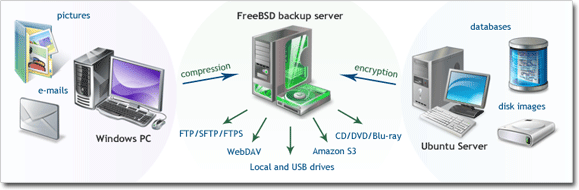
Example use: copying files, disk images and databases in a heterogeneous network
Ease of Use
An intuitive interface makes protection and recovery procedures easy for users of all levels. To back up your data, you need to create a backup task, which is done with the help of a simple Wizard, as follows:
- Select what you want to back up.
- Select where you want to store the data.
- Schedule the task.
In this manual you can find step-by-step instructions on every aspect of managing your data with our software. If you want to skip the product overview, you can start with the Installation and Quick Start sections.
Universality
The software works with very different types of data: from common files and folders to SQL databases and e-mail servers. To select data for backup, you don′t need to be an IT expert: simply check the box near an item that you want to back up, and the program will do the rest.
Supported storage devices and data transferring protocols enable you to save data to virtually any place. Depending on your situation, you may want to store copies to an external USB disk, transfer them to an FTP or WebDAV server, upload them to Amazon S3 storage, or make use of any other location.
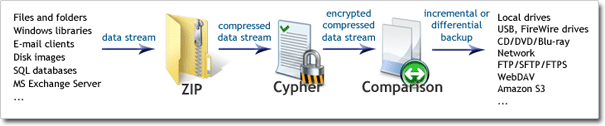
Data stream path: "on-the-fly" compression, encryption and comparison with previous backups
The program features built-in ZIP compression and 128-bit Blowfish encryption. Data processing is performed "on-the-fly", without temporary files, which allows backing up significant amounts of data in an efficient and resource-friendly way. Before files are written to the designated storage, they are compared to existing backups, which enables you make incremental or differential backups (save only changes).
On its way from "source" to "destination", data stream can also be transferred to a different computer running another instance of Handy Backup. This lets you back up all network data from a single control point, which is the idea of Server edition (see below). To learn technical details of the program′s client-server architecture, please see Architecture.
Standalone and Server Editions
The program is available in Standalone and Server editions:
- In Standalone editions, data stream remains within one computer. All processing and storage operations are handled by a single machine.
- In Server edition, data stream can be transmitted from one computer to the other, over the network. Logical components responsible for data transfer are called Workstations: one workstation manages all reading and processing operations, while the other manages data storage.
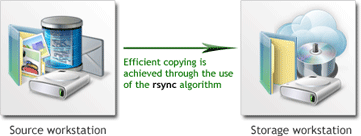
For example, you may want to back up a server that for security reasons cannot be connected to the Internet. The client-server architecture employed in the software allows you to transfer the data in encrypted form to the "Storage" workstation which will then save it to a local or a remote place. To learn more about cooperation of workstations, please see Workstation.
Extensibility
You can copy files, disk images, databases (MySQL, MS SQL, Oracle and other), and many other types of data. Supported storage destinations include local HDDs, USB drives, LAN, FTP, WebDAV, Amazon S3 and other locations. This versatility is achieved through the use of plug-ins: each program′s feature is a separate module that can be added to the program′s core independently of other features.
The software comes in several editions, each one with different sets of plug-ins. At any time you can upgrade your version by supplementing it with plug-ins of your choice. This lets you build a solution tailored for your needs, saving on the options you never use. For more details, please see Registration.
All the upgrades are available on the product website: www.handybackup.net
Multilanguage Support
The program is completely Unicode-enabled, and is available in several languages:
- English
- French
- German
- Spanish
- Czech
- Dutch
- Danish
- Swedish
- Norwegian
- Finnish
- Italian
- Portuguese
- Polish
- Hungarian
- Slovak
- Slovene
- Turkish
- Armenian
- Chinese
- Korean
Always Up-to-Date
Our developers constantly work on Handy Backup to add new features, improve its security and performance. We take into consideration any feedback and recommendations, striving to make an ideal solution for all types of users. Updates are released each month or two. To stay informed of all news, watch the product website: www.handybackup.net
Contents: