Step 5: Compression and Encryption
This page describes the fifth step of creating a backup task with the New Task Wizard.
On the fifth step of the New Task Wizard, you can enable compression and encryption. Both options are applied to data stream "on-the-fly" and use no temporary files. This is especially useful if you back up very large files, e.g. HDD images
- To enable compression, check Compress the backup data to save space. There are two types of compression:
- "Many-to-one". If you want to create a SingleZIP archive for the entire backup set, select the first option.

By default, this option creates a temporary directory, providing more convenient compression. You can also force the program to make no temp folder by clearing a checkbox. Then, files are packed to the single ZIP directly, saving both the job time and resources of the operating hard drive.
-
- "One-to-one". Select the second option (MultiZIP archive) if you want to create a separate ZIP archive for each file backed up.
- To enable encryption, check Encrypt backup data with a modified BlowFish algorithm for security reasons and specify password in the respective fields.
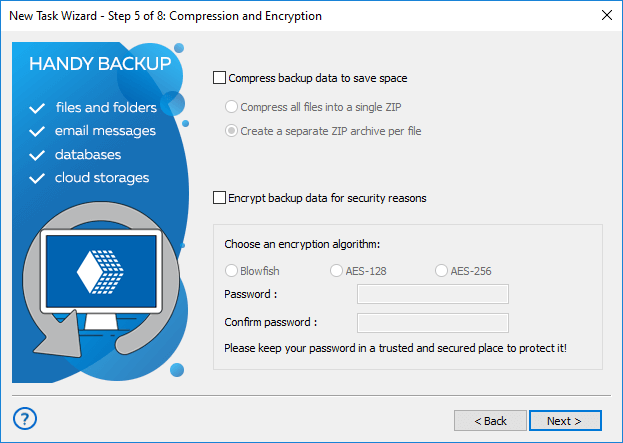
Note: Encryption of your backup do not depend on compression options selected earlier.
When finished, click Next.
Next steps are common for all tasks. See the following chapters:
Contents: