English

English

  • French
  • Russian
  • Spanish
  • German
  • Japanese
  • Italian
HomeContact UsPartnersOnline Backup
CloseRegister

Login

Password

  • Backup Software
  • Download
  • Order
  • Support
  • About
  • Backup Software for Home
  • Handy Backup Home Standard
  • Handy Backup Home Professional
  •  
  • Backup Software for Business
  • Handy Backup Small Server
  • Handy Backup Network Server
  •  
  • Handy Backup for Android
  • Online Backup Service
  •  
  • Compare Versions
  • Screenshots
Backup Software
  • Handy Backup
  • Handy Backup Server
  •  
  • Handy Backup Plug-ins
  • Language Packs
  •  
  • Sources for Partners and Press
Download
  • Purchase Handy Backup
  • Upgrade Handy Backup
  • Help Me Choose Edition
  •  
  • Volume Order Pricing
  • Special Offers
  •  
  • Information for Resellers
  •  
  • Contact Sales
Order
  • Contact Support
  • FAQ
  • Handy Backup User Manual
  • How to Register
  •  
  • How to Back up
  • Backup Terms Glossary
  •  
  • Feedback Form
Support

Handy Backup / Support / Handy Backup User Manual / User Interface

User Interface

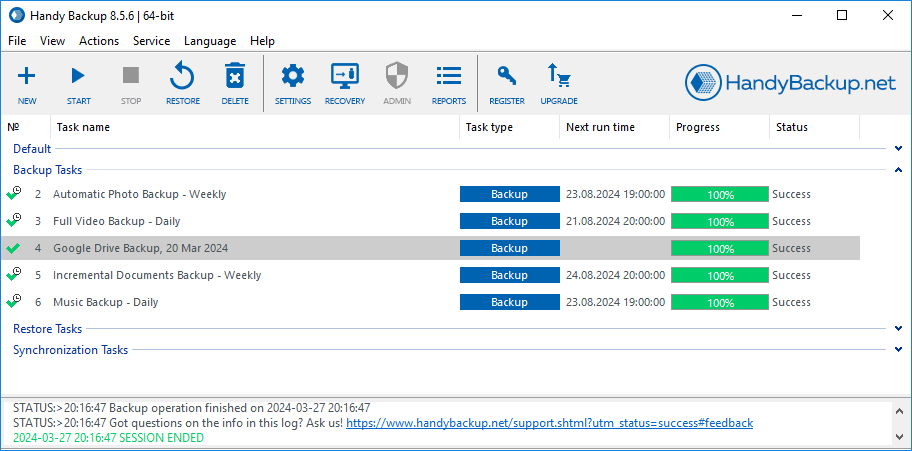
In this section we introduce what makes up the Handy Backup interface. The Handy Backup main window appears as follows:

Handy Backup User Interface

There are five main elements of the Handy Backup graphical interface:

  • Main Menu
  • Toolbar
  • Task View Window
  • File View Window
  • Log Window

Besides graphical interface there are several other functional elements that serve for interaction between the user and the program:

  • Hot Keys
  • Handy Backup Agent
  • Command Line interface


Main Menu

Go to Help Contents

Essentials

Installing Handy Backup

Installing Handy Backup Network Server

NEW!Installing Handy Backup Disaster Recovery

Installing Handy Backup under Linux

Updating Handy Backup from Earlier Versions

Registration

Plug-ins

How to Backup (Articles)

Download User Manual in PDF (3MB)

Who uses Handy Backup?

Loading client logos...

Copyright © 2004-2012 Novosoft LLC. All rights reserved. Handy Backup software.

Loading...

You are currently being redirected to a payment system. Please wait...

Back to Top