English
Other Languages
Search site:
 image MS Windows® Vista/2000/XP/2003
Handy Backup 6.1

Main Menu -> Actions


The Actions menu is used to execute tasks.
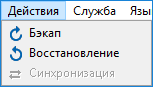

Handy Backup: Backup/Restore

The menu is organized as follows:

  • Backup – Runs a selected backup task. It can be applied only to backup tasks.

  • Restore – Runs a selected restore or backup task. If the task type is "restore" then it will be done according to its properties. If the task type is "backup", then it restores data to the source.

  • Synchronize – Runs a selected synchronization task.

Note: The Actions menu is only one of several ways to execute a task. To learn about running tasks, refer to Running Task.


Data to Back Up:

File Backup - back up individual files and folders stored in local, LAN and FTP locations
Email Messages Backup - back up e-mail box directly from your mail server
Image Backup - perform complete hard disk image backup with all data and operating system
Email MS Exchange Backup - back up and restore Microsoft Exchange Server stores
Lotus Notes Backup - back up Lotus Notes without stopping the service
ODBC Database Backup - protect your databases by regular backups

Backup Destination:

Backup to LAN, Local and External Drives - store your backups at any drives visible in Windows Explorer
Backup to FTP - offsite backup to remote FTP server provides maximum reliability
Backup to SFTP - transfer sensitive data to a remote server via secure SFTP protocol
Backup to CD-R/CD-RW - burn your backups to optical disks with multi-drive spanning and verification options
Backup to DVD/HD DVD/Blu-Ray - record important data to DVD disks using the integrated burning tool
Handy Backup Online - store backups at Novosoft Online Backup Service instead of third-party providers