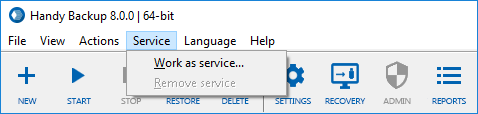
Main Menu -> Service
The Service menu is used to configure program operation as Windows service.
Using Handy Backup as Windows service provides the next advantages:
- Backup and restore tasks can be executed when the user interface will be closed (e.g. the program terminated);
- Execution of backup and restoration tasks will be continued after user’s logoff.
These possibilities allows user not to control backup and restoration tasks directly, performing other job required instead.
Running Handy Backup as Windows service
To run Handy Backup as Windows service, please follow the steps described below.
- On the main menu, find "Service" item and then select "Work as service..." option.
- The dialog window will appear, when you can enter the password for the current Windows user to add Handy Backup to the list of this user’s services.
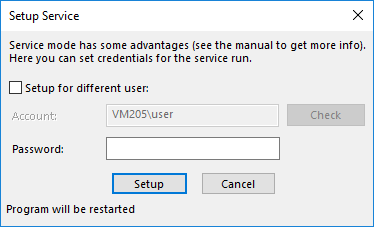
- If you want to add Handy Backup as a Windows service for the different user, mark the checkbox called "Setup for different user" above the name and password fields. Enter the user’s name (preceded by domain name if needed).
- You may check this user’s consistency pressing the "Check" button.
Note: User running Handy Backup as Windows service must have administrative privileges to start services!
- When you finish, press the "Setup" button. Program will be restarted.
Removing Handy Backup from the List of Services
To remove Handy Backup service from Windows, please act in the sequence described next:
- On the main menu, click "Service" and then select "Remove service" item.
- Program will be restarted. Continue to use it as usual.
Contents: