Laptop data backups

English

English

  • French
  • Russian
  • Spanish
  • German
  • Japanese
  • Italian
HomeContact UsPartnersOnline Backup
CloseRegister

Login

Password

  • Backup Software
  • Download
  • Order
  • Support
  • About
  • Backup Software for Home
  • Handy Backup Home Standard
  • Handy Backup Home Professional
  •  
  • Backup Software for Business
  • Handy Backup Small Server
  • Handy Backup Network Server
  •  
  • Handy Backup for Android
  • Online Backup Service
  •  
  • Compare Versions
  • Screenshots
Backup Software
  • Handy Backup
  • Handy Backup Server
  •  
  • Handy Backup Plug-ins
  • Language Packs
  •  
  • Sources for Partners and Press
Download
  • Purchase Handy Backup
  • Upgrade Handy Backup
  • Help Me Choose Edition
  •  
  • Volume Order Pricing
  • Special Offers
  •  
  • Information for Resellers
  •  
  • Contact Sales
Order
  • Contact Support
  • FAQ
  • Handy Backup User Manual
  • How to Register
  •  
  • How to Back up
  • Backup Terms Glossary
  •  
  • Feedback Form
Support

Handy Backup / Features / Laptop Backup

Laptop Backup

Desktop and laptop backup is a matter of great importance for both businesses and individual users. In business, information is above all other assets: loss of data always causes loss of money, and may result in a complete business failure! As regards home environment, a disaster with a personal laptop may not cost you much money, but is always heartbreaking. How would you feel if your family photos, all of the music and videos you love, all the priceless files that you carry on your laptop were gone?

For most people, backing up laptop data is quite a burdensome job. Okay, you understand the importance of backups. But to keep information safe and up-to-date, backups must be made regularly! Forgetting to back up your data once may lead to a painful loss. So how do you do it?

Automatic Laptop Backup Software

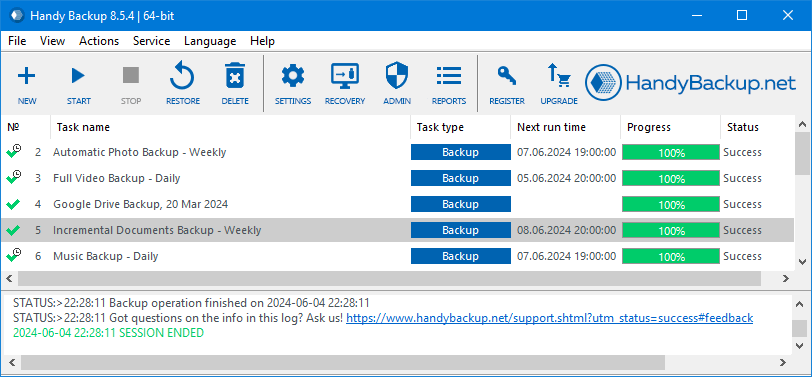
Handy Backup is a helpful Windows backup software designed to meet requirements of the widest range of customers: from home users to large businesses. In Handy Backup your IT expertise doesn’t matter much the programs interface is very simple and intuitive to use. All you need is to create a backup task and then Handy Backup will make laptop backups automatically, on a desired schedule.

Downloadsecure backup and synchronization software for your laptop! See Handy Backup download details...

  • Handy Backup Home Standard. Buy for $39

Learn about other editions of the featured software...

How Do We Make Your Backups as Easy as Possible?

The following features make Handy Backup one of the best utilities for laptop backup:

  • Easy data selection. Unlike most other laptop backup software that lets you protect only files and folders, Handy Backup features very convenient "presets" and "plug-ins" that allow quickly backing up My Documents, Favorites, operating system, and other data. There's a great option to limit backup set to certain file types, e.g. you can choose to copy only .doc and .rtf files.
  • Task Wizard. Handy Backup has a helpful Wizard that will help you to create a new task and assign its properties step by step.
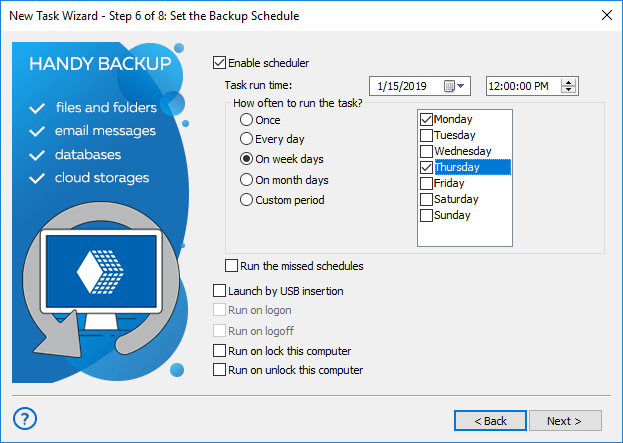
  • Automatic backup. Once set up, the scheduler will take care of your backup tasks, not requiring any further attention. You can virtually forget about backups, the program will do everything on its own, and send you detailed e-mail reports.
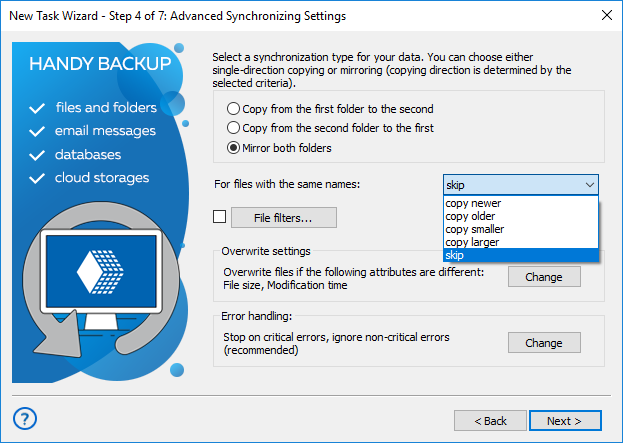
  • Synchronization. In addition to backup tasks, the utility allows you to perform synchronization (folder mirroring). You can easily configure daily synchronization of data between a laptop and a desktop - it's perfect solution if you need to use the same files on two computers simultaneously!
  • Data restoration... is easy as 1-2-3 and requires a single mouse click! You can restore backup completely, or select separate files to restore.

Handy Backup has many other useful functions to keep your backups easy and effective. To learn more, please refer to the full list of backup features of our software...

Secure laptop backup is easy and quick with Handy Backup!

Handy Backup is available in four editions. Order Handy Backup Home Standard below:

$39 per license

Buy Now

Price: $39 (1 license)

Volume discount: $0

Total: $39

Upgrade to 7.0

Volume Discounts
1 license$39 per unit
2-9 licenses$28 per unit
10-49 licenses$26 per unit

See all volume order prices

See all Order options.

What to Back Up

My Documents backup - one click backup of the My documents folder including pics, videos, music, text files

Website backup - most reliable solution to protect your business web representation

Disk Image Backup - back up your hard drive by creating a hard drive image and saving it to the storage medium

MySQL backup - simple, comprehensive backup of the MySQL database tables

ODBC Database Backup - back up any ODBC compatible databases including MySQL, Oracle, FoxPro, Interbase, MSSQL, DB2, MS Access, Postgre SQL etc.

Where to Back Up

Backup to DVD-R - record your backups to DVD-R with our in-built DVD burning tool

Backup to CD-R - record your backups to CD-R using data encryption and compression with one click

Backup USB - back up your data to any USB connected device such as USB flash key

Backup to FTP - transfer your backups to remote FTP server for more data security

Backup from FTP - back up data stored on a remote FTP server to your local computer or any removable storage medium

How to Back Up

Backup with ZIP compression - backup with 10 levels of Zip compression saves storage space

DVD backup verification - makes sure your data are restorable from DVD copy you made

Synchronizing files and folders - one click synchronization of files and folders across multiple locations including remote FTP servers

Who uses Handy Backup?

Loading client logos...

Copyright © 2004-2012 Novosoft LLC. All rights reserved. Handy Backup software.

Loading...

You are currently being redirected to a payment system. Please wait...

Back to Top