SQL Server Backup Software
SQL Server backup is a completely automated task within Handy Backup software, utilizing a dedicated plug-in for any SQL version. It allows for saving databases as compressed binary dumps while preserving all components and settings. Handy Backup serves as an excellent SQL backup tool, capable of scheduling and fine-tuning these tasks.
For those seeking reliable SQL auto backup software, we encourage you to download our 30-day trial version of Handy Backup and experience its comprehensive features firsthand.
 Download for Free
Version 8.7.0 , built on May 7, 2026. 152 MB
30-day full-featured trial period

Essential Features of SQL Backup Software
Dependable and Precise SQL Server Backup Database
Unlike SQL Server backup software that relies on ODBC drivers, Handy Backup interacts directly with the DBMS through the plugin for MSSQL automatic backup. This allows you to save SQL databases along with all included views, indexes, stored procedures, etc., ensuring they can always be restored intact.
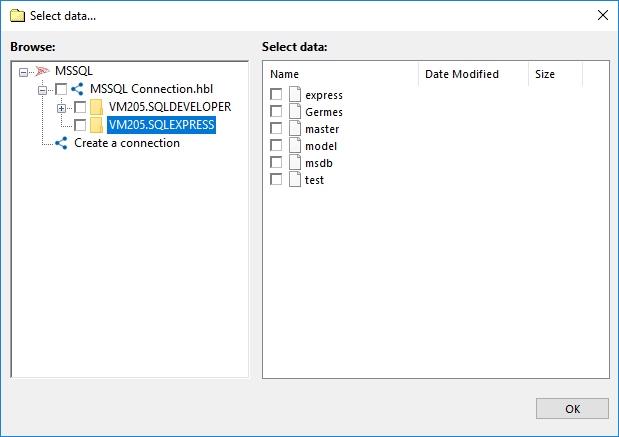
List of Supported Versions for SQL Database Backup Plug-in
The SQL data source is compatible with any edition of MS SQL Server, irrespective of the version, enabling you to:
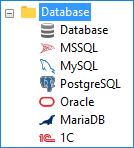
- Backup SQL Server 2005: The classic but nearly obsolete version.
- Backup SQL Server 2008: An improvement over SQL Server 2005, offering enhanced performance, security, and management features.
- SQL Server 2012 backup: Focused on providing robust backup and recovery solutions, SQL Server 2012 introduced innovations in data availability and disaster recovery.
- SQL Server 2014 backup: Building upon the foundation of its predecessors, SQL Server 2014 enhanced backup capabilities and introduced features for high availability and scalability.
- SQL Server 2016 backup: SQL Server 2016 emphasized cloud integration, advanced analytics, and improved security measures alongside efficient backup functionalities.
- SQL Server 2019 backup: Introduces advanced features including Big Data Clusters for scalable analytics, enhanced security with Always Encrypted and improved performance through Intelligent Query Processing.
- SQL Server 2022 backup: SQL Server 2022 improves security with Microsoft Defender for cloud integration and Ledger for tamper evidence, alongside performance enhancements like in-memory OLTP improvements and optimized query processing.
Handy Backup serves as a unified SQL Server backup software, employing a consistent interface across all versions. Furthermore, you can seamlessly coordinate combined SQL backups with any other server-grade or user-level data (e.g., website content via FTP, files, folders, etc.), using the same task setup to copy all this information.
Hot SQL Backup
Handy Backup enables the capturing of snapshots of MS SQL databases without halting the server. This method, known as hot backup, minimizes both server downtime and user disruptions. Naturally, you can always perform a backup of the SQL server in a stopped mode (referred to as cold backup) if necessary; there are no restrictions.
Automating SQL Backup through Scheduling

A built-in scheduler is an ideal tool for automating database backup tasks. It enables the initiation of a database backup strategy at a precisely defined time and then repeating these tasks at a predefined interval ranging from one minute to several months. This ensures the security of your SQL backup database against faults while also freeing up your time.
Internal scheduling requires no third-party utilities or scripts to run according to schedule, offering much more freedom to implement simple or complex SQL Server backup strategies, such as the 3-2-1 backup or Grandfather-Father-Son.
Additional Features
As SQL Server database backup software, Handy Backup offers several important features and advantages, including:
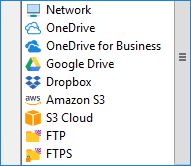
- A wide range of storage options, including S3-driven clouds, FTP servers, and external USB drives;
- Full, incremental, differential, and mixed SQL Server backup;
- Compression and encryption for SQL Server backup, enhancing security;
- Versioned backups, timestamps, and the ability to process databases with external software after backup;
- Scheduling tasks by period, exact time, or by plugging in an external USB drive.
Note: Incremental database backups can be quite large and always require a significant amount of time during restoration. Therefore, we strongly recommend using the differential or mixed methods instead of incremental for SQL Server backup database. However, you are free to use incremental backup if necessary!
These significant advantages, among many other Handy Backup features, have made it the fastest and most reliable SQL backup software for various versions of SQL software.
Recommended Solution
Lifetime license

Handy Backup Small Business
The Small Server solution functions excellently as ideal SQL database backup software, in addition to performing backups of other server-level and user data.
SQL Backup Trivia
Prior to programming your SQL backup tool for a specific task, you can optimize your backups by considering three simple factors.

How Often Does the SQL Database Change?
Consider taking a differential backup each time your database content undergoes a significant change (e.g., by 10%). If these changes occur within minutes, perform backups, for instance, every 10 minutes. If changes occur over hours or days, opt for daily backups.
How Critical Is the Database Content?
For critical (e.g., commercial) data, perform full backups at least once to twice per day, possibly every hour. For less critical databases, schedule backups at least once to twice per week, or take snapshots daily (e.g., after the main workday ends, such as at 9:15 PM).
How Big Are Database Backups?
If your backups are too large, consider using external USB drives or local NAS/mapped drives to store copies of these databases. For smaller databases, you can utilize commercial cloud backup solutions, which are always available for uploading/downloading data and are convenient to use.
Note: The best SQL Server backup software always considers storing identical backups in at least two different locations: one linked to a server and the other placed offsite (e.g., on a cloud or remote FTP). Simply duplicate one backup task to another and then change the destination of the second task to create such tasks!
SQL Server Backup Compression and Encryption
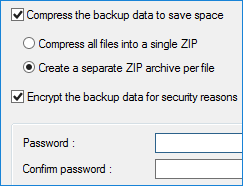
Transferring a SQL backup database over networks can potentially pose security risks. To safeguard your data packets, you can utilize VPN and/or SFTP, FTPS secured protocols. Moreover, Handy Backup automatically compresses any SQL database during the backup process.
- You can enhance security by adding 128-bit built-in encryption to these measures, providing an additional layer of protection for your backup.
- Another option is to utilize external encryption software before or after the backup process. Simply check the appropriate box in Step 7 and add the software command.
- Finally, you can achieve additional compression by consolidating your backup content into a single or multiple ZIP files within a specific task (not limited to SQL databases only).
Comparison of SQL Server Backup Software
Utilizing a built-in SQL backup program or crafting SQL backup scripts to create database copies are both viable methods. However, both approaches demand additional skills and knowledge. We do not recommend these methods for the average user or inexperienced administrator. Instead, consider using dedicated SQL server backup tools for a more efficient and user-friendly approach.
Handy Backup is a straightforward and dependable SQL backup tool. Users with beginner-level skills in Windows can effectively create backup and restoration tasks using it, even for the challenging task of SQL server backup.
Using SQL Server Backup Software: Video Tutorial
This video demonstrates how to utilize Handy Backup for SQL Server backup, showcasing its full potential and capabilities. The backup scheme utilized here is a mixed differential, enabling the creation of one full and several differential copies in a continuous cycle. You will also see all the features for creating backup tasks in advanced mode.
Note: To connect to a new database instead of using an existing connection, simply click "Create a connection" after selecting the "MS SQL" plug-in in Step 2. A dialog window will appear where you can enter your login and password for SQL server backup. Provide a name for the connection.
For full automation, the SQL server backup software utilizes the internal scheduler, running a task every day from Monday to Sunday. There is no compression or encryption demonstrated in this video for SQL backup data, but you can easily add these options in Step 5 as shown.
To explore the comprehensive features of our SQL database backup software, we invite you to download the 30-day trial version of our solution.
Download for Free
Version 8.7.0 , built on May 7, 2026. 152 MB
30-day full-featured trial period
Related to SQL Backup:
Capterra′s Rating:
"Great product, very simple and effective backup program"