Download reliable backup software for Windows workstations and servers! See download details...
- Handy Backup Standard. Buy for $39
- Handy Backup Server Network. Buy for $299
February 15, 2011
We are delighted to announce an update to Handy Backup 6.9 with several new options and features!
The new version brings a range of improvements and design enhancements aimed at making computer backups easier and more comfortable.
 Download for Free
Version 8.7.0 , built on May 7, 2026. 152 MB
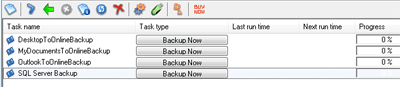
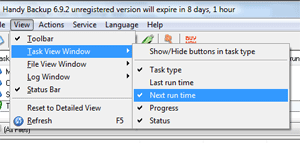
 Download for Free
Version 8.7.0 , built on May 7, 2026. 152 MB
Download reliable and easy backup software for any Windows PC or server!
You can try Handy Backup for 30 days for free!
March 17, 2011
We are happy to release Handy Backup 6.9.3 that further continues our commitment to making the program easier to use:
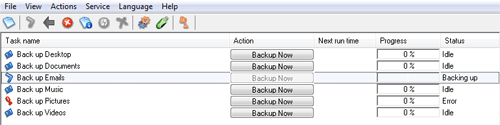
To create sample tasks, simply check the respective option during the installation.
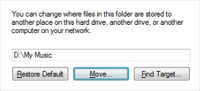
For example, if you change the Music folder path to D:\My Music, the respective backup tasks will start copying files from a new location.
March 31, 2011
We are happy to announce an update to Handy Backup. The new version 6.9.4 features several new functions designed to help administrators deploy the software in an easier and more comfortable way.
msiexec /i "handybackup_setup.msi" REGISTRATION_KEY="XXXXXXXXX"
(change the value inside the quotes to the desired registration number)
msiexec /i "handybackup_setup.msi" /quite
msiexec /i "handybackup_setup.msi" /log install.log
To learn about installing software over Active Directory, please see https://support.microsoft.com/kb/816102.
We hope that these features will make it easier to set up backup plans on any Windows network!
June 23, 2011
Dear friends! It is a great pleasure to announce the release of Handy Backup 6.9.5! Here are some of the highlights of the new version:
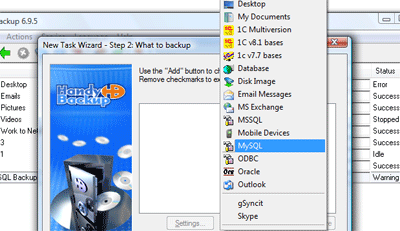
To back up MySQL, you need to click MySQL in the list and create a connection. Please read detailed description of MySQL Backup...
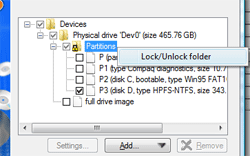
When you select a folder partially, it is ambiguous what you want:
On the screenshot above, it is clear that the user wants to back up Partition P3, and not back up any other elements that may appear in the Partitions folder.
Here is an opposite example:
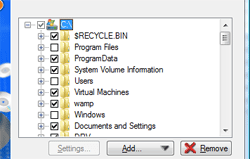
In this case, the user wants to back up the entire disk C:\ and skip folders C:\Windows\, C:\Users\ and C:\Program Files\. But the selection is similar to the above, and the program doesn’t know if it should back up only checked objects, or back up the entire folder without the excluded ones.
Basically, this can be solved with file masks (which have been in Handy Backup for years). But the use of file mask filtering is not very obvious and requires a lot of attention for complex backup task (especially in Server Data Backup). This is why we decided to go further and introduce a new option of “locking” folder contents:

When you “lock” the folder, new objects that appear in it will not be backed up, i.e. the backup will be limited only to elements you selected during task creation.
Download reliable backup software for Windows workstations and servers! See download details...
August 12, 2011
Dear friends!
We are delighted to release of new version of Handy Backup. You can read about the new features below:
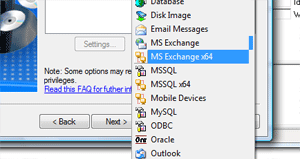
Designed specifically for 64-bit systems, Handy Backup Workstation x64 allows the core application to back up and restore 64-bit applications.
64-bit Workstations are licensed individually, i.e. the use of both 32-bit and 64-bit Workstations on one computer requires two “spots” in the backup network of Handy Backup Server Network. You can add more workstations to Handy Backup Server Network for $19 per unit. To do it, please contact us at [email protected].