Automatic Laptop Data Backup Software
Laptop backup software - Handy Backup prioritizes secure data preservation for both individual users and businesses, understanding the significant risks associated with data loss, including financial and reputational damage. This software is engineered for effortless, regular laptop backups, ensuring data remains safe and current without requiring extensive effort from the user.
 Download for Free
Version 8.7.0 , built on May 7, 2026. 152 MB
30-day full-featured trial period

Advantages of Handy Backup among Laptop Backup Solutions

Automatic Laptop Backup Software
To initiate the process, simply set up an automatic backup task, performing laptop backups on your chosen schedule. This approach ensures your data is consistently protected without the need for manual intervention, offering both convenience and peace of mind.

Simplicity
With Handy Backup, your IT expertise doesn′t matter much the programs interface is very simple and intuitive to use. Handy Backup is a helpful Windows backup software designed to meet requirements of the widest range of customers: from home to business users.

Local and Online Backup
When using Handy Backup, you can backup laptop to external hard drive, or to cloud (such as Google Drive), or to a FTP server, or make a local laptop backup to hard drive without any extra effort. This is the unified, convenient solution for all types of laptop backup data storage.

Flexible Data Selection
You can either make a complete laptop backup drive copy or select specific data types to save, from copying a registry or user folders to creating a laptop drivers backup. Handy Backup contains a vast amount of different data source and storage plug-ins for different data types.
Recommended Solution
Lifetime license

Handy Backup Professional
Download Handy Backup Professional - easy and reliable laptop backup software. Save and synchronize your notebook data right now. Free 30-days trial version!
How to Backup Laptop to External Hard Drive, Online or Locally?
The following features make Handy Backup one of the best laptop backup solutions:
- Task Wizard. Handy Backup has a helpful Wizard that helps you to create a new notebook backup task and assign its properties step by step. The Wizard can work either in Simple or Advanced mode.
- Convenient Management Panel. Using Handy Backup for laptop backup, you can monitor, control and configure the backup process from one window. A detailed log report will help you deal with errors if they occur (for example, if you run out of storage space for a backup).
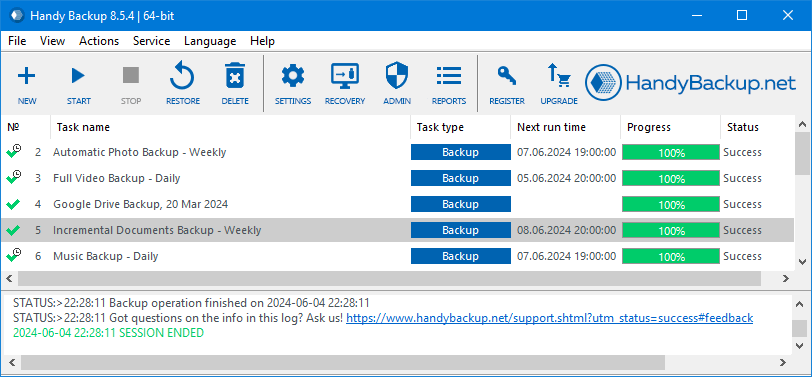
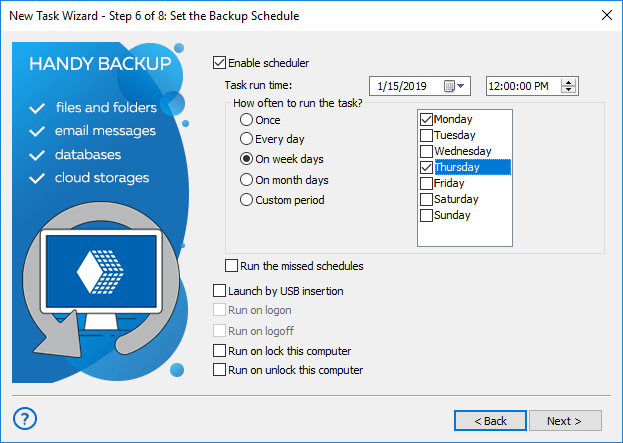
- Automatic laptop backup. Once set up, the scheduler will take care of your backup tasks, not requiring any further attention. You can virtually forget about backups, the program will do everything on its own, and send you detailed e-mail reports.
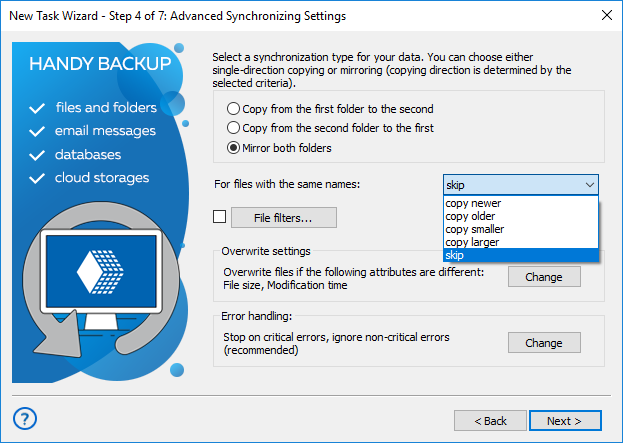
- Synchronization. In addition to backup tasks, the utility allows you to perform synchronization (folder mirroring). You can easily configure daily sync files between a laptop and a desktop - it′s perfect solution if you need to use the same files on two computers simultaneously!
- Data restoration from laptop backup cloud, local or network source, in just a few clicks! You can restore backup completely, or select separate files to restore.
Handy Backup has many other useful functions to keep your backups easy and effective. To learn more, please refer to the full list of backup features of our software.
Video Tutorial: Making a Laptop Backup Drive
In the next video, you will see how to use laptop backup systems in Handy Backup, including the Disaster Recovery utility.
Download for Free
Version 8.7.0 , built on May 7, 2026. 152 MB
30-day full-featured trial period
Secure laptop backup options are available in easy and quick solution, Handy Backup!
How to Prepare My Laptop for Backup?
Preparing your laptop for backup involves several key steps:
- Decide on the data to be backed up. Will you decide to back up your entire drive or just focus on important files like documents, photos and emails?
- Organize your files. This makes the backup process smoother and helps you identify what's important.
- Clean up your laptop by deleting unnecessary files, which can speed up the backup process.
- Choose a reliable laptop backup software that suits your needs, considering factors like storage capacity and security features.
- Finally, establish a regular backup schedule to ensure your data is always up to date.
For secure and automated backups tailored to your unique schedule, Handy Backup is an ideal solution. With its intuitive interface and comprehensive backup capabilities it provides a solid defense against data loss incidents. This dedicated auto laptop backup software ensures your critical data is safeguarded, making data protection straightforward and reliable.