Windows Partition Backup Software
Partition backup software allows making a whole copy of your Windows partition. Handy Backup is the professional partition backup software solution, which has the widest set of features, and at the same time is quite simple and fast to use.
 Download for Free
Version 8.7.0 , built on May 7, 2026. 152 MB
30-day full-featured trial period
Why You Will Need to Make Partition Backup?
One of the biggest dangers in the area of computing is a hard disk breakdown: if your HDD fails, it is extremely difficult to get back to work quickly. This is a strong reason to make a Windows backup partition image, from that you can easily restore your system and data when you need it.

Partition Backup Vs Saving an Entire Disk Image
Backup partition to image file often makes much smaller resulting files than a whole drive backup. Therefore, you can place such backup to storage of smaller capacity, e.g., to a common USB flash pen or to a cloud service (such as backup to Dropbox account) without losses or problems.

Avoiding Swap or Dump Backups
Partition backup drive allows avoiding the situation of taking many time and efforts for backing up servitor partitions on an entire drive image, such as a swap file or partition, a backup partition, a system recovery partition, etc. Often, you have no need to save such data as separate backups!
Partition Backup Software: Handy Backup
Handy Backup is an automatic partition and hard drive backup software with a wide set of advantages and crucial features.
Partition Backup and Recovery for Every Drive and OS

Complete Disk or partition image backup, including operating system, boot records and other information, regardless of HDD or SSD type used and of operating or file system on a partition.
Backup of Primary, Extended, Logical Partitions

Handy Backup saves any partition type (even such obscure types as a Linux swap if you need to backup it for some purposes) on a logical level, storing all partition data intact.
Quick Partition Recovery Actions

The backup and disaster recovery software provides fast recovery from a partition backup drive image, making it under the control of easy-to-use and comprehensible graphical user interface.
Automated Partition Backup Software

For convenience and realizing different backup strategies, Handy Backup contains the flexible scheduler to automate the backup process and many additional options like compression, encryption and other.
Learn more about backup features of our software.
Review About Partition Backup Software by Handy Backup
Recommended Solution
Lifetime license

Handy Backup Professional
Backup and restoration of partitions is available in Professional edition. Download our software and make the first Windows backup partition today! 30-days trial!
Note: When you purchase the Professional or higher edition, the same registration key can be also used to register Disaster Recovery, our new software that is installed on a Flash or USB drive and can create bootable system backup and restore drive, independent of your main OS.
Backup Hard Drive Partition to another Drive
In case when you want to transfer your Windows backup partition to another HDD, create multiple similar computers, or simply want to clone hard drive partitions, the disk imaging feature of Handy Backup can help you. Restore an image backup to a different HDD to create a precise copy of your disk.
With Handy Backup software, you can clone a disk or create a full backup of the entire drive simply by selecting the Disk Image item in the Disk Clone group when creating a task.
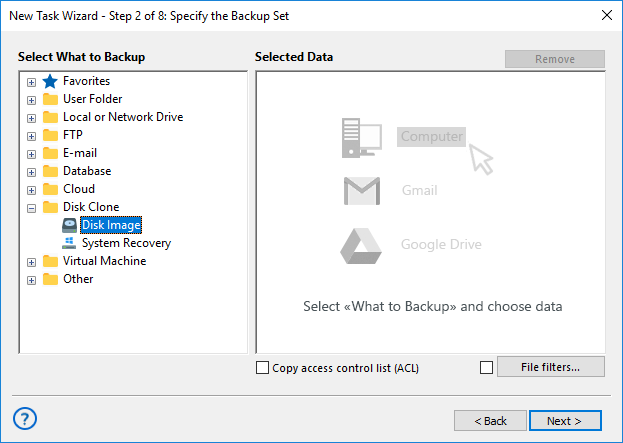
For more details on disk and partition image backup, please refer to disk image backup in the User Manual.
Video Tutorial: Partition Backup and Restore
This video will teach you how to backup partitions using the Disk Image plug-in, as well as how to restore a hard drive partition with the Disaster Recovery tool. You will see a full guide, following all steps of creating a Handy Backup task and then using the Disaster Recovery utility.
Download for Free
Version 8.7.0 , built on May 7, 2026. 152 MB
30-day full-featured trial period
Note: All instructions in this video suggest that you already have a copy of Handy Backup on your computer. If you still haven’t install it, don’t hesitate to download it.
"I create partition backup files for my Windows drives by using the Server Network edition. It is best partition backup software for my job! Since changing the Disaster Recovery to Slax 9, it supports every hardware in our network, allowing making partition backup and recovery under control of a simple-to-use, modern-looking interface!"
Ruis Garcia Gomez, a system administrator