Skype Backup Tool
Skype Backup may seem outdated in today’s digital age, but many users still require a reliable way to backup Skype for Business contacts, personal links, and essential chat history. With Handy Backup, you can effortlessly save any or all Skype data by accessing the application folder through the "Computer" plug-in.
Download the free trial version of our Skype Backup Tool today and explore its powerful features. With Handy Backup, protecting your Skype data is simple and efficient. Get started now and see why Handy Backup is the top choice for users seeking a reliable Skype backup.
 Download for Free
Version 8.7.0 , built on May 7, 2026. 152 MB
30-day full-featured trial period

Advantages of Handy Backup as Skype Backup Tool



Regular Scheduling
Set up automatic Skype backup and restore tasks to run at your preferred time, ensuring your Skype data is always securely backed up without manual intervention.
Encryption
Protect your Skype data with strong encryption standards, including AES 256, AES 128, and Blowfish, ensuring your information stays secure during backup and storage.
Partial Backup
Choose from incremental, differential, or mixed Skype chat backup options to save time and space by backing up only the data that has changed since the last backup.



Archiving
Archive your Skype data for long-term storage without losing access. With archiving, you can free up space while maintaining an organized, accessible backup of your Skype history.
Backup Destinations
Store your Skype backup in multiple locations, including NAS devices, FTP/SFTP/FTPS servers, network drives, local and external storages, and more, for secure and flexible data management.
Real-Time Backups
Create "hot" copies of your Skype data, instantly backing up new messages and updates. This ensures quick recovery of the latest conversations and files whenever needed.
Additional Advantages for Efficient Skype Backup

Receive email notifications about backup status, so you can always stay informed about your Skype data protection without needing to check manually.
Convenient Cloud Backup lets you easily back up data to cloud services like OneDrive backup, ensuring secure and hassle-free storage for your important files.
Time-stamping of backup folders helps you track the exact time of each backup, making it easy to identify when specific files were saved and helping to organize backups efficiently.
Detailed logs provide a comprehensive record of backup processes, ensuring transparency and offering you insights into any issues that may have occurred during the backup process.
Linux and Windows support ensures that no matter which operating system you use, your Skype data can be securely backed up, giving you broader compatibility and flexibility.
30-day trial with no credit card required gives you the opportunity to explore all features of the software without any commitment, allowing you to test it risk-free.
User-friendly interface makes it easy to set up and manage your Skype backups, even for those who aren’t tech-savvy, ensuring a smooth and hassle-free experience.
Lifetime license provides you with the benefit of long-term access to the software without any recurring costs, making it a one-time investment that guarantees continued protection.
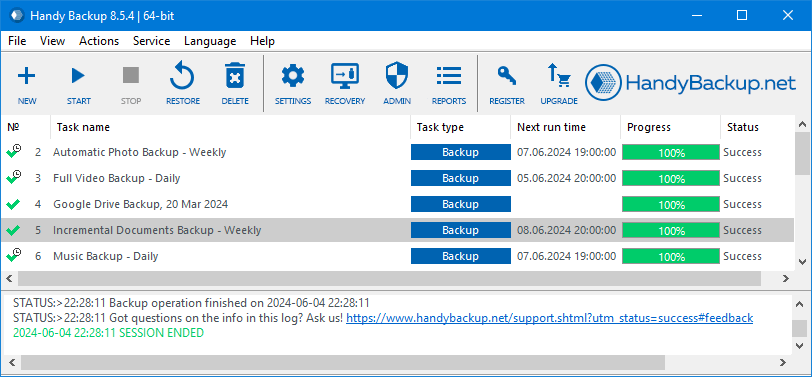
Recommended Solution
Lifetime license

Handy Backup Standard
If you want to back up your contacts, settings, or chat history, the Standard edition is the perfect solution for you, along with any higher-tier version. With our reliable solution, you can easily backup Skype chat history and ensure that all your important data is safely stored. Enjoy a free 30-day trial and experience the peace of mind knowing your Skype data is protected!
How to Backup Skype Data Simultaneously?
With Handy Backup, you can create a single task to back up all Skype-related data simultaneously, including the following information:

Skype Contacts
All users saved in your contact list, ensuring you never lose important connections.

Skype Settings
Both default and customized configurations, so you can restore your preferences after a reinstall or crash.

Skype Chat History
Complete history of all messages, preserving your conversations, no matter how old they are.

Skype Logs
Records of calls, errors, and received messages, allowing you to track all your Skype activity in one place.

Archived Calls
If available, back up archived voice calls to ensure that important conversations are never lost.
How to Back Up Skype Messages in Archives?
Since Skype does not save online audio-streamed conversations by default, the only way to back up Skype calls is to capture the audio stream and save it in a popular audio format, such as MP3 or WAV. This approach allows you to preserve Skype call data effectively.
Note: In some versions, Skype may store message archives on its servers instead of the local machine. In such cases, the program's capabilities for Skype data backup may be limited or restricted, potentially affecting the overall backup strategy.
Why Backup Skype Locally
Since chat histories are stored in the cloud and can be accessed across devices, backing up your data locally might be necessary for the following purposes:

To maintain additional security and safeguard against unexpected data loss, ensuring that your Skype messages and files are always protected and recoverable in case of a system failure;

To create an offline archive for older messages not available in the cloud, allowing you to store historical conversations for future reference without relying on cloud services;

To meet specific compliance or business requirements for data retention, ensuring that you keep records of Skype conversations as mandated by regulations or company policies;

To ensure data accessibility even without internet connectivity, enabling you to access your Skype backup and important messages anytime, regardless of network status.
We recommend backing up Skype data regularly—at least once a day—if you want to ensure your local copies are up-to-date.
How to Backup Skype Conversations with Handy Backup?
To back up Skype contacts and settings using Handy Backup, please follow these instructions:
- Start Handy Backup and create a new task by selecting "New task" from the menu or by clicking the corresponding button on the management panel. Choose the backup task option.
- Select a backup task in Step 1. The mode (simple or advanced) does not make a significant difference in this case.
- In Step 2, select the "Computer" option under the "Local or network drive" group as your data source.
- Click on the "C:" drive and, in the window that appears, locate and select the folder(s) containing your Skype settings. By default, the Skype backup file location can be found in the following folders:
C:\Users\[user name]\AppData\Roaming\Microsoft\Skype for Desktop
C:\Users\[user name]\AppData\Local\Microsoft\Skype for Desktop
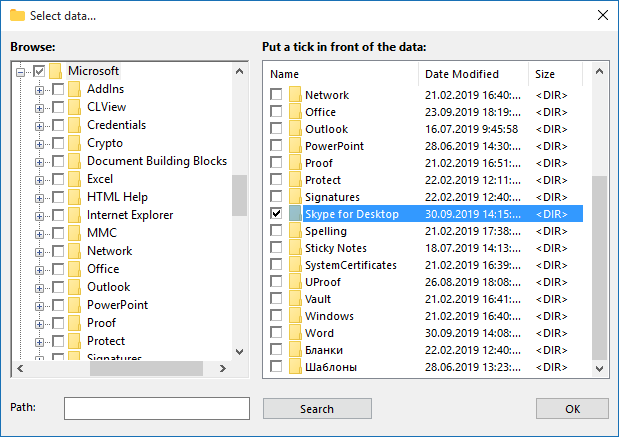
Note: To back up Skype chat history, locate the Skype conversation file named main.db in one of these folders.
- Click "OK" to finalize the selection.
- If you also have an archive of voice calls in an audio format, select the folder where these files are stored and include it in the backup set.
- Next, choose a destination for your backup, set compression or encryption options, schedule your backup task, and configure any other necessary settings. These steps are not specific to Skype backups; they apply to any backup task.
- Give your Skype backup task a name, then click "Finish" to complete the task creation. You can now run the task manually at any time, or let it run according to the scheduled sequence.
Download for Free
Version 8.7.0 , built on May 7, 2026. 152 MB
30-day full-featured trial period
Don’t wait until it’s too late to secure your Skype data! Download the free 30-day trial of Handy Backup today and experience seamless, automated backups for your Skype chat history, contacts, and more. Protect your memories and ensure peace of mind with just a few clicks!