Xbox 360 Games Backup
Backup Xbox 360 games anytime you want to protect your achievements, game files, save states, and even entire drive images. With Handy Backup, you gain unparalleled flexibility in securing your Xbox 360 data.
Download the free trial of our Handy Backup software today and start backing up your Xbox 360 games and data with ease! Experience the ultimate in data protection, with powerful features and simple scheduling that let you focus on your gaming.
 Download for Free
Version 8.7.0 , built on May 7, 2026. 152 MB
30-day full-featured trial period

Two Ways to Backup Xbox 360 Games
There are two main methods to backup Xbox 360 games using your PC:

To back up data from your Xbox 360, remove the hard drive from the console and directly connect it to your computer. This hardware method allows you to copy files efficiently and safely without needing additional software.

You can also back up your Xbox data by using a special USB cable designed to connect your Xbox to your PC. USB cable method allows for a simple and quick transfer of your files between the two devices.
Both methods let you view your Xbox drive content as part of your PC’s file system. With Handy Backup, you can create an Xbox 360 backup by selecting the "Computer" data source option.
The Advantages of Handy Backup for Seamless Xbox 360 Backup
Handy Backup is an all-in-one, highly flexible backup solution that offers the same robust features for Xbox 360 backups as it does for all other data on your computer. Whether it's Xbox games, data, or settings, Handy Backup can handle it all with ease. Here are some key advantages:

Choose Your Storage
Store your Xbox backups on local disks, cloud services like Dropbox and OneDrive, external USB drives, or NAS devices. The choice is yours.

Backup Everything
Backup Xbox and PC game files, save states, drive images, and documents in a single, seamless task. Never miss an important file again.

Set Automatic Backups
Enable automatic backups as soon as your Xbox drive is connected to your PC. No need to remember to start the task manually.

Store in Native File Formats
Save all Xbox backups in native formats, allowing easy management, editing, and transferring without risk of file corruption.

Use Compression and Encryption
Compress and encrypt your backups with AES encryption (128-bit, 256-bit) to protect them from unauthorized access and ensure efficient storage.

Choose Your Backup Type
Select from full, incremental, differential, or mixed backups based on your needs. Protect your data the way it works best for you.
Recommended Solution
Lifetime license

Small Office Home Office Backup Software
Handy Backup Standard edition lets you automatically save your Xbox and PC game data to any storage solution you can imagine. Take control of your game data, and never worry about losing your progress again. Download the free trial now and experience the ultimate backup solution for your gaming world!
How to Backup Xbox 360 Games with Handy Backup
To backup Xbox 360 game data, please follow the instructions below after choosing one of the methods mentioned earlier:
- Ensure that your Xbox drive is connected to your PC as an external disk.
- Open Handy Backup and launch the new task wizard by using the dedicated button on the management panel or by pressing Ctrl+N. Then, choose the backup task in Step 1.
- In Step 2, select the "Computer" data source option. Locate the drive corresponding to the Xbox connection and open it.
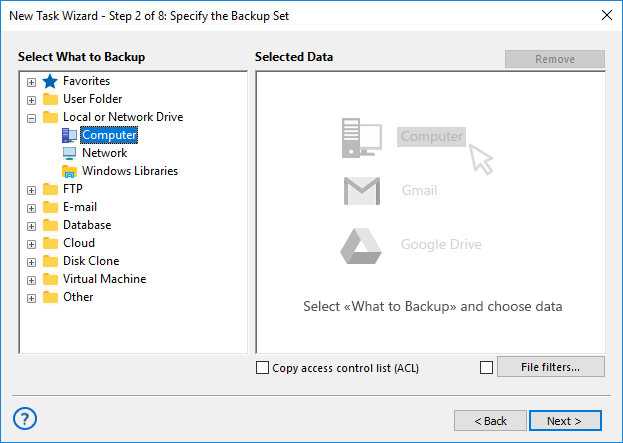
- Select the data to backup Xbox 360 games and mark them with checkboxes. Click OK.
- In Step 3, choose a storage location for your Xbox backups from the various options offered by Handy Backup.
- The next two steps let you select additional backup options, such as full, incremental, differential, or mixed backups, versioned backups, compression, encryption, and more.
- To schedule your task in Step 6, choose the option for automatic execution every time you connect your Xbox to your PC via a USB cable (for the cable method).
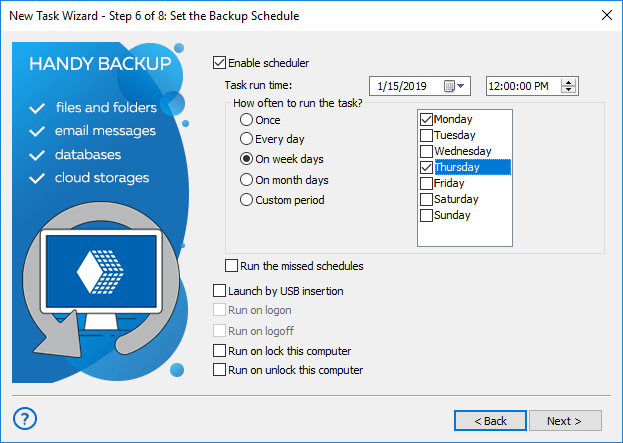
Note: The hardware method is difficult to schedule, as you may not know exactly when you'll connect your Xbox to your PC next. In this case, skip scheduling and manually start the backup task instead.
- Now give your task a name and finish the creation wizard. Enjoy how Handy Backup will automatically backup your Xbox games!
An Alternate Way: Creating an Xbox Drive Image
With the hardware method (as described above), you can create a disk image snapshot of your Xbox drive when it's connected to your PC. This snapshot can later be restored or used as part of a virtual machine, allowing you to repair your Xbox or transfer your data byte-for-byte to another Xbox unit.
To use this method, physically connect your Xbox drive to your PC and create a disk image backup (for more details, refer to the User Manual), or use the free Handy Backup Disaster Recovery (HBDR) utility to perform the same task.

Restoring and Mirroring Xbox Game Backups
To restore your Xbox 360 backups, you can create a restoration task. The process of creating a restoration task is similar to creating a backup task. Additionally, you can perform a "restoration" to a different location, creating a copy or mirror of your Xbox game data.
Download for Free
Version 8.7.0 , built on May 7, 2026. 152 MB
30-day full-featured trial period
Experience how easy it is to backup Xbox 360 games with Handy Backup right now by downloading a completely free 30-day trial version with the full set of features.
Start protecting your game data today with the ultimate Xbox 360 backup solution!