SQL Backup Script for Database Server
Backup database scripts is a basic method for SQL database backup among many users. Script files allow some degree of control and automation, easily merge into a batch process, and are clear for skilled users. However, dedicated backup software is always preferable over any SQL backup script!
 Download for Free
Version 8.7.0 , built on May 7, 2026. 152 MB
30-day full-featured trial period

SQL Backup Database Script: Trivia
A common database backup script consists of the three basic mechanisms:
- A backup utility that does a job (e.g., RMAN for Oracle or SQL server backup script tool).
- A bunch of SQL-related commands to prepare a server and set up backup parameters.
- A scheduler (it can be also external, such as cron in Linux and Unix-like systems).
Note: All these components require special train and skill to use these tools properly! However, any user can download and run a prepared script for a defined task, presumably if that user can predict the results of a script job according to instructions and advices of a script writer!
Dedicated Software vs Database Backup Script
Any SQL database backup software solution is more generic, more convenient, and, in most cases, a more reliable tool than a SQL server backup script.As an example, Handy Backup allows not only to back up any database in exist but also simulate any script database operations!
Recommended Solution
Lifetime license

Handy Backup Small Business
The Small Business solution replaces any SQL server backup script for any existing DBMS just out of the box! Lifetime license and free tech support!
Advantages of Handy Backup Software over Script Database Backup
Automation for Any SQL Database Engine
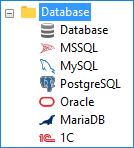
Handy Backup contains plug-ins for every existing SQL database engine, including Oracle, Microsoft SQL Server, MySQL, MariaDB, PostgreSQL, Lotus Notes and IBM DB2. It also allows replacing SQL server backup scripts for non-standard database engines via an appropriate ODBC driver.
Graphical Interface to Control SQL Backup
Compared to database backup script techniques, the main advantage of Handy backup is its GUI (graphical user interface), which allows users of almost any skill level to control any database backup processes more precisely and predictably than any script will allow!
Extra Features in One Bunch
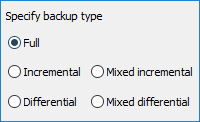
With Handy Backup, you can run other programs before or after a task (imitating script database backup without effort), make partial (incremental, differential or mixed) backup, keep many versions of the same dataset, encrypt database content, change recovery destinations and schedule all your tasks!
Storage Problems and Solutions
A typical SQL backup database script will save data to a pre-defined destination, e.g., to a local drive or an FTP server. By contrast, Handy Backup allows selecting database destination for each particular task, with a possibility of data encryption, using secure protocols etc.
Handy Backup allows saving databases local and online to such storage vaults as local disks, external USB drives, mapped and shared folders (including NAS/SAN), FTP, SFTP, FTPS and cloud storages based on S3 or WebDAV, as well as to OneDrive, Google Drive and Dropbox clouds.
A Video Lesson: Using Handy Backup Software Instead of Database Backup Script
See how quick and easy you can save your data with dedicated Handy Backup software instead of some database backup script! Note that it is an advanced backup mode, providing all functions. In a simple mode, things are even quicker and require much fewer efforts than in this advanced, featured task!
Here, the program makes a mixed differential backup, keeping a full and six diff (partial) backups in a row, and then starting a cycle again. Besides full and partial backups, it uses version control and a built-in scheduler, allowing avoiding external scheduling utilities as in database backup scripts.
Tip: If you want to use a new connection instead of an existing one as shown here, then just click "Create a connection" on the database plug-in window. Set up login and password for connecting to a database, just as for running a database script. Name your connection and click OK to add it to the list.
Download for Free
Version 8.7.0 , built on May 7, 2026. 152 MB
30-day full-featured trial period
Try Handy Backup instead of a SQL backup database script!
A 30-day free trial for all functions and features of the program!