Email Backup Tool — Handy Backup
Email backup software from Handy Backup offers a comprehensive and secure solution for automated email archiving. Designed to safeguard your valuable data, our versatile software effortlessly backs up emails from both webmail services and local clients, ensuring that your information is always protected.
 Download for Free
Version 8.7.0 , built on May 7, 2026. 152 MB





Unified Backup for Webmail and Desktop Email Clients
Webmail Backup (IMAP-Based)
Effortlessly backup emails from webmail services like Microsoft Outlook, Gmail, AOL, or Yahoo Mail using our dedicated IMAP plugin for seamless webmail and cloud-based email backups.
Local Email Clients Backup
Securely back up data and settings from popular email clients like Outlook, Mailbird, eM Client, Thunderbird and others ensuring all your local email information is preserved.






Advantages

Easy Email Migration
Move backups to another mailbox, or transfer to a completely different email address. Backups are stored in universal EML format, making it easy for users to access and manage email across a wide range of email clients.

Multiple Email-Accounts Backup
The solution lets you back up several email accounts at the same time. This is particularly convenient for users who manage multiple mailboxes, helping ensure that all critical email data is safely protected.

Item-Level Email Backup
Granular email backup allows you to back up only specific emails, folders, or date ranges instead of the entire mailbox. This gives you precise control over what data is protected, reducing storage usage.
Comprehensive Features of Handy Backup for Automatic Email Backup

Email Backup Migration
Restore backups to their original location, move them to another mailbox, or transfer to a completely different email address, making it simple to clone or migrate your email data.

Flexible Backup Scheduling
Automate your email backups with customizable scheduling options, ranging from every few minutes to monthly. Initiate backups based on specific system events for tailored data protection.

Access Without Recovery
View and browse email backups directly in their native EML format without needing to restore them. This feature supports effortless server-to-server and account-to-account migrations.

Advanced Backup Options
Choose from incremental, differential, or mixed backups to keep multiple versions of your data. Stay informed with email notifications about backup statuses and activities.

Detailed Logs
Track all backup activities with detailed logs that capture start and end times, statuses, and any issues. This transparency aids troubleshooting and helps you monitor the effectiveness of your backups.

Lifetime License
Opt for a lifetime license to gain perpetual access to the software and all future updates without recurring fees, offering a cost-effective long-term solution for data protection.
A Wide Range of Backup Storage Options
With Handy Backup, you have the flexibility to back up your Emails to a variety of storage options, ensuring that your important files are always secure and accessible. Here’s where you can store your backups with our reliable email backup app:
- Local and External Storage – Save your backups directly to your computer's hard drive or to an external drive for quick and easy access.
- Network Drives and NAS – Store your backups on network drives or Network Attached Storage (NAS) devices, making them accessible to other devices on your network.
- FTP/SFTP/FTPS Servers – Transfer your backups securely to remote FTP, SFTP, or FTPS servers, providing offsite protection and accessibility.
- WebDAV Servers – Use WebDAV servers to store your backups in a flexible and scalable way, ideal for both personal and professional use.
- Email Accounts – Back up your email content directly to your email account, keeping your communications safe and retrievable from any location.
- Cloud Storage – Utilize popular cloud services like Amazon S3, Dropbox, Google Drive, and OneDrive, or other S3- and WebDAV-compatible cloud solutions for reliable and scalable storage.
Versatile Backup Destinations

Customers about Handy Backup
Recommended Solution
Lifetime license

Home Backup Solution
Our email backup software supports both local email backups and direct backups from any popular. Try the best backup IMAP email software available with a free 30-day trial today and experience top-tier data protection and convenience!
Advantages of Using IMAP for Email Backup Software
In addition to the obvious benefits of a dedicated email backup solution such as scheduling, data encryption, automated backups, email recovery, Handy Backup offers specific advantages that make it an excellent choice for backing up email content.
- By backing up email messages directly from your Internet mail provider, you can open them with any mail client, as all local email solutions support the *.eml format.
- The backup setup is highly flexible—you can specify your mail service, port, login credentials, and authentication and connection methods to accommodate any mail service.
- In cases such as complete loss of account login data, physical or software account removal, or a ransomware attack, you can easily perform a full account restoration.
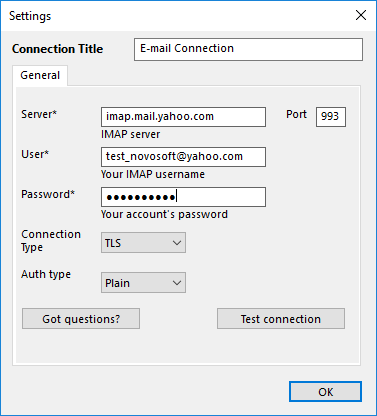
Note: To connect to a specific server, you can either use the settings from a previously established connection in a local email client (found in the "Properties" section of the configuration tab) or search online through Google or another search engine for the necessary settings.
- Handy Backup will verify the settings of your mail backup service and notify you if they are correct or not.
- There is no need to download the web page of your mail service. Instead, you can back up messages to your local computer and access them offline.
For detailed information on using an IMAP-based email backup solution, please refer to the User Manual. You can also view the full list of backup features of our seamless email backup software.
How to Backup Emails
Handy Backup features an intuitive task-based interface that facilitates email archiving either as a standalone task or as part of a broader data retention strategy. In Handy Backup, you can incorporate various types of data — such as files, folders, and databases — into a single backup set.
How to Export Emails to Computer or Online Storage Using IMAP
To back up incoming messages from a mail server via IMAP, please follow the instructions below.
- Create a new task and select the backup task type. Enable advanced mode if desired.
- In Step 2, choose the E-mail plugin from the E-mail category.
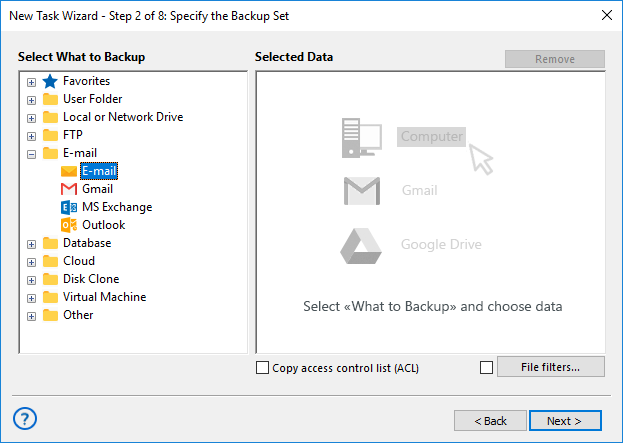
- Connect to the email server by clicking "Create a Connection".
- Fill in the required fields in the browser window to access your email account.
Note: Do not forget allowing Handy Backup using your account as an IMAP email backup client.
Next, create a new task as outlined in the User Manual. You can schedule the task and configure various properties, including full or incremental backup, compression, encryption, and more.
The Best Way to Backup Email Content from Local Clients
To use Handy Backup for backing up email from local clients (such as Outlook Express, The Bat!, or Thunderbird), copy the relevant files and folders using the Computer plug-in.
- Create a new task and select the backup task type. Enable advanced mode if desired.
- In Step 2, choose the Computer plug-in from the Local or Network Drive group.
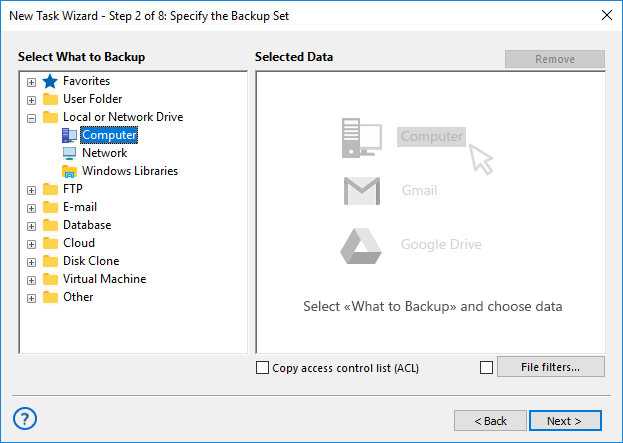
- Locate the folder containing emails downloaded by the local client. Select the folder (or choose individual emails from it).
- Click OK and proceed with creating the task.
Tip! The locations for local email content downloaded via the IMAP protocol vary depending on the email client you are using.
FAQ on Email Backup Software
- Can Handy Backup handle email backups for multiple email accounts simultaneously?
Yes, Handy Backup can manage email backups for multiple accounts at the same time. You can configure separate backup tasks for each email account, allowing you to back up all your email data efficiently from different providers simultaneously.
- Are there any limitations on the size of emails or attachments that can be backed up?
Our email backup tool does not impose strict limits on the size of individual emails or attachments. However, performance might be affected with extremely large attachments or very large volumes of data. For optimal performance, it’s recommended to manage backup sizes and ensure adequate storage space is available.
- What are the differences between incremental and full backups in Handy Backup?
A full backup captures a complete copy of your email data at a specific point in time, while an incremental backup only saves changes made since the last backup. Incremental backups are faster and require less storage space, but a full backup provides a complete snapshot of your data.
- Does your program save attachments when backing up emails? If so, in what form are they stored?
Yes, when backing up emails with the Email plug-in, all messages are saved in the .eml format. Attachments are stored inside the .eml file together with the message text and headers. This means each email is saved in full - and when restored, you will get it back in its original form with all attachments.
Video Tutorial: Using Handy Backup as Email Backup Software
This video example will show how to backup email with Handy Backup. It will show all flexibility and might of this solution by migrating a Yahoo!Mail to Outlook. Com. See how convenient and comfortable you can make a copy of your mailbox with this email backup software!
Download for Free
Version 8.7.0 , built on May 7, 2026. 152 MB
With Handy Backup, users can easily manage email backups from any web server or local system, simplifying the import and migration of emails between different services. Experience the full power of our email backup tool with a free 30-day trial — download it today!
Capterra′s Rating:

"Great product, very simple and effective backup program"
See also:
"In my opinion, Handy Backup is a perfect email backup solution. A few years ago, I have organized IMAP email backup through its “E-mail” plug-in for the version 7, and since that time, I migrated to Handy Backup 8 and transferred my email backup tasks as well. All tasks are working for now, without any flaw or mishap, and I always have a secured, reliable copy of all my Web mail accounts."
Mohammad Jardun, a software manager, Singapore