Synchronization with FilesAnywhere Web Space
Whether your site has been hacked or infected with a virus, an integral file has been accidentally deleted, your server has crashed, or an update has gone wrong, you can quickly get your site back up and running with a backup.
 Download for Free
Version 8.7.0 , built on May 7, 2026. 152 MB
30-day full-featured trial period
How to synchronize with FilesAnywhere
To synchronize your files to FilesAnywhere service:
- Download and install Handy Backup
- Go to www.filesanywhere.com and register for a FilesAnywhere account
- Your password will arrive shortly by e-mail
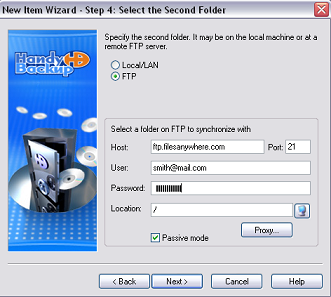
- Open your Handy Backup and set up your FTP access
- Your Host is ftp.filesanywhere.com, username is your e-mail address, and the password - you received this through e-mail
- Now, configure the directory through which to synchronize your files, and Handy Backup immediately sinchronizes your database to your FilesAnywhere account.
What does FilesAnywhere have to offer?
- Free 10-day trial
- Unlimited File Transfers
- Unlimited File Retention
Download Handy Backup for synchronize with FilesAnywhere
Video Example
Learn how to backup a website with Handy Backup, step by step.
Note: Instructions in this video suggest that you already have Handy Backup installed on your computer. If you still haven’t done so, don’t hesitate to download it.
Download for Free
Version 8.7.0 , built on May 7, 2026. 152 MB
30-day full-featured trial period