Image Backup Software for Windows 11, 10
System Image Backup Software - Handy Backup is designed to create a complete system image that includes all files, settings, and applications on your device, ensuring full system recovery when needed. It enables fast and reliable recovery in case of system failures, crashes, or hardware issues. Protect your data with confidence!
 Download for Free
Version 8.7.0 , built on May 7, 2026. 152 MB
30-day full-featured trial period

Windows Image Backup Software: Key Methods
For Windows System image backup, Handy Backup provides three essential solutions: the Disk Image and System Recovery plugins, as well as a dedicated “bare metal” utility, Disaster Recovery. These tools allow you to create secure backups and restore your system effortlessly in case of failure.

Disk Backup
Disk Image creates a full Windows 11 backup by capturing the entire disk or partition in a binary format. This backup is secure and cannot be altered, ensuring that the system can only be restored exactly as it was. This method is ideal for ensuring the integrity of your entire system in case of critical errors, malware attacks, or hardware issues.
System Recovery
System Recovery backs up entire drives by creating a readable image in the VHD format. This backup is perfect for users who need to access their files or restore a system in a virtual environment. OS users can benefit from this method as it allows you to recover from system errors or transfer your Windows system backup into a VM.
Recovery Tool
Disaster Recovery* is a standalone utility that creates a bootable system restore disk image on a USB drive. This tool is perfect for users who want to ensure they can recover their system even if the main OS is not bootable. Available for free with most Handy Backup editions, it provides a reliable way to get your system back up and running.
* You can use a backup created by the Disk Image plugin and restore it from scratch using the Disaster Recovery utility, ensuring complete system recovery.

Please refer to the Disaster Recovery user manual section to create a bootable USB drive or HDD, from which you can always restore a system image created by Handy Backup. The Disaster Recovery tool has its own operating system, independent of the current OS installed on any machine, allowing you to perform a "cold" Windows restore for a disk image.
Top Features of Windows 11 Image Backup Software

Leverage Two Powerful Plug-ins
Utilize the Disk Image plugin for a complete binary backup of your operating system or opt for the System Recovery plugin to create a VHD image. Pair this with the Disaster Recovery utility to back up your system to any spare USB drive for added protection.

Schedule Regular Backups
Easily set up system Windows 11 automatic backups with Handy Backup. You can choose backup intervals from minutes to months or trigger backups based on specific system events, such as when an external USB drive is connected or at scheduled times.

Backup Without Interruptions
Handy Backup uses VSS (Volume Shadow Copy Service), allowing you to backup Windows 11 image without interrupting system activities. Perform "hot" backups while keeping your system running smoothly, ensuring no downtime during backup.

Ensure Secure Backup with Encryption
Encrypt your Windows 11 system image backup with robust encryption methods such as AES-256, AES-128, or Blowfish, ensuring your data is fully protected. Additionally, you can archive your backup in a secure ZIP format for easier storage and transfer.

Backup to Multiple Destinations
Backup Windows 11 image to various destinations, such as local disks, USB drives, NAS, FTP/SFTP/FTPS servers, or cloud storage services, including those optimized for Windows 11 cloud backup. This flexibility ensures your backup strategy is secure and tailored to your needs.

Virtual Machine Compatibility
Turn your Windows 11 system backup into a virtual machine backup for testing, migration, or disaster recovery purposes. Handy Backup supports major VM platforms like Hyper-V and VMware, providing you with the flexibility to use your backups in virtualized environments.

Receive Email Notifications
Stay updated with real-time email notifications about your backup progress, including successful completions, errors, or warnings. Handy Backup keeps you in the loop, ensuring you're aware of your backup status at all times. Whether it's a small update or a critical issue, you’ll be informed instantly.

Comprehensive Backup Logs
Handy Backup creates detailed backup logs, allowing you to track every backup operation. These logs help you monitor the backup process, identify potential issues, and maintain a complete backup history for your system. With detailed timestamps and status updates, you can easily audit your backup history.
Recommended Solution
Lifetime license

Handy Backup Professional
Handy Backup Professional is a reliable system image backup software that allows you to create full Windows disk image backups, including the operating system, installed applications, and system settings. The solution lets you store images on a local hard drive or in popular cloud storage services, ensuring flexible and secure system recovery.
How to Create Windows Image
To create a Windows 11 full backup, you can use the "System Recovery" feature, which creates a VHD file of your entire Windows system drive image. Follow the simple instructions below, or refer to the User Manual for more detailed information on creating backup tasks.
- Open Handy Backup and start the new task wizard via the menu or by pressing Ctrl+N.
- Create a backup task in Step 1, then proceed to Step 2 by clicking "Next".
- Select the "System Recovery" plugin in the "Disk Clone" group on the left panel of Step 2.
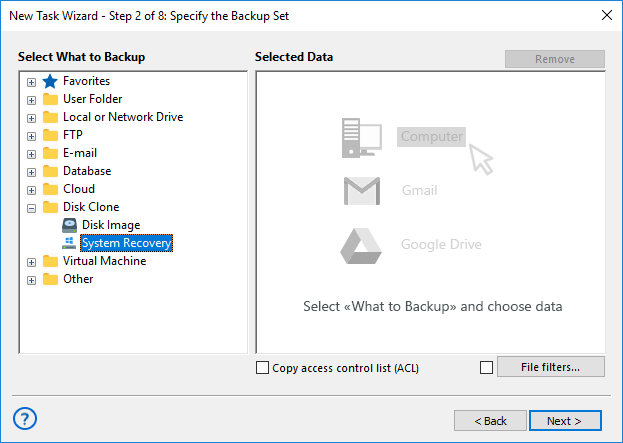
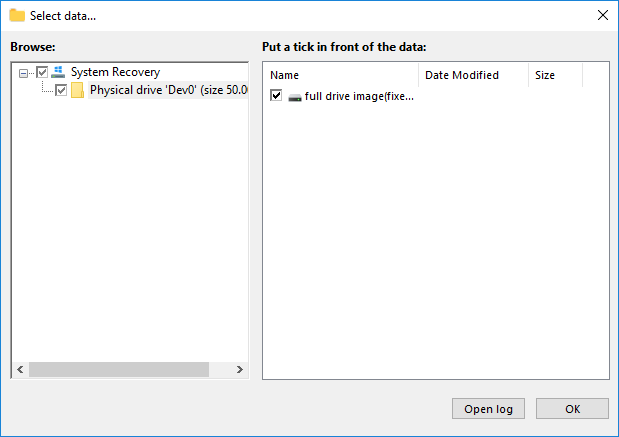
- In the new window, select the physical drive to back up as a Windows image.
- Click OK to confirm your selection and continue with the task creation process.
Handy Backup will now prepare to backup Windows 11 image, utilizing advanced features such as data compression, encryption, and flexible storage options to ensure your system is securely saved and easily recoverable.
Additional Advantages

We can develop a custom plugin to fit your unique backup and recovery needs.
Choose from four cost-effective editions, each designed for different user requirements.
Supports 21 languages, providing a smooth and intuitive experience for users worldwide.
Our dedicated customer support team is ready to assist with any questions or issues.
Web-based interface for convenient access and management from any device or operating system within the same network.
Enjoy a 30-day trial to explore all features before making a decision.
Designed with a user-friendly interface for seamless navigation and setup.
Get a lifetime license with continuous updates and long-term support.
Windows Image Backup Software for Different OS Versions

Windows 11 Image Backup
Handy Backup provides a powerful Windows 11 backup solution, allowing users to create full system images for quick recovery.

Windows 10 Image Backup
This OS continues to be widely used, and a reliable Windows 10 backup solution like Handy Backup ensures system stability, data protection, and easy recovery.

Windows 8 Image Backup
Handy Backup enables automated Windows 8 backup with full system image creation, ensuring smooth recovery and easy system migration to new drives.

Windows 7 Image Backup
With Handy Backup, you can easily create a full system image for Windows 7 backup, enabling fast recovery and seamless migration, including virtualization support.
Video Example: How to Create Windows 10 Image Backup
In our next video, we'll show you how to create a system backup of Windows 10. This method can also be used to create system image backup for other Windows versions, including Windows 11 image backup.
Note: There's no need to save the backup file to a USB drive for future restoration! In this video, we store our Windows image backup on a non-system drive connected to the PC, making it easily accessible whenever needed.
Download for Free
Version 8.7.0 , built on May 7, 2026. 152 MB
30-day full-featured trial period
Get started with Handy Backup today! Download the 30-day free trial and experience the powerful features of our Windows 11 Image Backup Software for complete disk protection. Keep your data safe, restore your system anytime, and enjoy hassle-free backup management!
FAQ
How reliable is the built-in Windows system image backup tool?
The built-in Windows tool is functional but limited and no longer actively developed by Microsoft. While it can create full system images, users often report issues with flexibility, compatibility, and recovery. For more reliable and automated protection, many users prefer dedicated software like Handy Backup.
Can I schedule automatic image backups in Windows 11/10?
The built-in Windows solution offers very limited scheduling options and is not designed for flexible automation. In contrast, Handy Backup allows you to fully automate system image backups with advanced scheduling options, including time-based tasks and event-based triggers such as USB connection.
Are Windows system image backups encrypted by default?
No, Windows built-in system image backups are not encrypted by default. This means anyone with access to the backup drive may potentially read the data. With Handy Backup, you can enable strong encryption (such as AES-256) to ensure your system image remains secure.
Handy Backup Review
Ruis Garcia Gomez, a system administrator