Linux Backup and Restore Software Solution
Linux backup software* incorporates a full range of services regarding data backup, running natively for different Linux backup solutions.
Handy Backup is an example of an efficient and easy-to-use Linux backup utility, containing plug-ins and capabilities for saving copies of data from any Linux workstation.

To assure Linux backup best practices realizing in most automatic and convenient mode we can dream about, Handy Backup contains many crucial features, providing the most effective job ever possible.

Scheduling Automatic Backup
Handy Backup has a flexible backup scheduler, which automatically repeats tasks execution with a given rate. Back up your Linux files while you work, sleep or have fun!

Linux Disk Image Backup
Hard disk imaging is a technology for making complete backup of HDD including operating system and all data. Protect every single bit of your data!

Linux Files and Folders Backup
Smart filemask-based filtering engine provides an easy way to back up only files that you need. Handy Backup keeps your backups accurate and saves space on your HDD!

Flexible Backup Settings
Make your Linux incremental backup, differential backup, mixed full/differential cycles; store many backup copies with versioning; encrypt and compress your backups – all from a single program!

Variety of Supported Storage Types
If you want to upload your backup to FTP or copy your Linux backup to USB flash drive, Handy Backup will let Linux backup online with a single click!

Linux Backup Cloud Capabilities
You can back up Linux to Amazon S3, Google Drive, OneDrive, Dropbox, other services, or any cloud via a Linux WebDAV client – enjoy seamless cloud backups!
If you also want to backup Linux server data, especially by network (either in plain and heterogeneous network environment), please learn more about Linux server backup.
Note: Another Handy Backup solution utilizing Linux (both for operating itself and for creating/restoring Linux backup images) is Disaster Recovery. This one is for system recovery from its full system image.

Handy Backup is a Linux backup utility proof-tested completely under Ubuntu 18.04, 16.04 and 14.04. It can also run under any modern distro through Jawa workstation, including CentOS and many other Linux and FreeBSD distributives.
Extended Compatibility Features
In addition, Handy Backup provides a lot more compatibility options as Linux backup and restore software, including utilizing Wine for GUI, organizing backup Linux to Amazon S3 cloud, or to any other cloud like Google Drive, using FTPS with SSL, saving Windows network data and so on.
Note: Starting from version 8.5, Handy Backup Server Network now includes a workstation specifically designed for the Linux operating system. This allows for smooth integration with the control panel running on the Windows OS, making it easier to create backups for Linux files. Additionally, it's worth noting that the functionality for backing up virtual machines and databases is currently in development. For detailed instructions on setup and usage, please consult the relevant section in the User Manual.
Customers about Handy Backup as Linux Backup Software
Recommended Solution
Lifetime license

Handy Backup Server Network
Check out the smart remote Linux workstation snapshot making over a network and get prepared for the Linux backup online! Free, full-featured 30-days trial!
Tuning
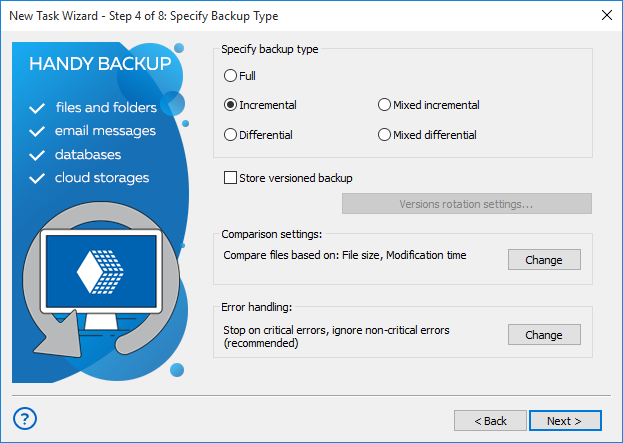
This screen allows you selecting between different Linux backup strategies, to save both traffic usage and storage space. It also handles such things as versioned backup, comparison and time stamping.
Encrypting
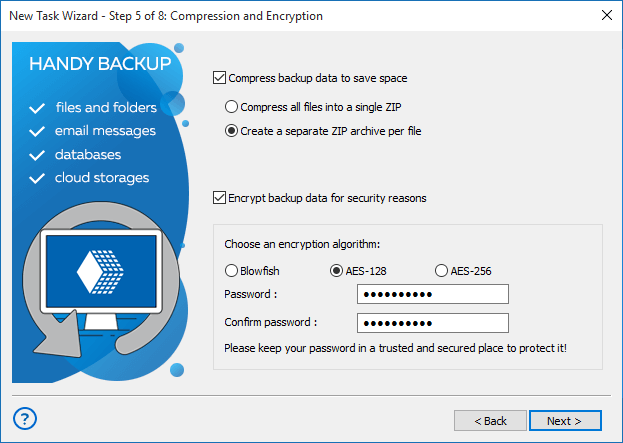
Enhance the security of your crucial Linux backup files and optimize your total backup storage space in the chosen vault by utilizing the built-in tool to both compress and encrypt the data with encrypted backup software.
Scheduling
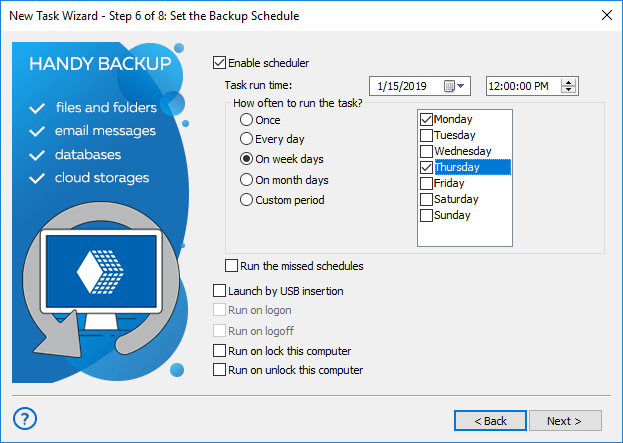
Select an exact time to run the Linux backup utility task, and set up continuous repeating of this task for a selected period. You can also force re-running missed schedules, or launch a task by an event!
Linux Data Deduplication
Remove your backup redundancy with a feature of Linux deduplication, making only these backups which are absent for now in your storage.
Web-based GUI
Command and control your Handy Backup under Linux using the Web-based graphical user interface (GUI), containing all features of the management panel for your backup tasks.
 Download for Free
Version 8.7.0 , built on May 7, 2026. 152 MB
30-day full-featured trial period
Experience the Linux backup to cloud, FTP or local resource with the powerful and convenient Handy Backup solution!
"I have use Handy Backup for both my Ubuntu-based PCs (desktop and laptop), and for a small business server, also based on Ubuntu and providing a PostgreSQL database to support my website’s CMS. It works well natively, requiring no Wine for running predefined tasks, although an interface is still Wine-based. Sure, I have no problems with copying my files and folders under Ubuntu!"
James Scotch, a software developer
"I make Linux backup to cloud, often to a Dropbox, for all my files and folders. Handy Backup works well with Linux files, it is smooth and requires no much resources. I use Linux Mint 17.1, which is based on Ubuntu, and Handy Backup does all my backups from there."
Maria Soledad Pereira, an HR manager