File Backup Software for Windows 11, 10
File backup software by Handy Backup is a simple yet powerful solution for securely saving and restoring your files wherever you want. It preserves native file formats unless specified otherwise, allowing you to protect, modify, clone, or transfer important data with ease.
Experience Handy Backup – the user-friendly solution for safeguarding files of all types, including seamless Windows 11 File Backup. Download the 30-day trial version now to explore its full potential, including advanced document backup features.
 Download for Free
Version 8.7.0 , built on May 7, 2026. 152 MB
30-day full-featured trial period

Easy Backup
Run file backups automatically by time or event, with no manual work.
Easy Restore
Fast recovery to the desired location, whenever you need it.
Storage Flexibility
Store backups on local, network, cloud, or FTP/SFTP for convenience.
Encryption
Protect file backups with strong AES encryption for maximum security.
How to Backup Files in Windows 11 with Flexible Storage Solutions
In its' latest OS, Microsoft has shifted its approach to file backup, emphasizing cloud-based solutions like OneDrive while reducing reliance on local storage options. While convenient, this approach may not always provide comprehensive file backup in Windows 11, especially for users who require diverse and secure storage methods.
Handy Backup, a powerful Windows 11 file backup software, offers a wide range of storage options for backing up files in Windows 11 seamlessly:

Local Storage: Securely perform your Windows 11 backups to external drives, local disks, USB devices, or mapped network drives for quick access and seamless recovery.
Network Storage: Store your backup files on shared folders, NAS/SAN devices, or file servers to ensure seamless centralized data protection.
Cloud & Online Storage: Securely back up data to OneDrive, OneDrive for Business, Dropbox, Google Drive, Box, and other cloud platforms using API-based integration.
FTP & Web Storage: Automate file backup in Windows 11 to FTP, SFTP, or FTPS servers, or use secure WebDAV and S3 storage for remote accessibility.
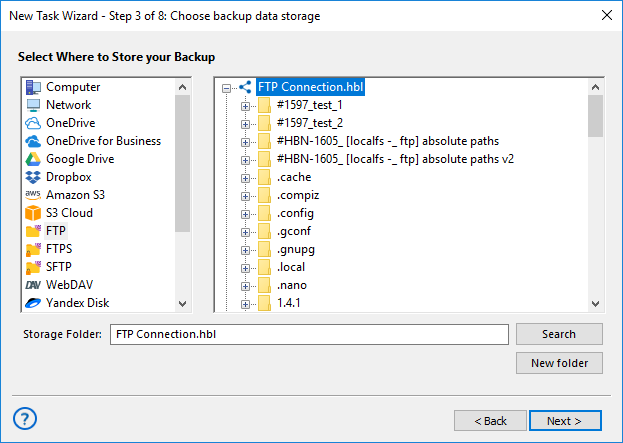
Note: If the selected storage allows, Handy Backup automatic backup software always prioritizes secure API-based data transfers instead of less secure methods like syncing local folders. This ensures enhanced security and reliability for backup files in Windows 11 without unnecessary risks.
Best File Backup Software: Protect Your Data with Advanced Features

Automated File Backup
Easily configure and automate backup tasks with a user-friendly interface. Set up scheduled operations, customize settings, ensuring seamless file protection.

Encryption
Protect sensitive data with industry-standard encryption algorithms, including AES-256, AES-128, and Blowfish.

Archiving
Utilize ZIP archiving to compress backups, reducing storage space while maintaining fast and easy access to your files when needed.

Partial Backup
Choose between incremental, differential, and mixed backup methods to optimize storage and reduce backup time while ensuring data integrity.

Storage Options
Store backups on local or external drives, network-attached storage (NAS), or remote servers via FTP, SFTP, and FTPS for maximum flexibility.

Cloud Backup
Back up data directly to popular cloud services such as Google Drive, OneDrive, Dropbox, Amazon S3, and more, ensuring off-site data safety.

Windows Compatibility
Fully compatible with Windows 11 file backup and older Windows versions, also enabling seamless Windows Server backup.

Linux Backup
Perform Linux file backups for supported distributions, ensuring seamless data protection across multiple platforms.
Recommended Solution
Lifetime license

Home Office Backup Solution
The Standard Edition offers all the essential tools and features, delivering exceptional value as one of the most affordable and reliable file backup software solutions available. Designed for both personal and small business use, it ensures effortless data protection. Try it free for 30 days!
How to Use Handy Backup as File Backup Software for Windows?
This brief guide will instruct you on how to backup files on your computer using an automated task with our efficient document backup software.
- To create a new task, click the main panel button or press Ctrl+N, then select "Backup" and proceed.
- Expand "Local or Network Drives", select the "Computer" plug-in, and choose files using the file system tree.
- Confirm your selection, choose the backup destination — such as backup files online — and follow the on-screen instructions to complete the setup.
Note: Ensure you know the location of files for backup. If unsure, use file filters based on masks or attributes.
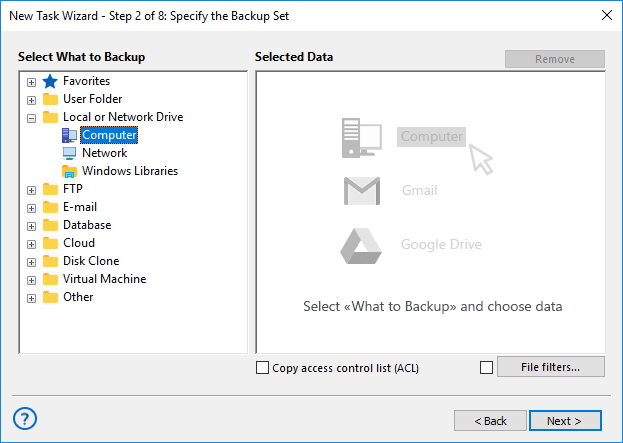
Using File Filters
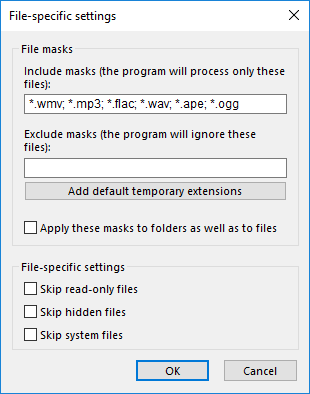
To learn how to backup files based on their names using masks, please follow the instructions provided here.
- Enable advanced mode on Step 1, then click "File filters" on Step 2 to open the filter settings.
- Use masks to include or exclude specific file names, then confirm your selection.
- Choose the "Computer" plug-in, select a drive or folder, and the backup utility will automatically find matching files.
Note: Handy Backup can also serve as a reliable solution for Windows 11 virtual machine backup of your files.
Restoring Files from Backup
Every file backup utility should include the ability for automatic restoration from backups. To utilize this feature in Handy Backup, please follow the steps below to create a restoration task.
- Launch the New Task Wizard and create a new restoration task following the instructions provided above. In Step 2, navigate to locate the index file backup.hbi in your archive folder. Then, click "Next".
- By default, Handy Backup will restore the files to their original location.
Important Note! We strongly recommend thoroughly inspecting any location before restoring a file backup into it. Otherwise, you may accidentally overwrite newer data with the backup content you are restoring into the destination folder!
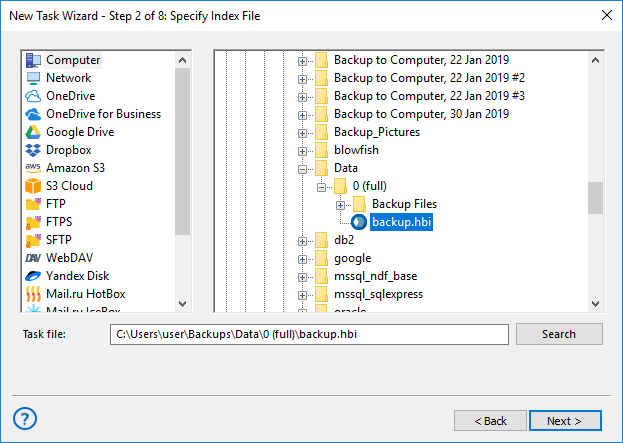
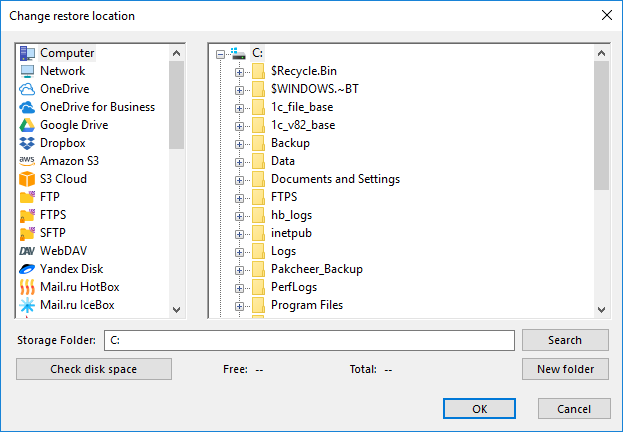
- If you wish to restore your files to a different folder than their original location, please follow these steps:
- In the "Select Restore Locations" dialog, choose a file to relocate, then click the "Change Location" button. This action will open the "Change restore location" dialog.
- Choose a new location (including the option for a completely different destination type, such as an FTP server).
- Continue creating a recovery task following the instructions outlined in the User Manual. None of these steps have any specific requirements for file restoration.
Streamlined Access to Individual Files
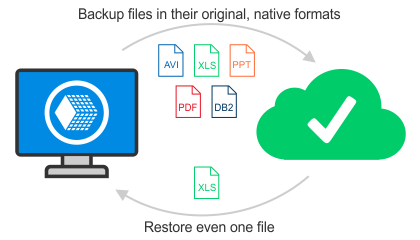
To streamline file backup and data recovery, Handy Backup allows accessing files directly without full restoration. This quick access is crucial for users needing to retrieve specific files or view archive contents without a complete restore.
Our tools simplify finding and extracting individual files in their original formats, saving time and effort compared to full restoration. For example, if you only require one document or image from an archive, you can retrieve it swiftly without restoring the entire set.
Restoring Individual Files from Backup
To retrieve an individual file or folder from a backup set using Handy Backup, follow these steps:
- Create a new recovery task.
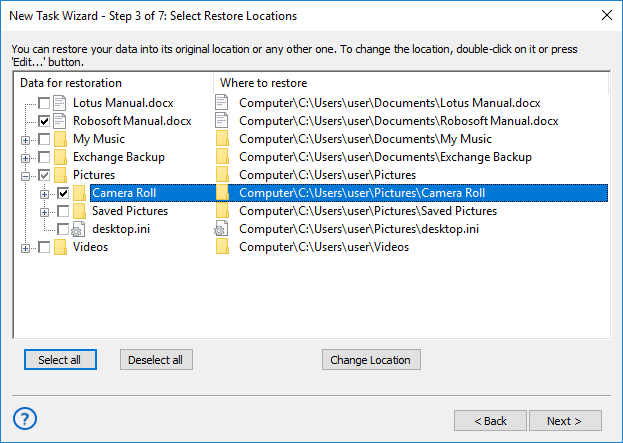
- During Step 3, titled "Select restore location," click "Deselect all" to clear the recovery list of all files, then utilize the left panel for seamless file navigation.
- Locate the specific file or folder you wish to recover and tick the checkbox next to its name.
This streamlined process ensures efficient and precise file recovery, empowering users to swiftly access and restore their data with ease.
Note: Selecting a subfolder will automatically include all items contained within it, both files and subfolders.
File Backup Utility: Video Tutorial
In the upcoming video, you'll learn how to back up files to a USB device, employ versioned file backup, trigger tasks via system events, and delve into additional special features provided by Handy Backup - an exceptional solution for document backup software.
Note: In this video, a user demonstrates how to create a file backup task from the My Desktop folder to a USB device. This task will initiate automatically whenever a user plugs a USB device into a PC slot.
Download for Free
Version 8.7.0 , built on May 7, 2026. 152 MB
30-day full-featured trial period
Handy Backup exemplifies the best file backup software available! Don't hesitate to give it a try by downloading the free 30-day trial version, complete with all functions and plug-ins, right away!