NAS Backup Software - Data Backup to NAS Server
Handy Backup is a perfect NAS backup solution for small business and home, allowing using network storage units as both source and destination for Windows NAS backup. Any edition of Handy Backup has capabilities to use it as effective and reliable NAS backup server software.
 Download for Free
Version 8.5.3 , built on March 5, 2024. 116 MB
30-day full-featured trial period
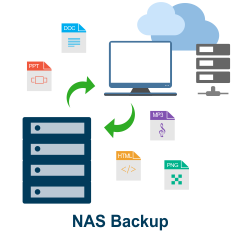
Capabilities of NAS Backup with Handy Backup
Using Handy Backup for saving data to or from your NAS gives you the following key advantages:
- "Black box" (external) and "white-box" (internal) approaches fully supported to serve as NAS backup software (See the detailed description below);
- Backup to external USB drive with an option to run a backup task automatically when plugging an appropriate USB device into any slot on a PC;
- Full automation of all backup stages, from selecting data of different types to scheduling and chaining pre-planned backup tasks;
- Preserving native formats for all data such as photo, HDD images or databases in unencrypted backups, allowing using NAS backup folders natively as simple data copies;
- Complete control over NAS server backup, including full, incremental, differential and mixed backup, as well as rotating NAS backup versions, making compression and encryption, silent running and so on.
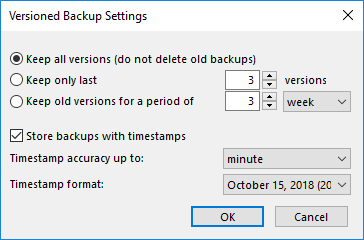
These features allow you organizing and automating all backup operations involving your NAS.
Windows and Linux Operational Capabilities
Handy Backup support both Windows and Linux in native mode. Now you can install a Linux copy of Handy Backup on your Linux-based NAS and run it locally in a fully native mode, requiring no bridge software to utilize all its functions!
Alternate Storage for NAS Backup Content
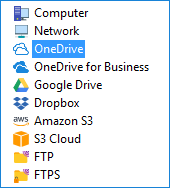
Sometimes, you may want to save a NAS backup online or to a local drive. For these purposes, Handy Backup provides a full set of storage plug-ins, allowing you making NAS backup to Google Drive or OneDrive, to Amazon S3, FTP, a local disk, a DAS device plugged by USB, or many other options.
The List of Backup Source and Storage Options
Besides using NAS as backup storage, you can utilize the following list of options to save NAS content or to download content from these storage solutions to some NAS.
- Local drives, external USB drives, mapped disks connected via the network;
- Other NAS units, FTP, SFTP and FTPS services, other machines in a local network;
- Cloud services based on S3 and WebDAV, both private and commercial;
- Popular cloud solutions including NAS backup to Amazon S3, Google Drive, Dropbox and Box.
You can use an option of using NAS with offsite backup to another machine only for the Server Network edition of Handy Backup. This solution also allows NAS to NAS backup in a “white-box” mode, presuming that both NAS devices utilize Windows or Ubuntu Linux to run operations. Learn more about online backup NAS to cloud.
Customers about Backup to NAS with Handy Backup
Recommended Solution
$249 per license
Handy Backup Small Business
The easiest way to save important data to NAS automatically is to use the Handy Backup Small Business edition of our software. Free 30-day trial version!
NAS Backup Approaches
You can use Handy Backup as the NAS backup solution with one of two ways:
"Black-box approach": You can use NAS as a mapped drive, or as a shared network resource, finding it by network address. This approach has no requirements for NAS software or configuration, although it links all NAS backup operations to an external machine.
"White-box approach": You can install Handy Backup to your NAS (if it has any edition of Windows as the OS), or use the Network Agent for network editions of Handy Backup (available for both Windows and Linux OS). Handy Backup becomes a part of your NAS software.
The second approach requires some skill to install Handy Backup on your NAS. As an advantage, it allows redirect some or all of your backup operations to the NAS (very useful if you plan to schedule your backups on a regular basis and do not have a server mainframe in your network).
Advantages and Problems of NAS as Backup Solution
The main advantage of a NAS unit is its relative cheapness. Using a NAS with offsite backup is much cheaper than purchasing a vault on some commercial cloud, especially with big amounts of data. Another advantage of using NAS for backup solution is a quickness of a local network access.

Disadvantages of keeping data on NAS with backup software are much more obscure. The key disadvantage, compared to global clouds, is a necessity of maintenance and regular tech support of NAS for backup storage, which completely depends on a NAS owner.
How to Back up Your Data to Your NAS with Handy Backup?
As compared to DAS (direct-attached storage, such as USB external hard disks), a NAS device has two big advantages. This section illustrates the “black box” approach when using Handy Backup as NAS backup software. To keep your dataset on a NAS connected to your network, please use the following sequence:
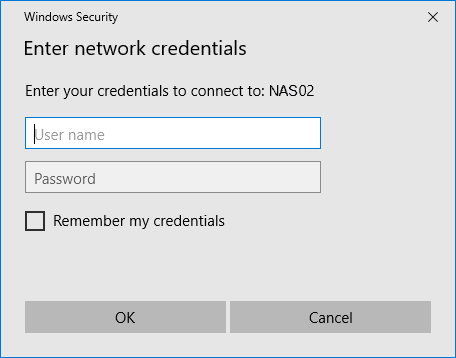
- Before using NAS for storing or backing up data, please open it in any network explorer (i.e. Windows Explorer) and enter your NAS login and password if it is required. This is necessary for successful connection to protected NAS.
- Create a new Handy Backup task by clicking on an appropriate button located on the management panel. (You can also create a new task just by pressing Ctrl+N.)
- Choose the backup task type. Go to Step 2 and select data you will save to your NAS.
- Proceed to Step 3 and select "Network" as the place for your data copies. On the right side, choose your NAS by name. Select a particular folder within your NAS file system if you need.
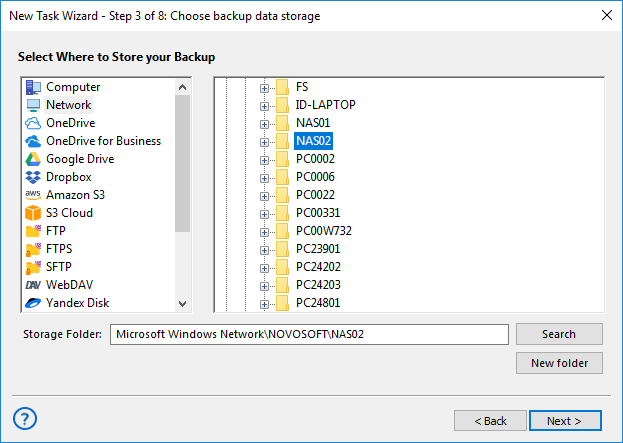
Note: If you have your NAS mapped as an external disk, use the “Computer” destination feature instead of the "Network" feature, and select your NAS by name and/or drive letter.
- Then set up all other task parameters as shown in the User Manual for each of remaining steps in the task creation wizard. Name your task and run it (or schedule running by time).
Download for Free
Version 8.5.3 , built on March 5, 2024. 116 MB
30-day full-featured trial period
To get a personal experience using Handy Backup as home or small business backup solution with your NAS backup server, please do not bother to download a 30-days completely free trial version!
"Handy Backup resolved my backup problem: backing up an NAS raid to a USB attached drive. The setup is easy, and it does its work very quickly, so I can utilize my NAS as backup storage on a full-time basis. I even trigger my NAS backup task to a USB by just plugging my drive into a PC. I could not find another product to do that!"
Mike L. Gonn, a private user