RMAN Backup and Recovery in Oracle
Oracle RMAN backup is a standard method of dealing with Oracle databases when issues touching the matter of backup and restore. Therefore, Handy Backup utilizes RMAN backup as a base for its standard Oracle plug-in, effectively replacing a typical RMAN backup script with a GUI-laden full backup solution.
 Download for Free
Version 8.5.3 , built on March 5, 2024. 116 MB
30-day full-featured trial period

RMAN Backup: Trivia
RMAN is an acronym for "Recovery manager", a feature developed around an earlier EBU (Extensive Backup Utility) solution. Users can realize any RMAN backup strategy by using it as a typical command-line utility, writing RMAN scripts for backup the database with scheduling, storing to FTP etc.
Features of RMAN Backup Script Solutions
If a user knows RMAN backup commands well, it can help creating such things as RMAN incremental backup script or a batch file allowing converting Oracle 11g data to 12c just from a backup file. However, for most users, an Oracle RMAN script is not a viable solution, due to its complexity and instability.

To modify a prepared script or batch, e.g. to rewrite a RMAN cold backup script to taking "hot" snapshots, a user must have a sufficiently high level of skill at Oracle RMAN backup.
Running an Oracle RMAN script without proper environment can cause malfunctions and even compromise data security (e.g. a RMAN backup script for Windows can commit a viral attack!)
To restore RMAN backup taken by a script, user must perform many operations in strictly manual mode and with a strictly defined sequence of actions, which also require competency.
Handy Backup: An Oracle Backup Solution Based on RMAN Oracle Backup
To simplify RMAN backup and give more flexibility to it, Handy Backup allows using its dedicated Oracle plug-in as Oracle backup software. Create an Oracle RMAN backup task with all features of Handy Backup and its GUI by using the next instruction:
- Setup an Oracle server for working with backups.
- Create a new task in Handy Backup using a menu or a new task button on the control panel.
- Select a backup task on the Step 1 and click "Next".
- Select the "Oracle" plug-in in the "Database" group on the left panel of the Step 2.
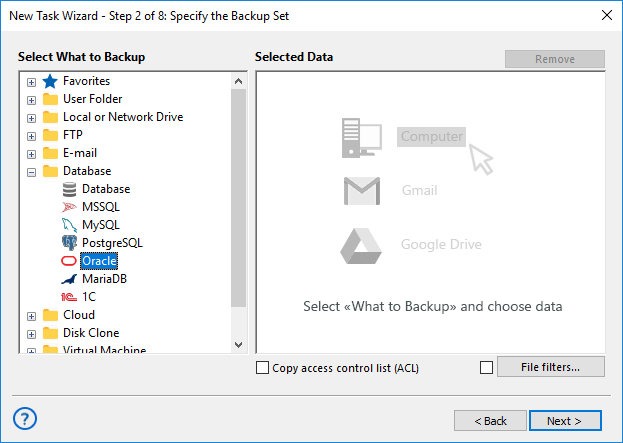
- Double-click on the plug-in name, or click the ">>" button.
- In the data selection dialog, mark the databases and schemas to backup Oracle via RMAN.
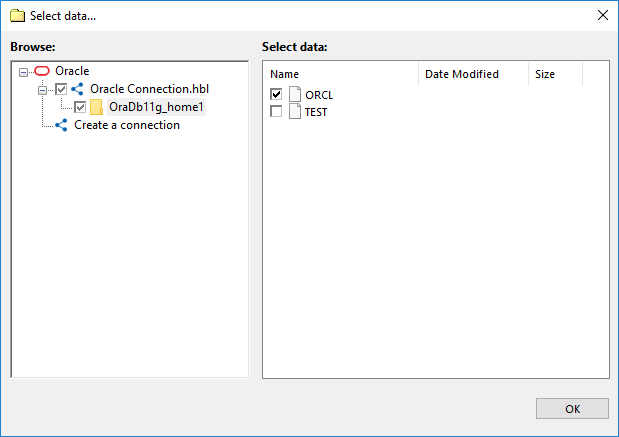
- Click ОК and return to the Step 2. Continue creating your task as described in the User Manual:
- Select an appropriate storage for backup Oracle RMAN database on the Step 3.
- Select full, incremental or other Oracle backup, versioning etc. on the Step 4.
- Encrypt and/or compress your Oracle RMAN backup on the Step 5.
- Schedule your new task by time or by a system event on the Step 6.
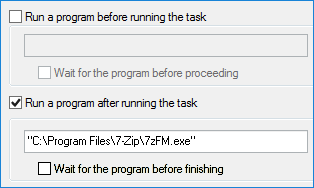
- If you need, select pre- and post-actions to run before and after a task on the Step 7.
- On the final Step 8, give a name for your RMAN backup task and finish the Task Wizard.
Note: You can always change any details of any existing task by viewing it. The tabs in a task window correspond to different steps of task creation, and you may refresh or change any parameter in the tabs much like the windows of the corresponding steps.
Recommended Solution
$249 per license

Handy Backup Small Business
The Small Business Server Backup edition contains a plug-in allowing RMAN schema backup, or saving up to a single table using different RMAN backup methods for Oracle.
How to Make Oracle RMAN Restore from Backup
To create an Oracle RMAN recovery, make a new restoration task. In the new task wizard, follow the next instruction:
- Select a restoration task on the Step 1. Go to the Step 2.
- Open the backup data storage, select a folder with a particular Oracle backup and find a file called backup.hbi.
- Select this file and click "Next".
- If you want to restore an Oracle database or schema in its original place, just click "Next" at every other step, until finishing task creation.
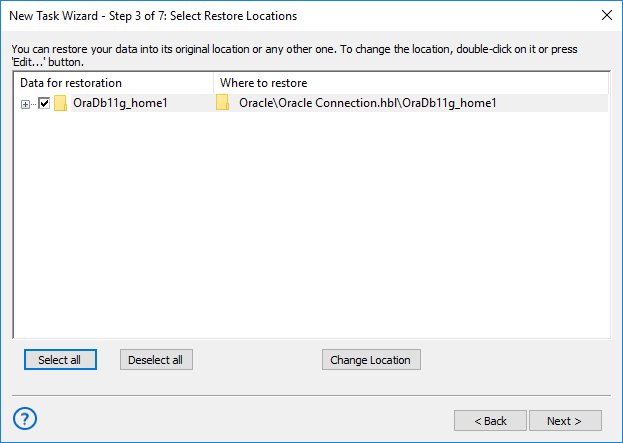
- To change the place of restoration, click the "Change location" button on the Setp 3.
- In the opening dialog, select a new location for your Oracle RMAN database backup. By using this method, you may clone, mirror or replicate Oracle data.
Key Advantages of Handy Backup
Being a graphical user interface over the RMAN backup solution, the dedicated Oracle plug-in for Handy Backup brings many advantages to its users over different dedicated batch sequences (such as a typical Oracle 12c RMAN backup script):
- Scheduling all tasks by time with a period from minutes to months, or by a system event;
- Internal encryption and compression of Oracle RMAN backup data;
- Supporting flexible backup methods including incremental, differential and mixed backup;
- Remote control (for network edition), reporting all task activity by email, GUI for RMAN backup.
Learn more about Backup Features.

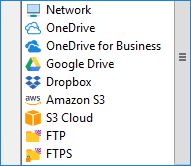
Expanding a Set of RMAN Backup Location Commands
With Handy Backup, you can save your Oracle RMAN backup database to almost any of modern data storages: local disks, USB drives, NAS units, FTP servers (with SFTP and FTPS), WebDAV-based clouds, a dedicated HBDrive storage, or cloud services including Amazon S3, Google Drive, OneDrive and Dropbox.
Replacing a RMAN Restore Script
Handy Backup covers all operations for Oracle RMAN backup and recovery, including automatic restoration. To restore RMAN backup, just make a restoration task, which will effectively replace a RMAN restore script and move your Oracle schema or database from backup to its destination place.
Running a Task as RMAN Cold Backup Script
To take a "cold" Oracle RMAN backup, just stop a server instance during a backup task, and then restart it. To do this operation, write the two separate batch files, one for stopping Oracle and the other one to restart it. On the Step 7, select the first script as pre-action and the second as the post-action to a task.
 Download for Free
Version 8.5.3 , built on March 5, 2024. 116 MB
30-day full-featured trial period
Use Handy Backup as full-featured Oracle backup software! Try the new possibilities by installing a free 30-day trial edition with all features and functions, including Oracle RMAN backup plug-in!