Amazon S3 Backup Software for Cloud Backup
Amazon S3 backup software is a client solution providing automatic data backup to Amazon S3 cloud. Handy Backup contains the dedicated S3 cloud backup plug-in allowing using it as the Amazon S3 backup client or to access other S3-based services. It is a fast, secure and convenient solution.
 Download for Free
Version 8.6.4 , built on June 09, 2025. 153 MB
30-day full-featured trial period

Advantages of Backup to Amazon S3 with Handy Backup
Besides serving a fully functional Amazon S3 backup software, Handy Backup has a couple of crucial advantages for working with this cloud in automatic mode, making it a perfect tool for Windows backup to Amazon S3:
- Native data formats allows browsing and restoring backups manually;
- Scheduling backup and restoration activity by time or by an event;
- Encrypting and compressing for reducing connection time and storage space;
- Different backup techniques, such as incremental and versioned backup;
- Control options like running as Windows service in silent mode, e-mail notifications and logs;
- Web interface (Beta) for remote management of backup tasks from any device with a browser.

Extra Capabilities of Handy Backup as Amazon S3 Client
The Amazon S3 backup plug-in turns Handy Backup to Amazon S3 backup client software with some additional functions and options for Amazon Web Services (AWS). Let us show some of these options.
Multi-Cloud Backup Exchanging
Handy Backup can automatically transfer data between S3 cloud storage on AWS and other storages, including local and online media such as:
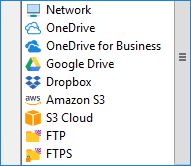
- Other clouds – Google Drive, Dropbox, Microsoft OneDrive, Box, Backblaze;
- S3 and WebDAV clouds (including private solutions based on OwnCloud and similar);
- FTP, SFTP and FTPS servers in local network or by Internet, including static websites;
- Local and external drives, NAS units, mapped drives and network machines.
Business Data Storage Solution
Amazon S3 is not cheap storage, and its users are often professionals or business-level customers. For these users, auto backup of server-level data to Amazon S3 can be very useful, including such data supported by Handy Backup as:
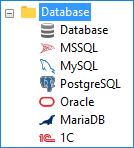
- MS SQL, MySQL, MariaDB, Oracle, PostgreSQL, IBM DB2 and Lotus Notes databases;
- Any database existed that uses an ODBC driver to operate under Windows;
- Server and client email data including Microsoft Exchange and Microsoft Outlook emails;
- Entire drive images including bootable images of Windows or any other OS.
Note: Amazon S3 plugin can be a valuable tool for implementing a robust and cost-effective data center backup solution. By leveraging its scalability and durability, businesses can safeguard their critical data while minimizing backup costs.
Replicating and Mirroring Data via Backup to Amazon S3
Handy Backup allows restoring backup content to any different place than an original backup location. This is a usable way for automatic replicating, mirroring or just sending content from Amazon S3 cloud backup to any other location you want:
- Cloning and mirroring databases to different servers;
- Replicating images of virtual machines using VMware or Hyper-V backup software;
- Sending user-defined files and folders to end-user FTP kiosk structures by a subscribe;
- Replicating user environment on some machines via the network.
Note: Handy Backup does not require any third-party solution, utility or Web bridge service to serve as S3 cloud backup software. It performs all operations directly via the Amazon S3 API.
Unified S3 Cloud Backup Plug-in
Handy Backup has a dedicated plug-in S3 Cloud (here “S3” means “Simple Storage Service”), connecting to almost any S3-driven service for using it to backup, recovery, synchronization or data storage. If you are an S3 cloud service provider, you can use Handy Backup for system integration and built-in backup. Request partnership

Testimonials About Amazon S3 Backup Software by Handy Backup
Recommended Solution
$89 per license

Handy Backup Professional
The Professional edition distributes the capabilities of Amazon AWS backup solution to as many network machines as you need, allowing making Amazon S3 backup for any data out of the box! Free 30-days trial version!
How to Backup Amazon S3 Content to Some Other Place with Handy Backup
It is a quite simple task. Just open Handy Backup, call a new task wizard and on Step 2, open the “Cloud ” list on the left panel. You will see Amazon S3 and S3 Cloud options as parts of this list:
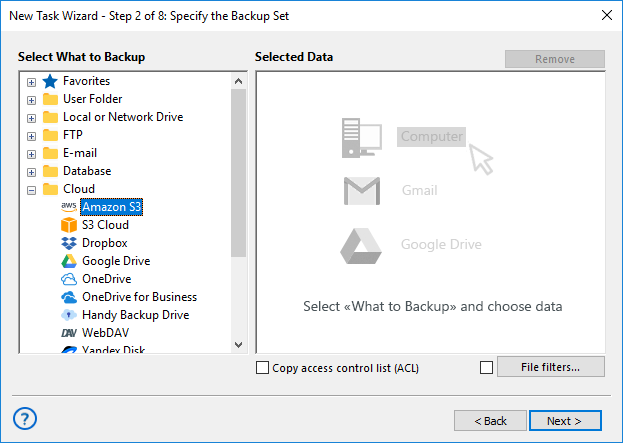
Click on the Amazon S3 option. When you see the "Create a connection..." string, click on it again, and in the new dialog window provide connection parameters to your Amazon S3 account:
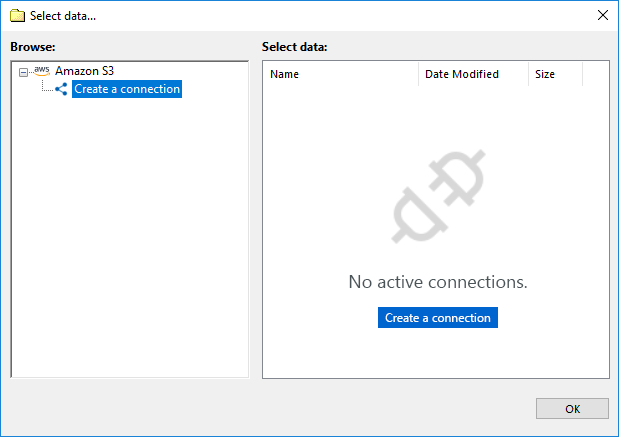
After successful connection, return to Step 2 and select those data you will plan to backup from Amazon S3 account. Next, continue creating a backup task according to the User Manual, setting such parameters as Amazon S3 incremental backup, encrypting and scheduling or other, if you need it.
Using Backup to Amazon S3 as Storage
For utilizing AWS as Amazon S3 cloud backup storage functions, please use the Amazon S3 plug-in on Step 3 instead of the Step 2 of task creation. Just select this storage from a list on the left panel.
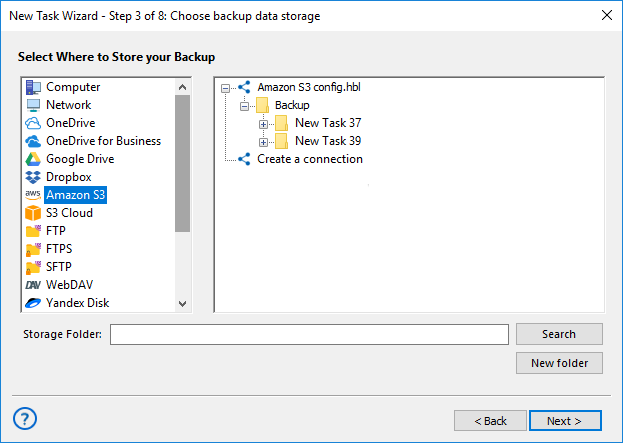
Note: You may need to establish connection to your AWS storage account, as it described before.
Video Tutorial: Amazon S3 Cloud Backup Software
In this video, we will show you how to create backup on Amazon S3 using the S3 plugin.
Download for Free
Version 8.6.4 , built on June 09, 2025. 153 MB
30-day full-featured trial period
If you want to try Handy Backup software Amazon S3 plug-in personally,
download the latest version of Handy Backup and get a 30-day free trial!
Back up to other popular сlouds with Handy Backup:
"I have some accounts on AWS to store my data via Amazon S3 backup, and I use Handy Backup to do this. I store our network shop databases and catalogue photos, client reviews and other dynamic content from our website two times a week, and Handy Backup automates all necessary actions for me, including connecting to Amazon S3."
Sarah Roswell, a Handy Backup customer