Chrome Profile Backup Tool
Google Chrome backup tool enables comprehensive protection for all essential Google Chrome data. Handy Backup serves as a reliable solution to backup Google Chrome by securely preserving its settings folder. Download the 30-day trial version today to keep your Chrome data safe and ready for easy Chrome backup and restoration.
 Download for Free
Version 8.7.0 , built on May 7, 2026. 152 MB

Why Chrome Backup Matters

Prevent Syncing Issues
Syncing failures can lock you out of important data. A backup keeps your Chrome settings safe and ready to restore.

Accidental Deletion
If you accidentally delete critical information, a Chrome backup tool ensures that you can quickly recover.

Recover From Account Restrictions
If your Google account is temporarily restricted, Chrome backup ensures your data remains safe and accessible.

More Control Over Your Data
Backing up Chrome locally reduces cloud reliance and gives you easy access to your settings and profile.
Ensure seamless Chrome settings backup with these key data types:
Backup For

Bookmarks
History
Login Data
Cookies
Preferences
Extensions
Handy Backup Advantages

Enable Incremental and Differential Backups – Efficiently back up only new or changed data from your browser, saving time and storage space.

Automate Backups – Set up automatic backup to keep your Chrome data safe and secure without any manual effort, ensuring you never miss a backup.

Receive Email Notifications – Get instant updates on your Google Chrome backup status and receive alerts about any issues, so you stay informed at all times.

Encrypt Your Data – Protect your Google Chrome backup with encryption, ensuring that your sensitive information remains safe from unauthorized access.

Store Backups in Native Format – Keep your Chrome data in its native format, allowing you to easily search and restore specific items without needing a full restore.

Customize Your Backup Settings – Select exactly which files and folders to back up, ensuring a tailored approach to meet your unique Chrome profile backup needs.

Enjoy 21 Language Support – Choose from 21 languages and use our Chrome backup tool in your preferred language, making it accessible for users worldwide.

Take Advantage of a Free 30-Day Trial – Test all features of Handy Backup risk-free for 30 days, with no credit card required, and experience its full capabilities.

Benefit from a Lifetime License – Enjoy a lifetime license that provides uninterrupted access to Handy Backup, with no renewal fees or subscription costs.
Recommended Solution
Lifetime license

Handy Backup Standard
Backup Google Chrome extensions, favorites, and passwords with the Standard Edition, designed to securely store your Chrome data on any modern storage device. Try it free for 30 days and discover why Handy Backup is the ultimate Google Chrome backup tool!
Backup your Chrome profile folder to keep your data safe
Located at

C:\Users\%username%\AppData\Local\Google\Chrome\User Data

~/.config/google-chrome/Default
Google Chrome Backup with Handy Backup
How to Perform
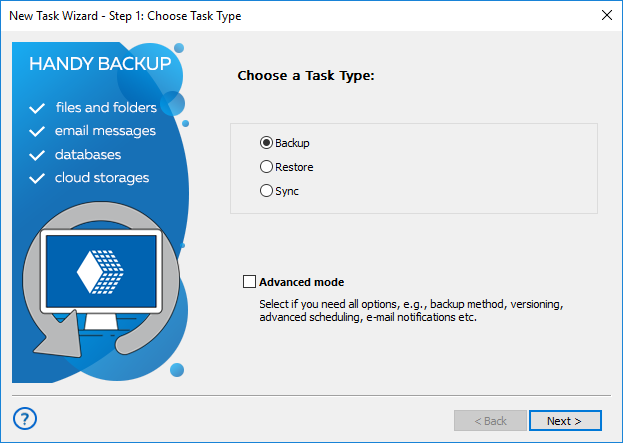
Step 1: Create a Backup Task
Open Handy Backup and create a backup task in either simple or advanced mode.
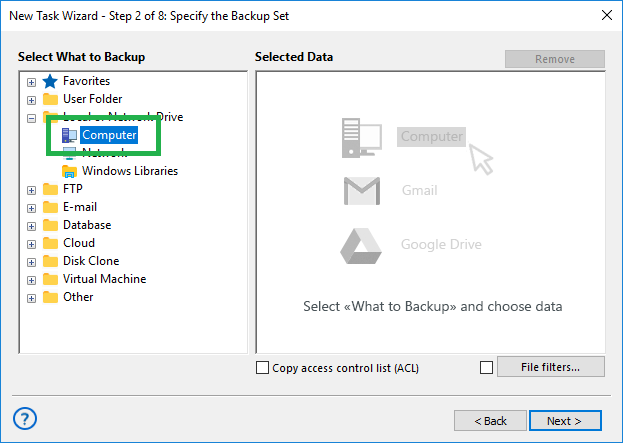
Step 2: Select the Computer Plugin
In Step 2, select the Computer plugin from the Local or Network Drive section.
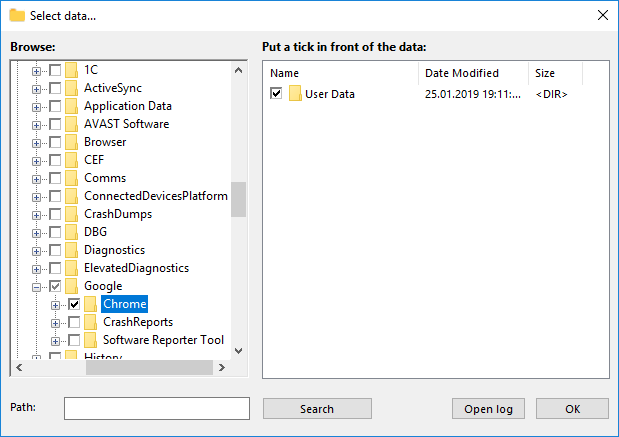
Step 3: Select User Data Folder
The "Select Data..." window will appear. Navigate to your user data folder as specified above.
You can choose to backup Chrome individual files and folders in the root folder to back up only what you need.
For Chromium backup, simply replace 'google-chrome' with 'chromium' in the file path to back up the correct folder.
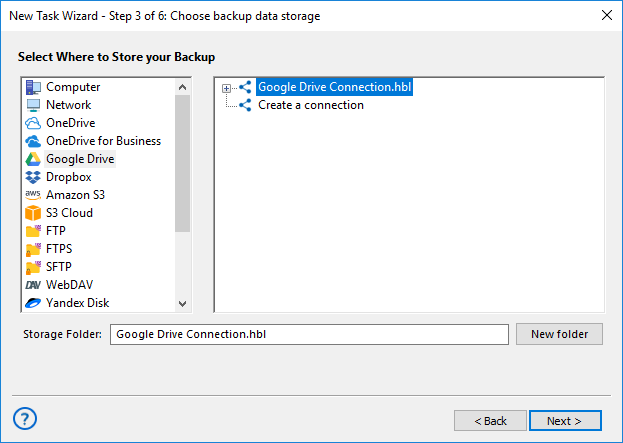
Step 4: Choose Backup Destination
Next, choose your preferred backup location. For example, you can choose Google Drive cloud backup.
Step 5: Configure Backup Settings
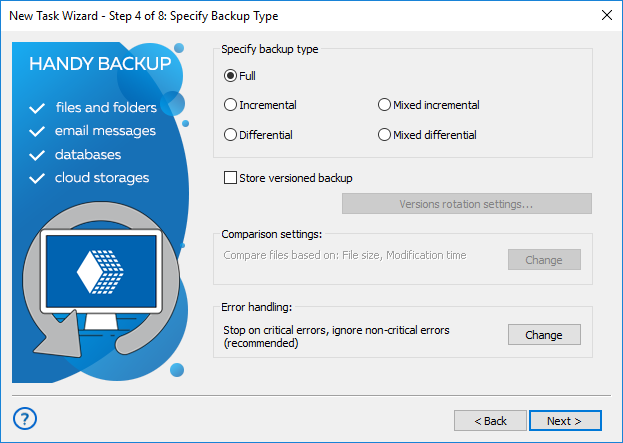
Finalize your backup by adjusting the settings, such as enabling incremental archiving, encryption, and other features for a seamless backup experience! For detailed instructions on creating and managing a backup task, please refer to the User Manual.
Delegate your backup tasks to Handy Backup, a fast, easy-to-use, and reliable all-in-one Google Chrome backup tool! Protect your data effortlessly with automated backups and seamless restoration—download your 30-day free trial today and experience full Chrome security.
Download for Free
Version 8.7.0 , built on May 7, 2026. 152 MB