Sharepoint Backup and Restore Solutions for Saving Sites, Database and Documents
Sharepoint backup software must protect shared data circulating via Microsoft Sharepoint product family, especially business-level data. With Handy Backup, you can save all components and stages of Sharepoint workflow, using both server and end-user data as simple files and folders.
 Download for Free
Version 8.7.0 , built on May 7, 2026. 152 MB
30-day full-featured trial period

Backup Sharepoint with Handy Backup: Advantages
Besides using internal Sharepoint online backup and restore plans, which are the points to use external backup solutions to do the same thing? The answers are extra security, extra cheapness and extra versatility of your Sharepoint backup data.

Security
Store your Sharepoint snapshots where you want, from local and external drives to NAS/SAN units to FTP, SFTP or FTPS sites and to clouds including Amazon S3, Dropbox, Google Drive and OneDrive. Encrypt and compress Sharepoint information. Moreover, be informed of each operation with data!

Cheapness
You will not pay for Sharepoint backup and restore operations with Handy Backup, except possible costs for network traffic and online storage space. Add your Sharepoint data to the total strategy of information backup on your PC or an entire network, including database, VM and disk image backup!

Versatility
Handy Backup saves your Sharepoint data in native formats (unless you are using encryption), allowing you using these data to manual browsing, replicating, cloning or every other way copying this information to other places than its original. Feel free with your Sharepoint data copies!
Features of Handy Backup to Save Sharepoint Content
In addition to its primary advantages, Handy Backup has some useful features allowing you organizing Sharepoint backup and restore tasks in full automatic mode.
- Scheduling tasks for an exact time and repeating for a period from minutes to months.
- Starting missed tasks, as well as starting a task by an event such as user logon/logoff.
- Keeping different versions of the same backup dataset, with possible time stamps.
- Full, incremental, differential and mixed full/differential backup for any data type.
- Starting other programs (including Sharepoint components) before or after some task.

Used together or separately, these components can make a good Sharepoint backup configuration environment, to automate any particular data-saving task and integrate it into some already well-developed business process or data workflow.
Recommended Solution
Lifetime license

Handy Backup Server Network
Protect your Sharepoint data with the Server Network edition, allowing saving all components of Sharepoint backup and restore site collection from an entire network! Free 30-days trial version!
How to Backup Sharepoint Data Using Handy Backup?
Data Backup Using the Generic Database Plug-in
To make a task for Sharepoint backup, please use the “Database” plug-in available in most editions of Handy Backup.
- Open Handy Backup and make a new backup task on Step 1. Proceed with either basic or advanced mode, according to what complexity you want for this task.
- Select the Database plug-in from the Database group on Step 2.
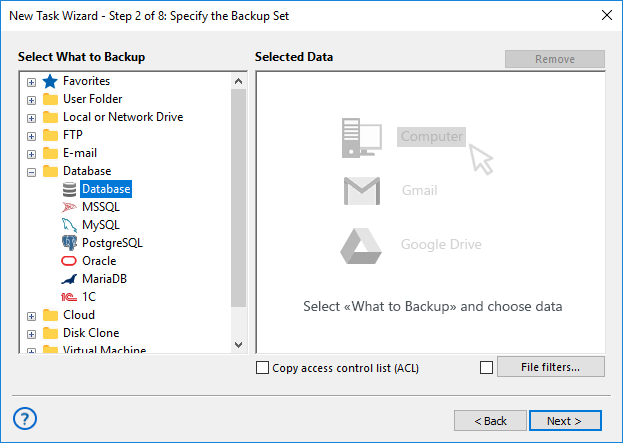
Note: This plug-in requires an ODBC driver for Sharepoint added as a data source to the Windows data list. Please refer to the User Manual, where the procedure of sharing an ODBC driver described.
- Open the Sharepoint backup database and select what data you want to save in a copy.
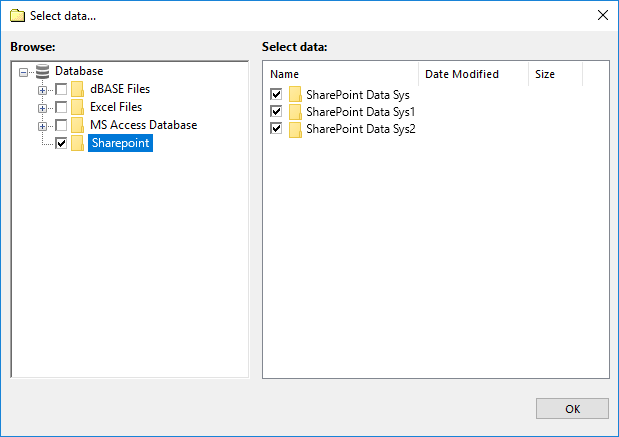
- After selecting, click OK and continue creating a task as described in the User Manual.
Make Sharepoint Backup Site Collection or Other Server-level Data via MSSQL
To access Sharepoint server-level information directly, you can use the MSSQL plug-in, allowing backup Sharepoint database without using an ODBC driver. To use the MSSQL plug-in, find it in the Database source list on the Step 2, and then select all Sharepoint databases you need.
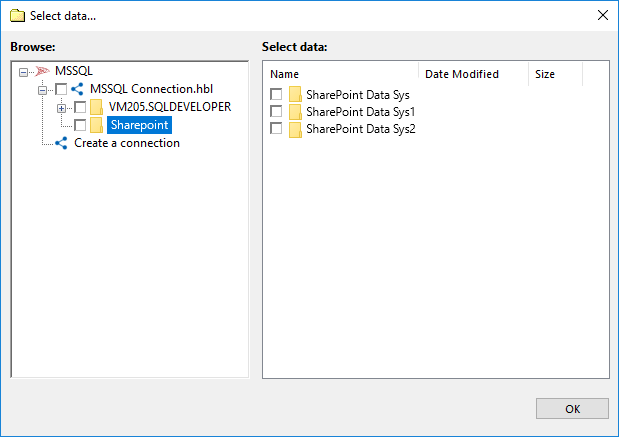
Sharepoint Backup and Recovery Tasks

You can create a restoration task for Sharepoint data, moving a restored copy to its original location or to another place. The last method allows also replicating and cloning any Sharepoint data to other PC or a server, preserving their original formats and content.
As Handy Backup stores all unencrypted data in native formats, you can easily organize granular restoration for Sharepoint data, either by selecting only part of data to restore by Handy Backup task or by completing a manual restoration using any file manager!
How to Use Sharepoint Backup and Restore
The simplest way is to follow the next guide:
- Right-click onto the name of Sharepoint backup task.
- In the context menu, select “Restore”. The program will automatically make Sharepoint recovery from a previously completed backup.

Sharepoint Granular Backup and Restore
To use partial recovery, you can just save unencrypted files when you copy your Sharepoint backup and restore site collection. From this collection, you can browse, pick, use or even modify/delete any Sharepoint backup data with standard file managing and database browsing tools!
Download for Free
Version 8.7.0 , built on May 7, 2026. 152 MB
30-day full-featured trial period
Add the extra layer of protection to your Sharepoint backup strategy, including Sharepoint to Handy Backup automating software. Try the possibilities by personal experience, downloading a latest full version of Handy Backup just now for a 30-days trial!
Other Microsoft products to backup: