Auto Backup Video Files
Video backup software can save copies of any video files in automated mode. Handy Backup allows backing up video files from any storage including the most popular My Video Windows library, allowing automatic backup of any movie formats online or locally.
 Download for Free
Version 8.5.3 , built on March 5, 2024. 116 MB
30-day full-featured trial period

Video Backup Principles
The term "video backup" includes two different types of operations
- Copying a video stream to a local or remote file;
- Creating reserve copies of video files.
The first definition is somewhat incorrect; saving a stream into a file is not a "backup" but a conversion of data format. The second term is absolutely correct.
Capabilities of Good Video Backup Software
Dedicated video backup software solutions must have some basic functions to save copies of video data or movies most effectively. Key features for this type of software are:
Auto backup video files. You can point which files you want to copy, and the program will copy these files, automatically finding and processing any of it (including seeking by the mask of a name such as AVI, WMV or MP4 extensions, and accessing remote storages for online backup video files).
Scheduling backup activities. The good video backup software solution must have a task scheduling option, allowing copying video (or any other) repeatedly by a period, or by some event such as plugging in the storage dedicated for the particular task.

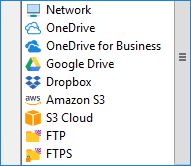
Many storage types to save video file backup. The program must have capabilities to save copies of data for many types of modern storage media, from local disks to USB to FTP web servers to commercial clouds, to provide the most efficient and convenient backup.
Handy Backup, a comprehensive file backup software solution, has all these capabilities – and even much more!
Special Features of Handy Backup
Besides backing up video files, Handy Backup can copy any other data types, including system images, database content, FTP services and websites, cloud accounts and business-level message services. Let us explain some most convenient and effective features of Handy Backup.

Native Format of Backup Copies
Unless selected to compress and/or to encrypt data, Handy Backup saves all copies in their original data formats, including preserving original file attributes. You can watch your video just from a backup folder, without restoring it or all video files previously.

Extended Backup Control
With Handy Backup, you can use all techniques of keeping data copies, including full, incremental and differential backup, mixed and versioned backup, keeping time stamps in backup folders, cloning libraries and collections, as well as encrypting and compressing your data.

Hot Backup Technique
Handy Backup uses the Volume Shadow Copying service (VSS) to organize hot backup, which means saving any data without stopping processing these data by other programs. You can even back up your video file when you are watching it!
Review About Video Backup Software by Handy Backup
Recommended Solution
$39 per license

Handy Backup Standard
Download auto backup software for videos and music libraries, pictures and other data!
Free 30-days trial version!
How to Save Copies of Your Video with Handy Backup?
To set up a task automatically backing up all video files on your computer to some place, please follow the provided instruction.
- Open Handy Backup and create a new task via the menu or just by pressing Ctrl+N.
- Select a backup task type on Step 1. Turn on an advanced mode.
- Proceed to Step 2 and select the "Computer" plug-in here.
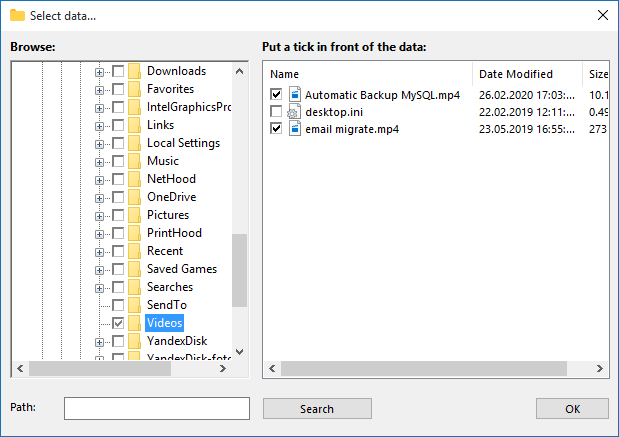
- Now click a "File filters" button; you will see a new dialog.
- Enter the masks of video file names, e.g. "*.AVI; *.MP4; *.WMV", separated by semicolon.
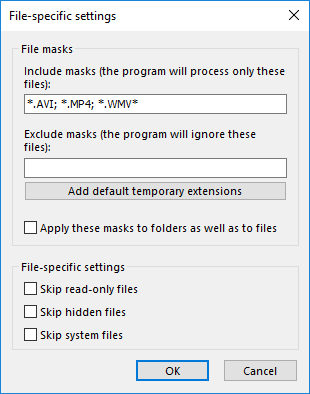
- Click OK. Proceed to the Step 3 and select a storage big enough to place all your videos.
Note: Video files are bulky; always select the storage with a maximal capacity, such as a NAS unit or a USB external drive, to save your video collection.
- On Steps 4 and 5, you can tune up your backup process, such as selecting a backup type.
- Schedule your task on a Step 6, e.g. to set the backups to be executed daily.
- Set the task managing parameters on the Step 7, and then give your task a name.
After completing this sequence, your task will save copies of all your videos (selected by provided extensions) with a period specified to the task.
Saving a Video Library
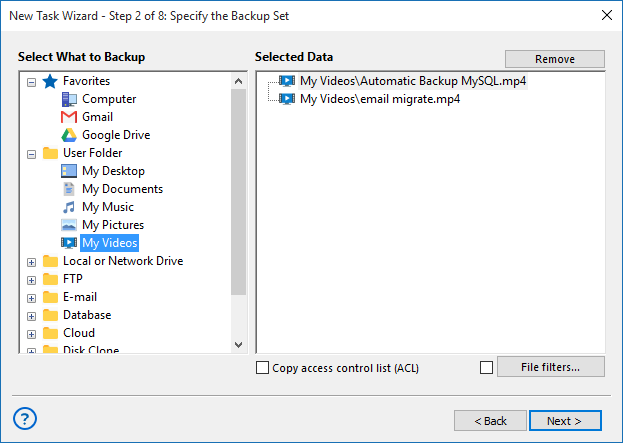
You can use the previous instruction to make "My Video" backup, saving a dedicated video folder on your user library. To do it, just select "User Folders" on Step 2, and then a "Video" option from the list of local user folders.
Download for Free
Version 8.5.3 , built on March 5, 2024. 116 MB
30-day full-featured trial period
Back up videos, pictures and other memorable data with Handy Backup automatic file backup software for Windows!
"I save both my video records and final-cuts with Handy Backup. These are the two tasks, one for saving a My Video backup copy, and other for saving Adobe projects in my workflow folder. Both tasks are scheduled to make a backup two times per day. I have also a task for manual backup of all my videos, when I plug a USB disk to my workstation. It is wonderful, because Handy Backup will start a task automatically every time when I plug my drive into a computer!"
Sandra Clint, a wedding video maker