Backup Rotation Schemes
For most computer users backing up is very much like going to a dentist. People invent thousands of reasons to not do it: takes too much time, interferes with work, too expensive, etc. But even if one realizes the necessity of backups, there still remains a question: how to start? What backup scheme to choose to avoid disasters and reduce potential losses to the minimum?
Optimal data backup strategy should involve the use of several different storage media and "intelligent" backup method (i.e. incremental backup or differential backup). It suggests a sort of a balance between reasonable number of storage media and reliability of a backup scheme. For example, a full backup on Sunday and incremental backups throughout the week can work well; still it’s far from perfect.

 Download for Free
Version 8.7.0 , built on May 7, 2026. 152 MB
30-day full-featured trial period
Over time, people have developed several techniques that enable balancing data retention with cost of extra storage media. Two most popular backup rotation strategies are called Grandfather-Father-Son and Tower of Hanoi.
Grandfather-Father-Son
Grandfather-father-son backup is the most widely used backup rotation schedule. According to this backup rotation schedule incremental backups are performed daily, while full backups weekly and monthly.
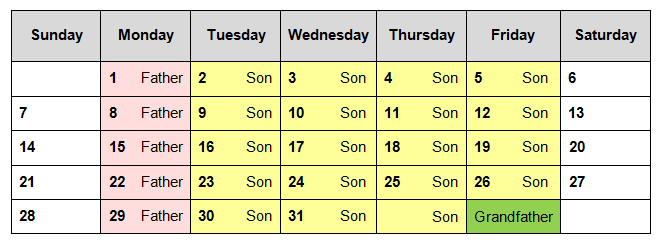
- First of all, from one to four media sets are designated for incremental daily backups. As daily incremental backup backs up the least of the data, compared with other backup sessions in this backup rotation schedule, any of these media sets can be referred to as 'son'. These media sets are reused each week on the designated day.
- Secondly, full backups are performed weekly - daily incremental backup is not performed on this day. As the first backup needs to be a full backup, the scheme is started on Friday, the day of the full backup. Consequently, the media set used on Friday can be referred to as 'father'.
- Furthermore, on the last business day of the month a full backup is performed to a new media set, which can be referred to as 'grandfather'. These media sets are designated for specific months throughout the year.
As the backup data size can vary, each of these media sets may be a single medium or multiple backup media sets. To complete a quarterly backup rotation, a total of twelve backup media sets are required when using basic backup rotation schedule.
Sometimes one may wish backup history needs to be saved - in this case a media set with a full backup is taken from the rotation and replaced with a new media set.
Recommended Solution
Lifetime license

Handy Backup Professional
Check out the Professional edition - it has everything you need to back up a home PC, including file backup, disk imaging, support for FTPS, SFTP, Amazon S3, and much more. Free 30-days trial version!
Tower of Hanoi
The Tower of Hanoi backup rotation schedule stems from a puzzle, which was invented by Edouard Lucas, a French mathematician, and consisted of three pegs with eight discs placed on one of them. The task was to move all the discs to another peg, never placing a smaller disc under a larger one.
Just like in the game, the backup media sets are rotated through the entire backup process. Compared with the Grandfather-father-son rotation schedule, this one can employ more backup media sets and save a deeper backup history. This backup rotation schedule requires only five backup media sets to perform backups during a month every day, for instance.
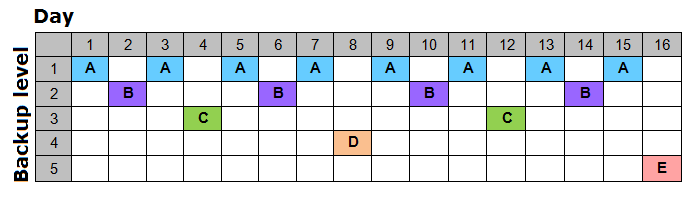
How the Tower of Hanoi Backup Rotation Schedule Works
In this backup rotation schedule the first media set is used every second day, the second media set is used every fourth day when the first set is not used, the third media set is used when neither of previous sets are used and every eighth day and so on.
Each additional backup media set, added to the rotation, doubles the backup history, and is used only when the previous sets are not used, thus, the later a backup media set is added to the history, the less it is used and the older files it stores are.
This enables one to have a deep backup history, but does not allow storing many recent backup copies, as a daily backup is erased in two days, for example.
See also: