Full Backup and Restore Software
Full backup means copying (saving in storage) of an entire dataset every time the backup process performed, instead of backing up just new or changed data in this dataset.
This type of backup consumes highest amounts of both time and space, although it is also the most convenient and reliable backup type.
Handy Backup allows to perform full backup of any data type existed!
 Download for Free
Version 8.5.3 , built on March 5, 2024. 116 MB
30-day full-featured trial period

The Principle of Full Backup
As described before, the full backup is the technique of copying any data entirely to a last bit every time the full backup task executes. No means that some data have not any changes after the last full backup session; new copy includes all of these data without restrictions.
- Pros: Full backup copies all data from the backup set to the new fresh copy without any restrictions. This fact can assure that all the files and other data will be saved to the copy.
- Contras: Full backup consumes much more time and space, especially if some full data copies being kept together on the same storage media. These facts may slowing the backup process and creating problems with the storage space available.
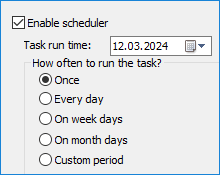
We recommend to schedule every single backup task to the time when the main amount of jobs performed by the computer operating with backups are done or idle, e.g. at the end of the week or just by night. Try also to be sure that your storage media can hold a new full backup.

Note: Handy Backup stores all data backed up in native formats to these data, if other data-keeping options (e.g., compression or encryption) are not specified for the backup task. If you have a strong need to save some storage space, please use the data compression for full backups.
A Note about Mixed Backup
The mixed full and incremental or differential backup will create a chain of continuous backups. Always starting with a full backup, it when creates a number of differential or incremental backups, controlled by a time or by a pre-defined chain length. When a chain reaches an end, all process of mixed backup repeats again.
Types of Full Backup
Handy Backup can back up fully a dataset consisting of any type of data existed. Therefore, full backup tasks can be useful for any dataset or source option. Some of these options will be explained below.

Windows Full Backup
If a user wants to perform full Windows backup, the key consideration is to provide enough space to save the system image. Handy Backup is the excellent Windows full backup software, allowing you creating the system disk image, a perfect and bootable copy of your Windows.
- Windows 10 / Windows 8 full backup. Handy Backup has a set of tools to perform full backup of all system files used by Windows 8, as well as to create the logical-level copy of disk image. This allows Handy Backup not to be obstacle with intrinsic Windows 8 internal files.
- Windows 7 / Vista full backup. The mainstay of Windows-based computers operates today under Windows 7. Handy Backup can perform full backup for not only an entire image of the system but also for Windows libraries, registry and other crucial Windows components.
Full Disk Backup of Other Types
- Full PC backup. This is a task slightly different from backing up Windows. To do it, just select all the PC’s logical drives to make a disk image backup, and choose the option of full backup.
- Linux full backup. You can back up Linux drives fully as data drives connected to your PC, as Handy Backup is not a Linux software. However, Disaster Recovery utility can create a bootable full backup of Linux drive image.
- Full disk backup for data drives. Users can back up any non-system disk by Handy Backup as the perfect drive image, and then restore this image to a location needed.

Full Database Backup
You can copy any type of database, either SQL or non-SQL, to make a perfect snapshot. Some details of backup operations varies at the level of program, but for users of Handy Backup all these actions can be set and performed identically.
- MySQL full backup. Create the configuration to access your MySQL database before performing the full backup of any selected MySQL data.
- MS SQL server full backup. Perhaps the simplest database backup operation to create; just select the data needed among the MS SQL database content.
- Oracle backup. Oracle backup operates through RMAN, the dedicated Oracle backup utility. It allows Handy Backup using the internal Oracle API, to create fast and stable backups.

Note: Some databases having no dedicated Handy Backup data option uses the Database data source, and require an ODBC driver of an appropriate type to access full backup.
Recommended Solution
$89 per license

Handy Backup Professional
Handy Backup Professional allows making full backup to almost any modern data storage for all user-level data and whole HDD backup copies. Full-featured 30-days trial!
Other Full Backup Applications
As mentioned earlier, any type of data can be backed up fully. Let us look at some of these data types, to select the most valuable applications of full backup technique.
- Exchange full backup. Microsoft Exchange is the biggest enterprise-level message service available for now, and the full backup Exchange database can save a lot of time and money related to business messages data.
- Full backup of user files and folders. Although it is a technique requiring the biggest resources for performing, the full backup of user data guarantees users from any data loss. The versatility of Handy Backup allows users to select an exact dataset for full backup.
Learn also about application backup and restore for PC.
How to Use Full Backup with Handy Backup
Selecting the full backup option is a simplest thing to be done. To apply the full backup for any of your data, please use the following sequence of actions.
- Open Handy Backup and create a new task. Select a backup task on the Step 1.
- On the Step 2, select any data types you want to back up with this particular task.
- Then select the backup destination on the Step 3.
- On the Step 4, select the "Full backup" type, as seen on the picture.
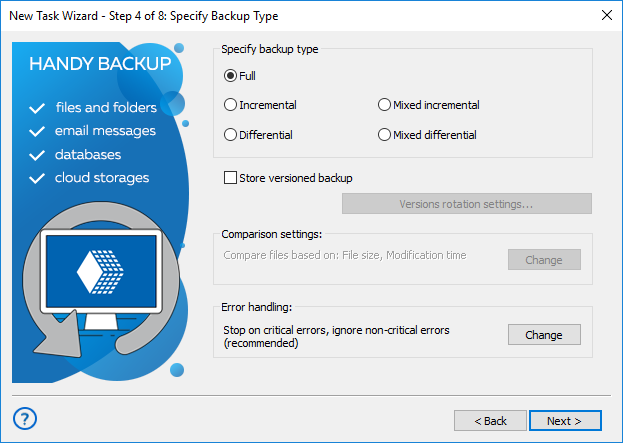
Note: The full backup option allows storing versioned backups. Please read the User Manual for detailed instructions if you feel the need for creating versioned backup.
- Set up other backup task parameters you feel right, as described in the User Manual for creating backup tasks. These steps are not specific to full backup.
- Give your task a name, and finish the task creation. Your full backup task is ready to run.
Handy Backup - Full-featured Utility for PC Backup
You can use the full backup technique any time you feel the size of backup copies and the time consumed to backup are not too great. The full backup is the backbone of any data saving strategy, so Handy Backup allows you to implement this technique for any data and without any effort.
Download for Free
Version 8.5.3 , built on March 5, 2024. 116 MB
30-day full-featured trial period
For more information, please see all backup features of our software.
See also: