Simple Backup Software for Data Safety
Easy backup from Handy Backup provides a convenient and reliable way to protect your data and simplify the backup process on your computer. Download our software for file backup and enjoy a smooth, hassle-free experience with minimal effort and no IT skills required. Our solution makes backing up so straightforward that any home user or small business owner can master it in minutes.
 Download for Free
Version 8.7.0 , built on May 7, 2026. 152 MB


Restore Without the Software Running
Our simple backup software stores files in their native format. Just open the backup folder in Windows Explorer and download what you need. No special recovery program required — this game-changing simplicity is what users love most about our solution.

Set It Once, Forget Forever
Schedule your desktop backup once and it runs automatically in the background. The program can work as a Windows service, never interrupting your work or slowing down your computer. Perfect for those who have little time and need reliable protection without the hassle.

Backup Anywhere You Want
Save your backups to USB drives, external HDDs, cloud services (Google Drive, Dropbox, OneDrive), or FTP servers. Mix different storage types for maximum data safety. Your data, your choice of where to keep it secure.

Smart Data Organization
All your data is pre-organized by type — documents, photos, emails. Select what you need with a single click or set custom rules for easy file backup. No more hunting through complex folder structures.
Features that Make Backup Truly Simple

Files, Folders, and Personal Data
Protect your documents, photos, music, and videos with automatic data backup. Select specific folders or file types — the software handles the rest while you work.

Email Backup Made Easy
Automatically save emails from Microsoft Outlook, Gmail, Yahoo, and other mail clients. All settings, contacts, and attachments stay safe and accessible.

Cloud-to-Cloud Synchronization
Back up data between different cloud services or download cloud files to local storage. Sync Google Drive to Dropbox, OneDrive to your hard drive, or any combination you need.
Save Storage Space
Reduce backup size by up to 70% with built-in ZIP compression. Store more backups without buying additional storage — your existing hard drive or USB holds much more data.

Keep Your Data Secure
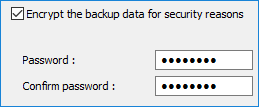
Protect all sensitive files with strong encryption, ensuring financial, personal, and business data remain secure even if your backup is lost. For most users, AES-128 provides a perfect blend of speed and security. For enhanced security, choose AES-256 for the highest level of protection for critically sensitive data, or Blowfish for a fast and reliable solution for general file encryption.
Easy Computer Backup in 3 Simple Steps
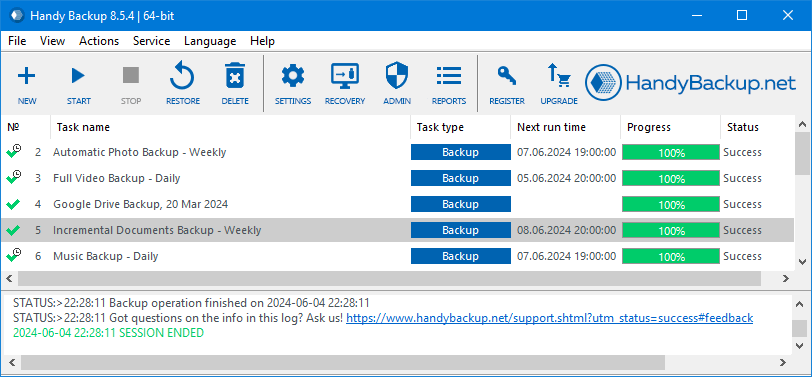
Our simple backup tool was specifically designed for users without technical expertise. The intuitive setup wizard quickly guides you through creating your first backup in under 2 minutes.
Step 1: Choose Your Data
Check the boxes for folders and files to backup, or take advantage of our ready-made sets: Documents, Photos, Videos.
Step 2: Pick Storage Location
Selectwhere to save copies: local drive, USB, cloud, or network folder. Multiple destinations are supported too.
Step 3: Set Schedule
Chooseconvenient time for automatic backup or run manually when needed. Daily, weekly, or real-time options available.
What Makes Easy Backup Software Different

Direct File Access
Unlike other programs, our easy-to-use backup solution stores files in their original format. Browse and restore them without launching the program — just like regular files in Windows.

One-Time Purchase
Pay once, runs for years. No subscriptions or hidden fees — the perfect easy backup solution for home use. Your budget will thank you.

Perfect for Non-Technical Users
Designed for home users and small businesses. If you know how to copy and paste files, you can use Handy Backup successfully.

Free Lifetime Support
Technical support is included at no extra cost. We'll help you set up and solve any issues that arise.
Over 20 Years of Reliable Data Protection
Thousands users worldwide trust Handy Backup to protect their data. The program is especially valued for its simple file restoration — just open the folder and copy what you need. No complicated recovery process.

I particularly like the fact that I can restore files directly by just going to the backup location and retrieving them immediately without having to use a restore function.
Jane, Business User

I’ve been using Handy Backup for several years to get copies of my user folders and web emails. It’s incredibly easy to set up and control. In just a minute or two, I create a new task that can keep working for years, unless I need to make any changes, which are just as quick and simple! It’s a fantastic app for users who prefer not to read lengthy instructions!
Linda Alemann, an interior designer

Very happy with this product. Have just had a hard disk failure but was able to easily restore files from Handy Backup.
Juan, Business User
Automatic Backup That Never Fails

Flexible Scheduling
Run backups daily, weekly, monthly, or on-demand in real-time. Set multiple schedules for different data types. Your Easy Computer backup adapts to your workflow.
Email Notifications
Get detailed reports about successful backups or alerts if something goes wrong. Stay informed without actively monitoring.
Store Your Backups Your Way
Build a Smart Backup Strategy
Follow the industry-standard 3-2-1 backup rule: keep 3 copies of your data on 2 different types of storage media, with 1 copy stored offsite. Handy Backup makes this professional approach effortless - backup simultaneously to your external drive, NAS, and cloud storage in a single automated task.
Choose Your Backup Type
Full Backup creates a complete copy, ideal for first-time or monthly backups. Incremental Backup only saves changed files, cutting storage and time by up to 90%. Handy Backup lets you combine both, e.g., with weekly full and daily incremental backups.
Recommended Solution
Lifetime license

Home Backup Solution
Experience the convenience of our easy-to-use backup software designed for home computers with the Standard edition! Benefit from automatic file backup, folder sync, and a wide range of additional plug-ins to enhance its functionality. Download the 30-day trial to see if it suits your needs.
FAQ on Application Backup Software
Can I restore individual files without recovering the entire backup?
Yes, you can. Simply browse your backup folder in Windows Explorer and copy individual files directly, with no restore process needed. This effortless recovery is the most praised feature of our Easy backup software.
How do I set up automatic backup to an external drive that isn't always connected?
Enable "Skip if drive is missing" in Handy Backup. It will automatically run your backup when the external drive is connected. Email alerts can notify you of any missed backups.
Download for Free
Version 8.7.0 , built on May 7, 2026. 152 MB
Discover the convenience of our easy backup software, designed for both home and business use. Download Handy Backup now and effortlessly safeguard your valuable data!
Can I restore individual files without recovering the entire backup?
Yes, you can. Simply browse your backup folder in Windows Explorer and copy individual files directly, with no restore process needed. This effortless recovery is the most praised feature of our Easy backup software.
How do I set up automatic backup to an external drive that isn't always connected?
Enable "Skip if drive is missing" in Handy Backup. It will automatically run your backup when the external drive is connected. Email alerts can notify you of any missed backups.
Download for Free
Version 8.7.0 , built on May 7, 2026. 152 MB
Discover the convenience of our easy backup software, designed for both home and business use. Download Handy Backup now and effortlessly safeguard your valuable data!